有道云笔记全量下载迁移
在有道云上有几个GB的文件, 会员也开了好多年, 但不再打开也有好多年了. 有道云笔记后期最主要的问题是速度太慢了, 文件多了之后搜索和编辑都非常痛苦, 本地mac客户端的同步也经常出问题, 失去了快速记录和检索的价值. 后面习惯了使用 vscode 本地记录 markdown 文档, 有道的文档就再没有打开过. 这几个GB都是自己打工拉磨的日子敲下或是摘录的文字和截图, 许多技术文档都过期不再有价值了, 但还是需要备份下, 在本地重新焕发价值.

有道云笔记的mac客户端支持全量
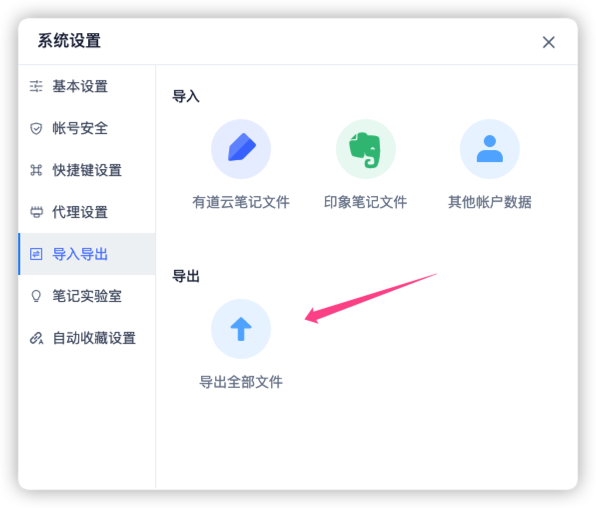
有道云笔记的mac客户端支持全量, 测试发现还是挺方便的, 直接全量下载, 但问题也不小:
- 对于非markdown文件, 统一都渲染输出为pdf文件. 这样的全量导出只能做为存档了, 失去了再利用编辑的价值.
- 对于markdown文件, 图片仍然保留着youdao链接, 没有下载到本地, 大量信息从此丢失了, 还不如导出为pdf.
本地备份, 文档大小为7.3GB
du -d1 -h
7.3G    ./youdao-backup-20230606
开源脚本支持导出所有文件为markdown文件
本来打算自己开发下, 有道云笔记有web版本, 跟爬取网站一样, 写个脚本, 遍历下每个文件夹每个文件下载保存即可. 但是想一想细节也不少, 比如如何处理非markdown文档, 如何下载替换markdown里的图片, 都需要摸索尝试, 而自己能支配的时间太有限了. github搜了一下, 发现竟然还有不少公开脚本, 看来早就有人处理了. 看了几个repo的代码, 最后选择了 youdaonote-pull
, 经过测试发现实现算是最完整的.
https://github.com/DeppWang/youdaonote-pull/tree/master
登录网页版有道云笔记, 获取登录态相关的cookie信息, 填写到配置文档里, 直接运行即可.
python pull.py --frontmatter --retryurl >> download-5.log
测试运行情况
本次使用 Cookies 登录
正在 pull,请稍后 ...
正在转换有道云笔记「/Users/geehanlin/Documents/youdao-backup-all-20230609/Test/SubFolderX/测试子文件夹Sub.md」中的有道云图片链接...
已将图片「https://note.youdao.com/yws/res/222059/WEBRESOURCE9f11a7356555d982d815a80259c400d0」转换为「/Users/geehanlin/Documents/youdao-backup-all-20230609/Test/SubFolderX/images/WEBRESOURCE9f11a7356555d982d815a80259c400d0.png」
新增「/Users/geehanlin/Documents/youdao-backup-all-20230609/Test/SubFolderX/测试子文件夹Sub.md」
正在转换有道云笔记「/Users/geehanlin/Documents/youdao-backup-all-20230609/Test/SubFolderX/测试子文件夹.md」中的有道云图片链接...
已将图片「https://note.youdao.com/yws/res/222054/WEBRESOURCE1b00728816656d51374f56338519f3ef」转换为「/Users/geehanlin/Documents/youdao-backup-all-20230609/Test/SubFolderX/images/WEBRESOURCE1b00728816656d51374f56338519f3ef.png」

...
运行完成!耗时 10007 秒
最后下载的文件大小
du -d1 -h
7.7G    ./youdao-backup-all-20230609
存在的问题
测试发现有两个问题, 一个是图片无法重试, 一个是丢失了文档创建时间等元数据信息, 还是有些遗憾. 后面花了一个晚上解决了这两个问题, 并且发起了 Merge Request.
失败图片链接无法重试
下载日志里有大量的图片转换失败的消息, 在云文档上抽查了几个发现确实是失效的链接, 不知道是当时就失效了, 还是有道云把图片弄丢了.
youdaonote-pull 脚本支持对没下载的文档进行多次重试, 也支持根据更新时间进行覆盖更新, 但是不支持对下载失败的图片链接进行重试, 不知道那上千个失败的图片链接是不是网络问题导致的.
失败信息
下载「https://note.youdao.com/src/FD20263E5E6C43F4875475E085E510CE」失败!图片可能已失效,可浏览器登录有道云笔记后,查看图片是否能正常加载
下载「https://note.youdao.com/src/FD20263E5E6C43F4875475E085E510CE」失败!附件可能已失效,可浏览器登录有道云笔记后,查看附件是否能正常加载
...
 cat download.log | grep "失败"  | wc -l
    1325
文档创建时间等元数据丢失
文档原生保存为markdown, 丢失了编写时间, 文件大小等元数据信息.
不过markdown是支持元数据的, 叫做front matter, 用特殊格式进行标记即可.
youdao-pull 代码讲解
看了一下代码, 整体处理思路还是比较清晰的, 代码主要流程:
- 使用cookie信息发起请求, 因此不用关注有道云登录相关细节
- 使用Web API获取文件和文件夹列表, 对于文件夹则继续递归获取
- 使用Web API下载每个文件到本地存档
- 重点: 转换本地文件到markdown格式, 对于xml或是html的doc文档支持转化为markdown文档
- 从markdown里抽取图片和附件链接, 下载到本地, 并修改markdown链接为本地相对路径.
- 图片支持直接上传云端图床, 也是使用云端APP提供的API进行处理即可.
查找API是比较麻烦的, 抽取图片链接进行下载和替换也比较麻烦, 但技术上并不难. 整体的难点是转换文件为markdown格式, 调整过程中有许多细节需要去兼容处理, 没想到这个repo竟然把这一步给做了.以后遇到xml/html文档要转化为markdown文档也不担心了.
开源的好处就是很多琐碎麻烦的事情都有人帮忙做好了, 需要做的就是组装和调整.
转换 xml 为 markdown 文档
import xml.etree.ElementTree as ET

@staticmethod
def covert_xml_to_markdown_content(file_path):
  # 使用 xml.etree.ElementTree 将 xml 文件转换为对象
  element_tree = ET.parse(file_path)
  note_element = element_tree.getroot()  # note Element

  # list_item 的 id 与 type 的对应
  list_item = {}
  for child in note_element[0]:
      if 'list' in child.tag:
          list_item[child.attrib['id']] = child.attrib['type']

  body_element = note_element[1]  # Element
  new_content_list = []
  for element in list(body_element):
      text = XmlElementConvert.get_text_by_key(list(element))
      name = element.tag.replace('{http://note.youdao.com}', '').replace('-', '_')
      convert_func = getattr(XmlElementConvert, 'convert_{}_func'.format(name), None)
      # 如果没有转换,只保留文字
      if not convert_func:
          new_content_list.append(text)
          continue
      line_content = convert_func(text=text, element=element, list_item=list_item)
      new_content_list.append(line_content)
  return f'\r\n\r\n'.join(new_content_list)  # 换行 1 行
class XmlElementConvert(object):
"""
XML Element 转换规则
"""
@staticmethod
def convert_para_func(**kwargs):
# 正常文本
# 粗体、斜体、删除线、链接
return kwargs.get('text')
@staticmethod
def convert_heading_func(**kwargs):
# 标题
level = kwargs.get('element').attrib.get('level', 0)
level = 1 if level in (['a', 'b']) else level
text = kwargs.get('text')
return ' '.join(["#" * int(level), text]) if text else text
@staticmethod
def convert_image_func(**kwargs):
# 图片
image_url = XmlElementConvert.get_text_by_key(list(kwargs.get('element')), 'source')
return ''.format(text=kwargs.get('text'), image_url=image_url)
@staticmethod
def convert_attach_func(**kwargs):
# 附件
element = kwargs.get('element')
filename = XmlElementConvert.get_text_by_key(list(element), 'filename')
resource_url = XmlElementConvert.get_text_by_key(list(element), 'resource')
return '[{text}]({resource_url})'.format(text=filename, resource_url=resource_url)
@staticmethod
def convert_code_func(**kwargs):
# 代码块
language = XmlElementConvert.get_text_by_key(list(kwargs.get('element')), 'language')
return '```{language}\r\n{code}```'.format(language=language, code=kwargs.get('text'))
@staticmethod
def convert_todo_func(**kwargs):
# to-do
return '- [ ] {text}'.format(text=kwargs.get('text'))
@staticmethod
def convert_quote_func(**kwargs):
# 引用
return '> {text}'.format(text=kwargs.get('text'))
@staticmethod
def convert_horizontal_line_func(**kwargs):
# 分割线
return '---'
@staticmethod
def convert_list_item_func(**kwargs):
# 列表
list_id = kwargs.get('element').attrib['list-id']
is_ordered = kwargs.get('list_item').get(list_id)
text = kwargs.get('text')
if is_ordered == 'unordered':
return '- {text}'.format(text=text)
elif is_ordered == 'ordered':
return '1. {text}'.format(text=text)
@staticmethod
def convert_table_func(**kwargs):
"""
表格转换
:param kwargs:
:return:
"""
element = kwargs.get('element')
content = XmlElementConvert.get_text_by_key(element, 'content')
table_data_str = f'' # f-string 多行字符串
nl = '\r\n' # 考虑 Windows 系统,换行符设为 \r\n
table_data = json.loads(content)
table_data_len = len(table_data['widths'])
table_data_arr = []
table_data_line = []
for cells in table_data['cells']:
cell_value = XmlElementConvert._encode_string_to_md(cells['value'])
table_data_line.append(cell_value)
# 攒齐一行放到 table_data_arr 中,并重置 table_data_line
if len(table_data_line) == table_data_len:
table_data_arr.append(table_data_line)
table_data_line = []
# 如果只有一行,那就给他加一个空白 title 行
if len(table_data_arr) == 1:
table_data_arr.insert(0, [ch for ch in (" " * table_data_len)])
table_data_arr.insert(1, [ch for ch in ("-" * table_data_len)])
elif len(table_data_arr) > 1:
table_data_arr.insert(1, [ch for ch in ("-" * table_data_len)])
for table_line in table_data_arr:
table_data_str += "|"
for table_data in table_line:
table_data_str += f' %s |' % table_data
table_data_str += f'{nl}'
return table_data_str
@staticmethod
def get_text_by_key(element_children, key='text'):
"""
获取文本内容
:return:
"""
for sub_element in element_children:
if key in sub_element.tag:
return sub_element.text if sub_element.text else ''
return ''
@staticmethod
def _encode_string_to_md(original_text):
""" 将字符串转义 防止 markdown 识别错误 """
if len(original_text) <= 0 or original_text == " ":
return original_text
original_text = original_text.replace('\\', '\\\\') # \\ 反斜杠
original_text = original_text.replace('*', '\\*') # \* 星号
original_text = original_text.replace('_', '\\_') # \_ 下划线
original_text = original_text.replace('#', '\\#') # \# 井号
# markdown 中需要转义的字符
original_text = original_text.replace('&', '&')
original_text = original_text.replace('<', '<')
original_text = original_text.replace('>', '>')
original_text = original_text.replace('“', '"')
original_text = original_text.replace('‘', ''')
original_text = original_text.replace('\t', ' ')
# 换行 <br>
original_text = original_text.replace('\r\n', '<br>')
original_text = original_text.replace('\n\r', '<br>')
original_text = original_text.replace('\r', '<br>')
original_text = original_text.replace('\n', '<br>')
return original_text
转换 html 为 markdown 文档
python依赖markdownify支持转换html为markdown文档, 因此html处理起来反而比较简单.
from markdownify import markdownify as md

@staticmethod
def covert_html_to_markdown(file_path):
    """
    转换 HTML 为 MarkDown
    :param file_path:
    :return:
    """
    with open(file_path, 'rb') as f:
        content_str = f.read().decode('utf-8')

    # 如果换行符丢失,使用 md(content_str.replace('<br>', '<br><br>').replace('</div>', '</div><br><br>')).rstrip()
    new_content = md(content_str)
    base = os.path.splitext(file_path)[0]
    new_file_path = ''.join([base, MARKDOWN_SUFFIX])
    os.rename(file_path, new_file_path)
    with open(new_file_path, 'wb') as f:
        f.write(new_content.encode())
抽取 markdown 图片和附件链接
REGEX_SYMBOL = re.compile(r'[\\/:\*\?"<>\|]')  # 符号:\ / : * ? " < > |
REGEX_IMAGE_URL = re.compile(r'!\[.*?\]\((.*?note\.youdao\.com.*?)\)')
REGEX_ATTACH = re.compile(r'\[(.*?)\]\(((http|https)://note\.youdao\.com.*?)\)')
def _migration_ydnote_url(self, file_path):
    """
    迁移有道云笔记文件 URL
    :param file_path:
    :return:
    """

    # 有道笔记后来支持直接上传excel等附件, 这类文件不需要迁移url
    # 不然下方会报错 /youdao-backup/abc.xlsx 'utf-8' codec can't decode byte 0x87 in position 10: invalid start byte
    if not file_path.endswith(".md"):
        print(f"非markdown文件, 不需要处理markdown链接: {file_path}")
        return

    with open(file_path, 'rb') as f:
        content = f.read().decode('utf-8')

    # 图片
    image_urls = REGEX_IMAGE_URL.findall(content)
    if len(image_urls) > 0:
        print('正在转换有道云笔记「{}」中的有道云图片链接...'.format(file_path))
    for image_url in image_urls:
        image_path = self._get_new_image_path(file_path, image_url)
        if image_url == image_path:
            continue
        #将绝对路径替换为相对路径,实现满足 Obsidian 格式要求
        #将 image_path 路径中 images 之前的路径去掉,只保留以 images 开头的之后的路径
        if self.is_relative_path:
            image_path = image_path[image_path.find(IMAGES):]
        # 其实 image 与附件的正则表达式差不多, 不过这里先处理了图片, 就不会继续尝试附件下载了
        content = content.replace(image_url, image_path)

    # 附件
    attach_name_and_url_list = REGEX_ATTACH.findall(content)
    if len(attach_name_and_url_list) > 0:
        print('正在转换有道云笔记「{}」中的有道云附件链接...'.format(file_path))
    for attach_name_and_url in attach_name_and_url_list:
        attach_url = attach_name_and_url[1]
        attach_path = self._download_ydnote_url(file_path, attach_url, attach_name_and_url[0])
        if not attach_path:
            continue
        # 将 attach_path 路径中 attachments 之前的路径去掉,只保留以 attachments 开头的之后的路径
        if self.is_relative_path:
            attach_path = attach_path[attach_path.find(ATTACH):]
        content = content.replace(attach_url, attach_path)

    with open(file_path, 'wb') as f:
        f.write(content.encode())
    return
根据本地保存时间判断是否需要更新
repo还是比较细心, 还会考虑多次充分备份的情况, 一般自己写脚本备份就不会考虑这些细节了.
def _get_file_action(self, local_file_path, modify_time) -> Enum:
    """
    获取文件操作行为
    :param local_file_path:
    :param modify_time:
    :return: FileActionEnum
    """
    # 如果不存在,则下载
    if not os.path.exists(local_file_path):
        return FileActionEnum.ADD

    # 如果已经存在,判断是否需要更新
    # 如果有道云笔记文件更新时间小于本地文件时间,说明没有更新,则不下载,跳过
    if modify_time < os.path.getmtime(local_file_path):
        logging.info('此文件「%s」不更新,跳过', local_file_path)
        return FileActionEnum.CONTINUE
    # 同一目录存在同名 md 和 note 文件时,后更新文件将覆盖另一个
    return FileActionEnum.UPDATE
单元测试
很少写单元测试, 对于这种依赖于远端服务的脚本, 单元测试要怎么写一直都挺好奇. 看了一下, 发现其实跟java一样使用了 mock 模拟某个函数的返回. 因此这里测试的只是本地固定的逻辑而已, 若是有道云修改了API返回, 那代码仍然不可用.
mock的不只是api, 连自带的open函数都能劫持掉.
import unittest
from unittest.mock import patch, mock_open, Mock

# 如果 cookies 格式正确,但少了 YNOTE_CSTK。期待:登录失败
cookies_json_str = """{"cookies": [
                            ["YNOTE_LOGIN", "3||1591964671668", ".note.youdao.com", "/"],
                            ["YNOTE_SESS", "***", ".note.youdao.com", "/"]
                        ]}"""
youdaonote_api = YoudaoNoteApi(cookies_path=self.TEST_COOKIES_PATH)

with patch('builtins.open', mock_open(read_data=cookies_json_str.encode('utf-8'))):
    message = youdaonote_api.login_by_cookies()
    self.assertEqual(message, 'YNOTE_CSTK 字段为空')

youdaonote_api = YoudaoNoteApi(cookies_path=TEST_COOKIES_PATH)
with patch('pull.YoudaoNoteApi._covert_cookies',
            return_value=[["YNOTE_CSTK", "fPk5IkDg", ".note.youdao.com", "/"]]):
    error_msg = youdaonote_api.login_by_cookies()
    self.assertFalse(error_msg)

# 当目录 ID 存在时。期待获取正常
youdaonote_api.http_get = Mock(return_value=MockResponse({'count': 2, 'entries': [
    {'fileEntry': {'id': 'test_dir_id', 'name': 'test_dir', 'dir': True}},
    {'fileEntry': {'id': 'test_note_id', 'name': 'test_note', 'dir': False}}]}, 200))
dir_info = youdaonote_api.get_dir_info_by_id(dir_id='test_dir_id')
self.assertEqual(dir_info['count'], 2)
self.assertTrue(dir_info['entries'][0]['fileEntry']['dir'])
self.assertFalse(dir_info['entries'][1]['fileEntry']['dir'])
有道云笔记API
在web上打开开发者工具浏览, 可以找到几个关键的API.
ROOT_ID_URL = 'https://note.youdao.com/yws/api/personal/file?method=getByPath&keyfrom=web&cstk={cstk}'
DIR_MES_URL = 'https://note.youdao.com/yws/api/personal/file/{dir_id}?all=true&f=true&len=1000&sort=1' \
              '&isReverse=false&method=listPageByParentId&keyfrom=web&cstk={cstk}'
FILE_URL = 'https://note.youdao.com/yws/api/personal/sync?method=download&_system=macos&_systemVersion=&' \
            '_screenWidth=1280&_screenHeight=800&_appName=ynote&_appuser=0123456789abcdeffedcba9876543210&' \
            '_vendor=official-website&_launch=16&_firstTime=&_deviceId=0123456789abcdef&_platform=web&' \
            '_cityCode=110000&_cityName=&sev=j1&keyfrom=web&cstk={cstk}'
- 文件列表API
包含文件夹和文件, 每个文件都有对应的属性信息.
 [{
      "fileEntry": {
        "userId": "fake@163.com",
        "id": "WEB27c5d7914914e8e45101b087e1afake",
        "version": 188167,
        "name": "python typing 参数检查.md",
        "parentId": "WEB4e800ecbacaab5186e0f86f09279fake",
        "createTimeForSort": 1622953695,
        "modifyTimeForSort": 1622954675,
        "fileNum": 0,
        "dirNum": 0,
        "subTreeFileNum": 0,
        "subTreeDirNum": 0,
        "fileSize": 2826,
        "favorited": false,
        "deleted": false,
        "erased": false,
        "publicShared": false,
        "tags": "",
        "domain": 1,
        "entryType": 0,
        "createProduct": null,
        "dir": false,
        "orgEditorType": 0,
        "namePath": null,
        "noteSourceType": 0,
        "transactionTime": 1622954675,
        "markNum": 0,
        "myKeep": false,
        "myKeepV2": false,
        "myKeepAuthor": "",
        "myKeepAuthorV2": "",
        "summary": "",
        "noteType": "0",
        "hasComment": false,
        "rightOfControl": 0,
        "noteTextSize": 0,
        "financeNote": null,
        "entryProps": {
          "encrypted": "false",
          "orgEditorType": "0",
          "bgImageId": "",
          "modId": "",
          "noteSourceType": "0"
        },
        "modDeviceId": "",
        "checksum": "2AA3ED42871C45ABACB4A27D1A33A3F0",
        "transactionId": "WEB27c5d7914914e8e45101b087e1afake"
      },
      "fileMeta": {
        "chunkList": null,
        "sharedCount": 0,
        "title": "python typing 参数检查.md",
        "fileSize": 2826,
        "author": null,
        "sourceURL": "",
        "resources": [],
        "resourceName": null,
        "resourceMime": null,
        "createTimeForSort": 1622953699,
        "modifyTimeForSort": 1622954679,
        "metaProps": {
          "spaceused": "2826",
          "FILE_IDENTIFIER": "2AA3ED42871C45ABACB4A27D1A33FAKE",
          "WHOLE_FILE_TYPE": "NOS",
          "tp": "0"
        },
        "externalDownload": [],
        "storeAsWholeFile": true,
        "coopNoteVersion": 0,
        "contentType": null
      },
      "otherProp": {},
      "ocrHitInfo": []
    },]
- 普通查看文件的页面链接
下载的链接是另一个, 找一下就行.
https://note.youdao.com/web/#/file/C51C3C2487204274BE9E291CC3C7fake/note/WEB912023f1fca5eb3a377190d7e801fake/
个人patch修复
花了一个晚上新增的功能, 现在可以放心认为整个有道云笔记都已经备份了.
额外参数
python pull.py --frontmatter --retryurl
支持导出文档元数据信息
有道笔记里记录了文章的创建日期, 修改日期, 文件大小等参数, 尤其是日期信息, 可以快速得知文档背后的故事. 直接导出为markdown后丢失了这部分信息, 对于使用有道云多年的用户而言比较可惜.
支持增加参数 --frontmatter, 在markdown里增加元数据信息 frontmatter. 在原文档可以直接查看 frontmatter, 经过标准的markdown应用渲染后则无法看到, 不影响阅读.
关于frontmatter的介绍: https://frontmatter.codes/docs/markdown
支持对已经备份的文档再次运行该命令, 增加元数据信息. 同时也支持多次运行, 不会导致数据冗余.
python pull.py --frontmatter
支持对下载链接进行再次重试
对于历经几年数GB的youdao云笔记, 图片和链接的地址可能成千上万, 非常容易出现某些文档下载成功了, 但是图片却处理失败的情况. 增加参数--retryurl, 支持多次运行, 对未下载成功的图片和文档进行再次重试.
python pull.py --retryurl
增加 markdown frontmatter
关于 markdown frontmatter
markdown frontmatter 元数据信息, 可以按照yaml格式随意定义, 并没有固定的元数据信息. 有些静态博客生成器, 会要求固定的元数据信息, 按照规定进行变更即可. 比如docusaurus的doc插件和blog插件, 要求的frontmatter信息就不一样.
比如当前这个docusaurus的markdown文档, 我编写的frontmatter信息为
---
slug: youdao-note-download-migration
tag: [opensource, markdown, github]
title: 有道云笔记全量下载迁移
date: 2023-06-12
---

content
docusaurus对markdown frontmatter的支持
https://docusaurus.io/docs/api/plugins/@docusaurus/plugin-content-docs#markdown-front-matter

https://daily-dev-tips.com/posts/what-exactly-is-frontmatter/
Frontmatter is a way to identify metadata in Markdown files. Metadata can literally be anything you want it to be, but often it's used for data elements your page needs and you don't want to show directly.
Some examples of common metadata are:
- Title of the post
- Description for SEO purposes
- Tags that belong to a document
- Or the date it was written
python-frontmatter 支持修改 frontmatter
python依赖包python-frontmatter, 支持抽取markdown文件的元数据信息为dict格式, 支持进行读取和修改.
https://pypi.org/project/python-frontmatter/
Jekyll-style YAML front matter offers a useful way to add arbitrary, structured metadata to text documents, regardless of type.
代码修改
def _patch_markdown_front_matter(self, local_file_path, file_params):
    """
    将有道云笔记的参数做为markdown的frontmatter记录, 主要用于记录创建时间和修改时间.

    Args:
        local_file_path (_type_): _description_
        file_params (_type_): _description_
    """

    if not local_file_path.endswith(".md"):
        print(f"非markdown文件, 不需要处理markdown frontmatter: {local_file_path}")
        return

    file_entry =  file_params["fileEntry"]
    with open(local_file_path, "r") as f:
        try:
            fm = frontmatter.load(f)
        except yaml.scanner.ScannerError as ex:
            print(f"识别 markdown frontmatter错误, 忽略. file {f} except: {ex}")
            return
        remote_modified_time = file_entry["modifyTimeForSort"]
        stored_update_time = fm.metadata.get("noteMeta", {}).get("modifyTimeForSort", -1)
        if stored_update_time >= remote_modified_time:
            return
        fm.metadata["noteMeta"] = {
            "id": file_entry["id"],
            "name":  file_entry["name"],
            "parentId":  file_entry["parentId"],
            "version": file_entry["version"],
            "fileSize": file_entry["fileSize"],
            "checksum": file_entry["checksum"],
            "createTimeForSort":  file_entry["createTimeForSort"],
            "modifyTimeForSort":  file_entry["modifyTimeForSort"]
        }
        fm.metadata["createTime"] = datetime.fromtimestamp(file_entry["createTimeForSort"]).isoformat()
        fm.metadata["modifyTime"] = datetime.fromtimestamp(file_entry["modifyTimeForSort"]).isoformat()
        print(f"update metadata: {file_entry['name']} modified at {fm.metadata['modifyTime']}")
    frontmatter.dump(fm, local_file_path)
一把辛酸泪
打工人曾经搬砖拉磨记录的文档, 竟然有5千多个.
➜  find . -iname "*.md" | wc -l
    5664
➜  du -sch
7.7G    .
7.7G    total