开发的悲催时刻
有些时候, 一个小小的bug, 可能浪费几个小时时间.
curl调用参数报错
2023-08-08
手动拼接代码里请求的参数进行测试, 一直报错参数有问题.
json格式排查, 业务逻辑各种排查(担心某个地方的annotation加了逻辑, 毕竟这不是自己写的代码), 包括用vim查看是否有特殊字符, 看得眼睛都花了.
一个小时后, 让同事帮忙看了下, 发现参数"Resource:"里面多了一个冒号. 要是没有其他人帮忙排查, 只能第二天才能发现了.
curl --location --request POST 'localhost:60000/api/v1/checkPermission' \
--header 'Authorization: Bearer:fake.fake.FGZ5AWi6W5pJcN_iLPh46B4615ENkahzvk1JEuGcL9U' \
--header 'Content-Type: application/json' \
--header 'x-wedata-trace-id: abcd0815673' --data '{
    "ServiceType": "HIVE",
    "ClusterId": "H3_crya9sv7",
    "User": "100500000141",
    "ProjectId": 1809987990565543936,
    "Resource:": { "Type": "database", "Values": ["gee01"] },
    "Permission": "r"
}'
一直报错
{"Code":"InternalError","Message":"resourcemust not be null","Data":null}
vim 查看特殊字符
复制粘贴到vim里, 使用:set list可以查看特殊字符, 使用:set nolist可以取消特殊字符.
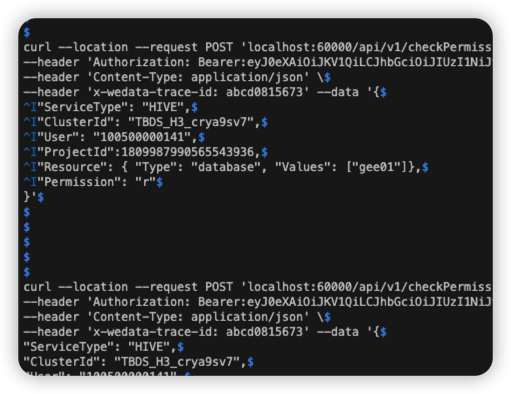
Hidden characters in Vim
Hidden characters in Vim can be thought of as "whitespaces". Below are the characters that Vim considers hidden for better readability.
eol (end of line)
tab
trail (space character before a newline character)
extends (character in the last column to show that next line is continuation of line wrap)
precedes (character in the first column to show that this line is continuation of previous line as a line wrap)
conceal
nbsp (non breakable space character)
Enable visibility of hidden characters
To temporarily enable the visibility of hidden characters, you can use the following command.
:set list
To reverse this change, you can hide the hidden characters again by using the command given below.
:set nolist