nvm 安装不同版本 nodejs
2023-05-01
没想到ubuntu上更新安装最新版的nodejs那么麻烦, 最后找了nvm进行管理, 与pyenv一样轻松方便.
python有pyenv, java有jenv, nodejs看来有nvm.
安装使用步骤
How To Install Node.js on Ubuntu 20.04
https://www.digitalocean.com/community/tutorials/how-to-install-node-js-on-ubuntu-20-04
- 下载自动化安装脚本, 安装nvm
curl -o- https://raw.githubusercontent.com/nvm-sh/nvm/v0.39.3/install.sh | bash

source ~/.bashrc
- 查看可安装版本
nvm list-remote
Output
. . .
v18.0.0
v18.1.0
v18.2.0
v18.3.0
- 安装指定 nodejs 版本
nvm install v14.17.0
建议安装长期版本
nvm install v16.20.1
- 查看本地已经安装的版本
You can view the different versions you have installed by listing them:
nvm list
- 切换使用某个版本
nvm use v14.17.0
不过测试发现只在当前shell中生效, 再次打开就没有了.
- 默认生效版本
https://stackoverflow.com/questions/45657649/nvm-how-do-you-set-the-node-version-globally
nvm alias default v15.0.1
- 设置不同文件夹的生效版本
You can use an .nvmrc file in the root of the project with the version you want to use. For example v12.4.0 or v10.16.0. You have to make sure that this version is installed or it will use the default node version in your machine.
And run nvm use to trigger it pick up the version number from .nvmrc.
安装记录
curl -o- https://raw.githubusercontent.com/nvm-sh/nvm/v0.39.3/install.sh | bash
 curl -o- https://raw.githubusercontent.com/nvm-sh/nvm/v0.39.3/install.sh | bash
  % Total    % Received % Xferd  Average Speed   Time    Time     Time  Current
                                 Dload  Upload   Total   Spent    Left  Speed
100 15916  100 15916    0     0  67440      0 --:--:-- --:--:-- --:--:-- 67440
=> Downloading nvm from git to '/home/ubuntu/.nvm'
=> Cloning into '/home/ubuntu/.nvm'...

remote: Enumerating objects: 360, done.
remote: Counting objects: 100% (360/360), done.
remote: Compressing objects: 100% (306/306), done.
remote: Total 360 (delta 40), reused 170 (delta 28), pack-reused 0
Receiving objects: 100% (360/360), 219.95 KiB | 11.00 MiB/s, done.
Resolving deltas: 100% (40/40), done.
* (HEAD detached at FETCH_HEAD)
  master
=> Compressing and cleaning up git repository

=> Appending nvm source string to /home/ubuntu/.bashrc
=> Appending bash_completion source string to /home/ubuntu/.bashrc
=> Close and reopen your terminal to start using nvm or run the following to use it now:

export NVM_DIR="$HOME/.nvm"
[ -s "$NVM_DIR/nvm.sh" ] && \. "$NVM_DIR/nvm.sh"  # This loads nvm
[ -s "$NVM_DIR/bash_completion" ] && \. "$NVM_DIR/bash_completion"  # This loads nvm bash_completion
nvm install 14.17.0
nvm install 14.17.0

Downloading and installing node v14.17.0...
Downloading https://nodejs.org/dist/v14.17.0/node-v14.17.0-linux-x64.tar.xz...
######################################################################################### 100.0%
Computing checksum with sha256sum
Checksums matched!
Now using node v14.17.0 (npm v6.14.13)
nvm list
ubuntu@VM-0-4-ubuntu:/data/muddy$ nvm list

       v14.10.0
->     v14.17.0
         system
default -> v14.10.0
iojs -> N/A (default)
unstable -> N/A (default)
node -> stable (-> v14.17.0) (default)
stable -> 14.17 (-> v14.17.0) (default)
lts/* -> lts/hydrogen (-> N/A)
lts/argon -> v4.9.1 (-> N/A)
lts/boron -> v6.17.1 (-> N/A)
lts/carbon -> v8.17.0 (-> N/A)
lts/dubnium -> v10.24.1 (-> N/A)
lts/erbium -> v12.22.12 (-> N/A)
lts/fermium -> v14.21.3 (-> N/A)
lts/gallium -> v16.20.0 (-> N/A)
lts/hydrogen -> v18.16.0 (-> N/A)
nvm current
ubuntu@VM-0-4-ubuntu:/data/muddy$ nvm current
v14.17.0
node 版本过低导致的问题
现在操作系统自带的node版本一般都落后于主流, 一般都需要先把node版本升上去, 不然在react项目中随便干点啥都报错.
建议安装lts版本
nvm install v16.20.1
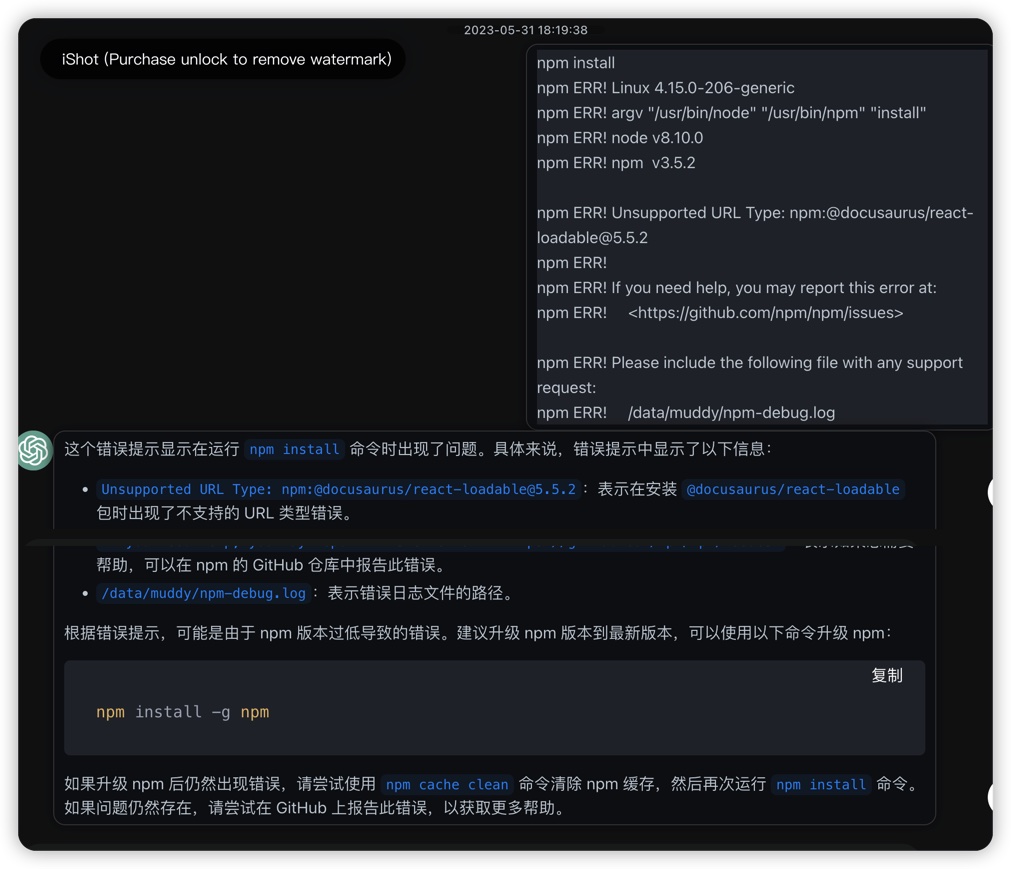
- node 版本过低错误 1
npm install
npm install
npm ERR! Linux 4.15.0-206-generic
npm ERR! argv "/usr/bin/node" "/usr/bin/npm" "install"
npm ERR! node v8.10.0
npm ERR! npm  v3.5.2

npm ERR! Unsupported URL Type: npm:@docusaurus/react-loadable@5.5.2
npm ERR!
npm ERR! If you need help, you may report this error at:
npm ERR!     <https://github.com/npm/npm/issues>

npm ERR! Please include the following file with any support request:
npm ERR!     /data/muddy/npm-debug.log
- node 版本过低错误 2
npm run build

> muddy@0.0.0 build /data/muddy
> docusaurus build

/data/muddy/node_modules/@docusaurus/core/bin/docusaurus.mjs:11
import logger from '@docusaurus/logger';
^^^^^^

SyntaxError: Unexpected token import
    at createScript (vm.js:80:10)
    at Object.runInThisContext (vm.js:139:10)
    at Module._compile (module.js:616:28)
    at Object.Module._extensions..js (module.js:663:10)
    at Module.load (module.js:565:32)
    at tryModuleLoad (module.js:505:12)
    at Function.Module._load (module.js:497:3)
    at Function.Module.runMain (module.js:693:10)
    at startup (bootstrap_node.js:188:16)
    at bootstrap_node.js:609:3

npm ERR! Linux 4.15.0-206-generic
npm ERR! argv "/usr/bin/node" "/usr/bin/npm" "run" "build"
npm ERR! node v8.10.0
npm ERR! npm  v3.5.2
npm ERR! code ELIFECYCLE
npm ERR! muddy@0.0.0 build: `docusaurus build`
npm ERR! Exit status 1
npm ERR!
npm ERR! Failed at the muddy@0.0.0 build script 'docusaurus build'.
npm ERR! Make sure you have the latest version of node.js and npm installed.
npm ERR! If you do, this is most likely a problem with the muddy package,
npm ERR! not with npm itself.
npm ERR! Tell the author that this fails on your system:
npm ERR!     docusaurus build
npm ERR! You can get information on how to open an issue for this project with:
npm ERR!     npm bugs muddy
npm ERR! Or if that isn't available, you can get their info via:
npm ERR!     npm owner ls muddy
npm ERR! There is likely additional logging output above.

npm ERR! Please include the following file with any support request:
npm ERR!     /data/muddy/npm-debug.log
- node 版本过低导致的错误 3
 npm run build

> muddy@0.0.0 build /data/muddy
> docusaurus build

file:///data/muddy/node_modules/@docusaurus/core/bin/docusaurus.mjs:30
process.env.BABEL_ENV ??= 'development';
                      ^^^

SyntaxError: Unexpected token '??='
    at Loader.moduleStrategy (internal/modules/esm/translators.js:117:18)
    at async link (internal/modules/esm/module_job.js:42:21)
npm ERR! code ELIFECYCLE
npm ERR! errno 1
npm ERR! muddy@0.0.0 build: `docusaurus build`
npm ERR! Exit status 1
npm ERR!
npm ERR! Failed at the muddy@0.0.0 build script.
npm ERR! This is probably not a problem with npm. There is likely additional logging output above.

npm ERR! A complete log of this run can be found in:
npm ERR!     /home/ubuntu/.npm/_logs/2023-05-31T12_20_52_327Z-debug.log
- 与
package.json里要求的版本不一致, 提示需要升级node版本
npm install
npm WARN notsup Unsupported engine for @docusaurus/preset-classic@2.4.1: wanted: {"node":">=16.14"} (current: {"node":"14.17.0","npm":"6.14.13"})
npm WARN notsup Not compatible with your version of node/npm: @docusaurus/preset-classic@2.4.1
npm WARN notsup Unsupported engine for @docusaurus/core@2.4.1: wanted: {"node":">=16.14"} (current: {"node":"14.17.0","npm":"6.14.13"})
npm WARN notsup Not compatible with your version of node/npm: @docusaurus/core@2.4.1
npm WARN notsup Unsupported engine for @docusaurus/logger@2.4.1: wanted: {"node":">=16.14"} (current: {"node":"14.17.0","npm":"6.14.13"})
npm WARN notsup Not compatible with your version of node/npm: @docusaurus/logger@2.4.1
npm WARN notsup Unsupported engine for @docusaurus/utils-common@2.4.1: wanted: {"node":">=16.14"} (current: {"node":"14.17.0","npm":"6.14.13"})
npm WARN notsup Not compatible with your version of node/npm: @docusaurus/utils-common@2.4.1
npm WARN notsup Unsupported engine for @docusaurus/cssnano-preset@2.4.1: wanted: {"node":">=16.14"} (current: {"node":"14.17.0","npm":"6.14.13"})
npm WARN notsup Not compatible with your version of node/npm: @docusaurus/cssnano-preset@2.4.1
npm WARN notsup Unsupported engine for @docusaurus/utils-validation@2.4.1: wanted: {"node":">=16.14"} (current: {"node":"14.17.0","npm":"6.14.13"})
npm WARN notsup Not compatible with your version of node/npm: @docusaurus/utils-validation@2.4.1
npm WARN notsup Unsupported engine for @docusaurus/utils@2.4.1: wanted: {"node":">=16.14"} (current: {"node":"14.17.0","npm":"6.14.13"})
npm WARN notsup Not compatible with your version of node/npm: @docusaurus/utils@2.4.1
npm WARN notsup Unsupported engine for @docusaurus/mdx-loader@2.4.1: wanted: {"node":">=16.14"} (current: {"node":"14.17.0","npm":"6.14.13"})
npm WARN notsup Not compatible with your version of node/npm: @docusaurus/mdx-loader@2.4.1

npm ERR! code ETARGET
npm ERR! notarget No matching version found for react-loadable@5.5.2.
npm ERR! notarget In most cases you or one of your dependencies are requesting
npm ERR! notarget a package version that doesn't exist.
npm ERR! notarget
npm ERR! notarget It was specified as a dependency of '@docusaurus/core'
npm ERR! notarget

npm ERR! A complete log of this run can be found in:
npm ERR!     /home/ubuntu/.npm/_logs/2023-05-31T10_39_36_911Z-debug.log
咨询 chatgpt
常规的安装类文档, 咨询chatgpt都给你整得明明白白, 速度可能还快过在自己的文档仓库里搜索.
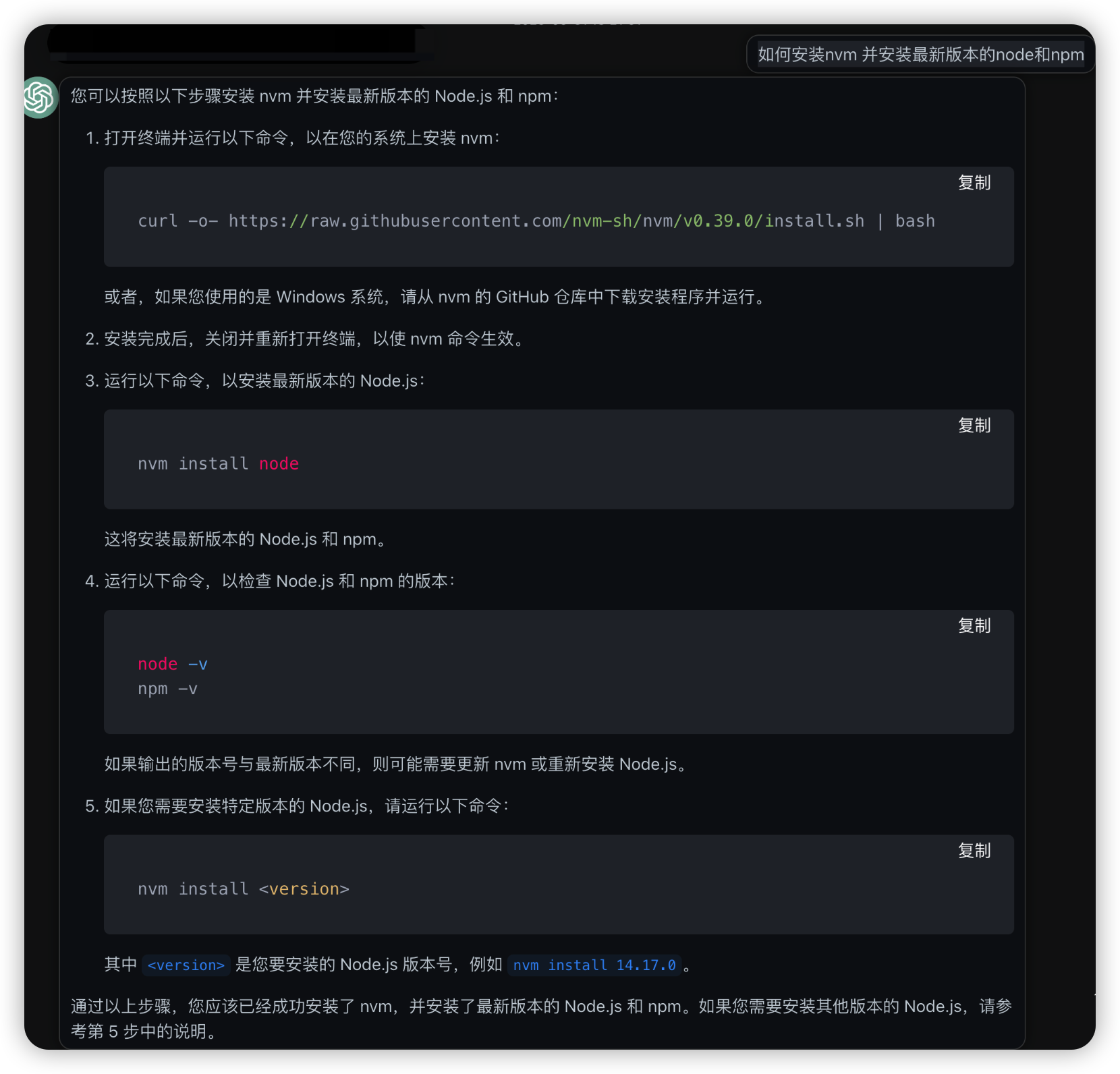
chatgpt根据错误, 建议升级node版本, 提供了解决思路.
bugs
nvm 切换国内源
估计是因为国内网络太慢导致的, 切换为国内nvm源, 直接回复正常.
export NVM_NODEJS_ORG_MIRROR=https://npm.taobao.org/mirrors/node/
nvm ls-remote只剩下 iojs版本
nvm ls-remote只剩下 iojs版本
ubuntu@VM-8-16-ubuntu:~$ nvm ls-remote
    iojs-v1.0.0
    iojs-v1.0.1
    iojs-v1.0.2
    iojs-v1.0.3
    iojs-v1.0.4
    iojs-v1.1.0
    iojs-v1.2.0
    iojs-v1.3.0
    iojs-v1.4.1
    iojs-v1.4.2
    iojs-v1.4.3
    iojs-v1.5.0
    iojs-v1.5.1
    iojs-v1.6.0
    iojs-v1.6.1
    iojs-v1.6.2
    iojs-v1.6.3
    iojs-v1.6.4
估计是因为国内网络太慢导致的, 切换为国内nvm源, 直接回复正常.
export NVM_NODEJS_ORG_MIRROR=https://npm.taobao.org/mirrors/node/