VSCode 贴士
vscode 支持多词查询
2023-06-20
https://stackoverflow.com/questions/49944569/search-in-vs-code-for-multiple-terms
Use regex flag and search for (word1[\s\S\n]*word2)|(word2[\s\S\n]*word1)
比如查询同时有ranger和curl的文本:
(curl[\s\S\n]*ranger)|(ranger[\s\S\n]*curl)
目前也提供了vscode插件, search: https://marketplace.visualstudio.com/items?itemName=usernamehw.search
插件使用方法比较复杂, 提供的commands并没有暴露快捷方式, 所以需要自己设置键盘快捷键绑定.
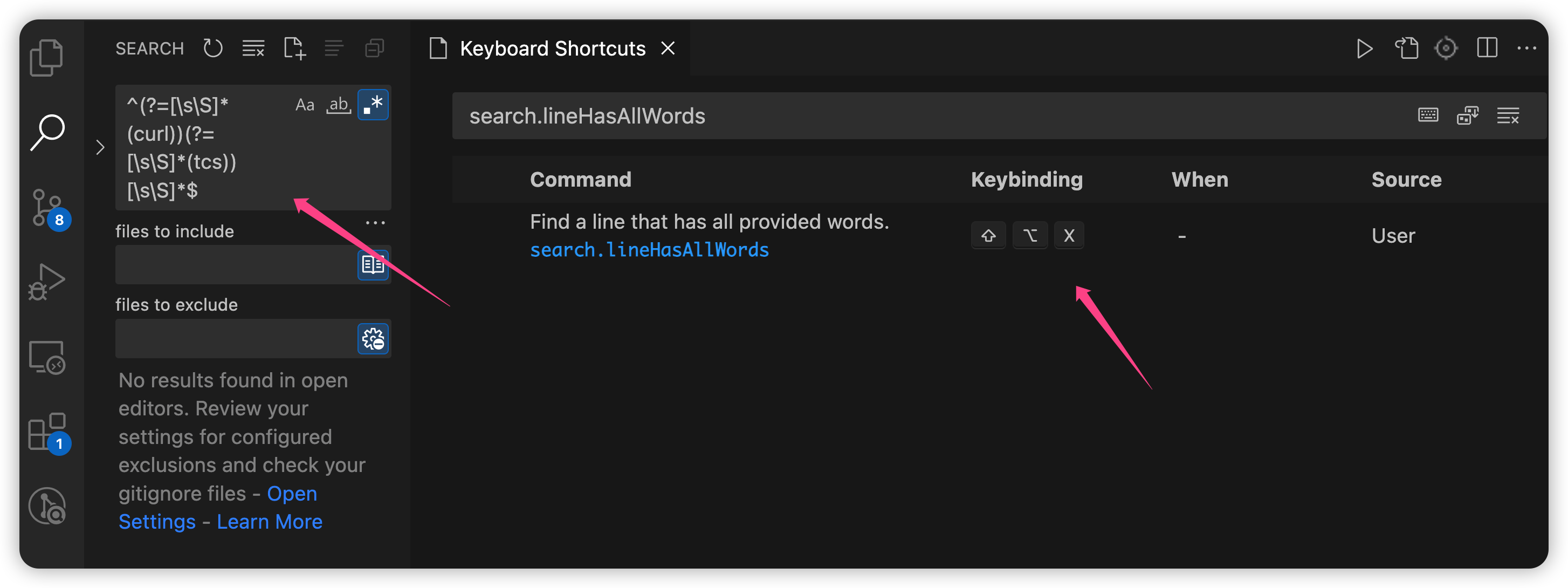
后面调用快捷键就可以触发弹框, 然后支持多词搜索, 以正则表达式的方式调用原生的搜索框.
关于commands: https://code.visualstudio.com/api/extension-guides/command
Commands trigger actions in Visual Studio Code. If you have ever configured a keybinding, then you've worked with commands. Commands are also used by extensions to expose functionality to users, bind to actions in VS Code's UI, and implement internal logic. VS Code includes a large set of built-in commands that you can use to interact with the editor, control the user interface, or perform background operations. Many extensions also expose their core functionality as commands that users and other extensions can leverage.
search插件代码
https://github.com/usernamehw/vscode-search
import { IFindInFilesArgs } from './types';
import vscode, { commands, ExtensionContext, window } from 'vscode';

export function activate(extensionContext: ExtensionContext): void {
    commands.registerCommand('search.fileHasAllWords', async () => {
        const input = await window.showInputBox();
        if (!input) {
            return;
        }
        const words = input.split(' ');
        let regexStr = '^';
        for (const word of words) {
            regexStr += `(?=[\\s\\S\\n]*(${word}))`;
        }
        regexStr += '[\\s\\S\\n]*$';

        vscode.commands.executeCommand('workbench.action.findInFiles', {
            query: regexStr,
            isRegex: true,
            triggerSearch: true,
        } as IFindInFilesArgs);
    });
    commands.registerCommand('search.lineHasAllWords', async () => {
        const input = await window.showInputBox();
        if (!input) {
            return;
        }
        const words = input.split(' ');
        let regexStr = '^';
        for (const word of words) {
            regexStr += `(?=[\\s\\S]*(${word}))`;
        }
        regexStr += '[\\s\\S]*$';

        vscode.commands.executeCommand('workbench.action.findInFiles', {
            query: regexStr,
            isRegex: true,
            triggerSearch: true,
        } as IFindInFilesArgs);
    });
}


export function deactivate(): void { }
user Settings vs workspace Settings
https://code.visualstudio.com/docs/getstarted/settings
有多个配置json文件, 优先级如下:
Configurations can be overridden at multiple levels by the different setting scopes. In the following list, later scopes override earlier scopes:
- Default settings - This scope represents the default unconfigured setting values.
- User settings - Apply globally to all VS Code instances.
- Remote settings - Apply to a remote machine opened by a user.
- Workspace settings - Apply to the open folder or workspace.
- Workspace Folder settings - Apply to a specific folder of a multi-root workspace.
- Language-specific default settings - These are language-specific default values that can be contributed by extensions.
- Language-specific user settings - Same as User settings, but specific to a language.
- Language-specific remote settings - Same as Remote settings, but specific to a language.
- Language-specific workspace settings - Same as Workspace settings, but specific to a language.
- Language-specific workspace folder settings - Same as Workspace Folder settings, but specific to a language.
- Policy settings - Set by the system administrator, these values always override other setting values.
A VS Code "workspace" is usually just your project root folder. Workspace settings as well as debugging and task configurations are stored at the root in a .vscode folder. You can also have more than one root folder in a VS Code workspace through a feature called Multi-root workspaces. You can learn more in the What is a VS Code "workspace"? article.
需要注意的只有Default Settings, User Settings, Workpace Settings. 其中UserSettings与vscode的安装实例绑定, 而workspace setting则与每个项目绑定.
workspace setting 会在每个项目的.vscode文件夹下保存配置, 可以通过git跨机器保持相同的配置.
编辑页面的长度提示线
不知道怎么丢失了, 找了一下json的配置项如下, 搜索的话可以搜rulers.
    "editor.rulers": [
        120
    ],