flink cdc 入门测试
时代变化太快了, 几年前有听说cdc, 没想到用起来这么方便. 不需要去了解binlong的细节, 轻轻松松实现mysql的实时感知. 不需要去做etl和数据湖, 直接flinksql支持从几个不同的数据源做sql join, 然后插入到elastisearch里. 按照以前的技术架构, 这得开发多少工作量, 现在几行简单配置就完成了. 这些搞组件开发的, 跟日常做业务crud的, 真不是一个层次的.
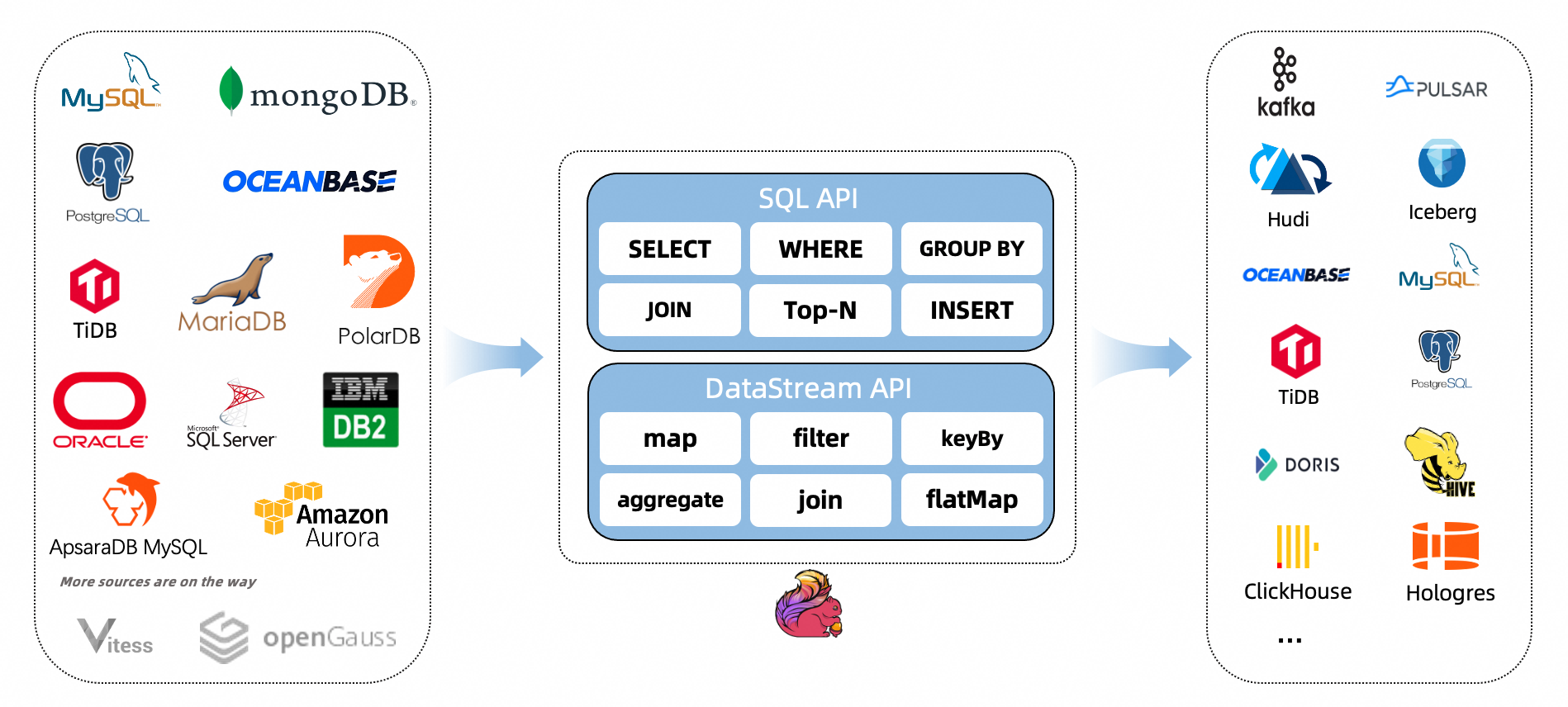
目前支持的cdc类型
主要支持的还是mysql/postgresql这种传统oltp的数据库, 不支持hive/hbase这种大数据数据源.
https://ververica.github.io/flink-cdc-connectors/master/content/about.html
CDC Connectors for Apache Flink® is a set of source connectors for Apache Flink®, ingesting changes from different databases using change data capture (CDC). The CDC Connectors for Apache Flink® integrate Debezium as the engine to capture data changes. So it can fully leverage the ability of Debezium. See more about what is Debezium.
简单测试
https://github.com/ververica/flink-cdc-connectors
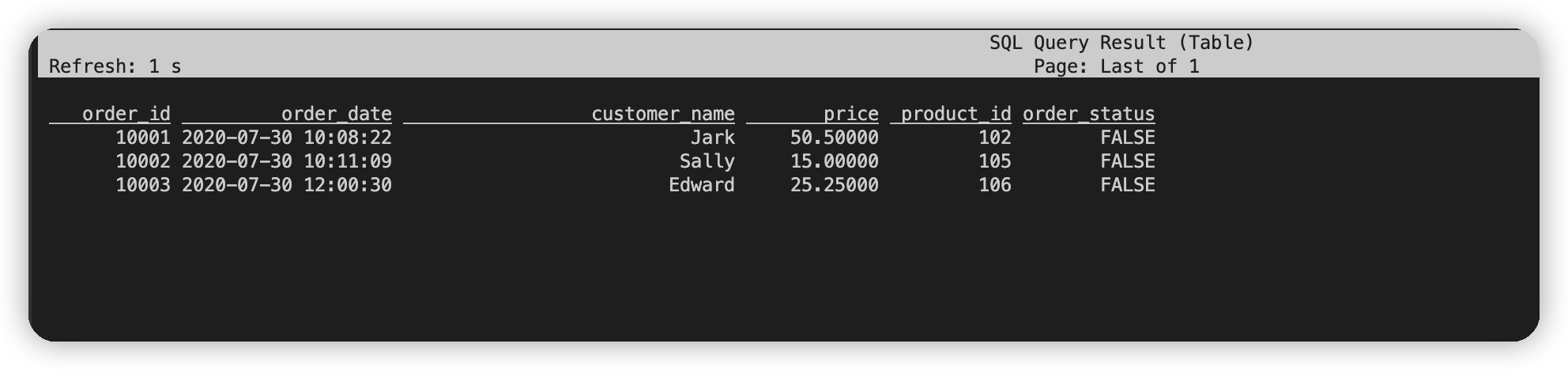
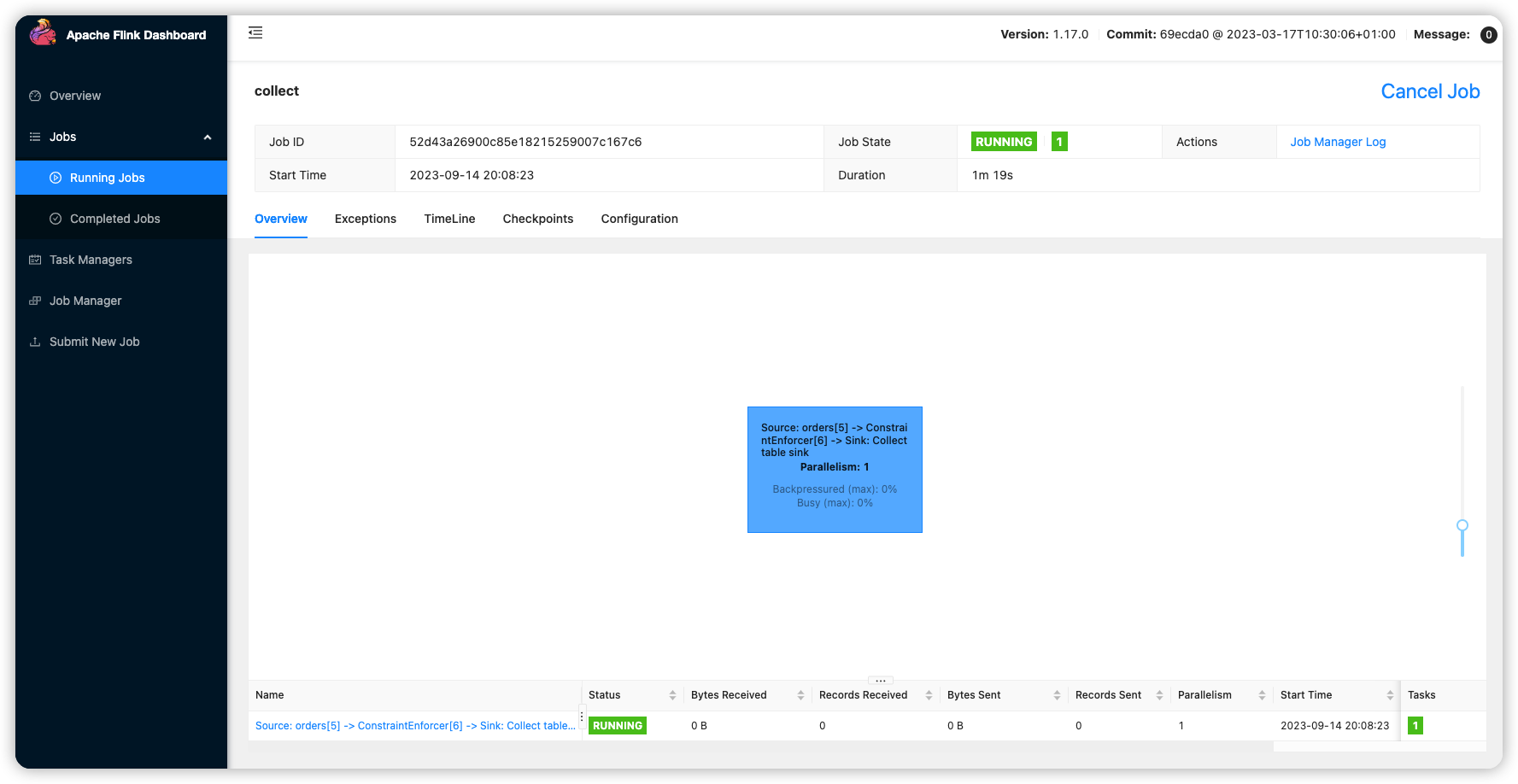
在flink sql里注册表格, 然后select表格, 即可直接触发flinksql任务
 ./bin/sql-client.sh
 Command history file path: /data/home/gee/.flink-sql-history

Flink SQL>

Flink SQL>
CREATE TABLE orders (
   order_id INT,
   order_date TIMESTAMP(0),
   customer_name STRING,
   price DECIMAL(10, 5),
   product_id INT,
   order_status BOOLEAN,
   PRIMARY KEY (order_id) NOT ENFORCED
 ) WITH (
   'connector' = 'mysql-cdc',
   'hostname' = 'localhost',
   'port' = '3306',
   'username' = 'root',
   'password' = '123456',
   'database-name' = 'mydb',
   'table-name' = 'orders',
   'server-time-zone' = 'UTC'

 );
[INFO] Execute statement succeed.

-- 直接触发查询界面
Flink SQL> select * from orders;
flink ui 交互界面
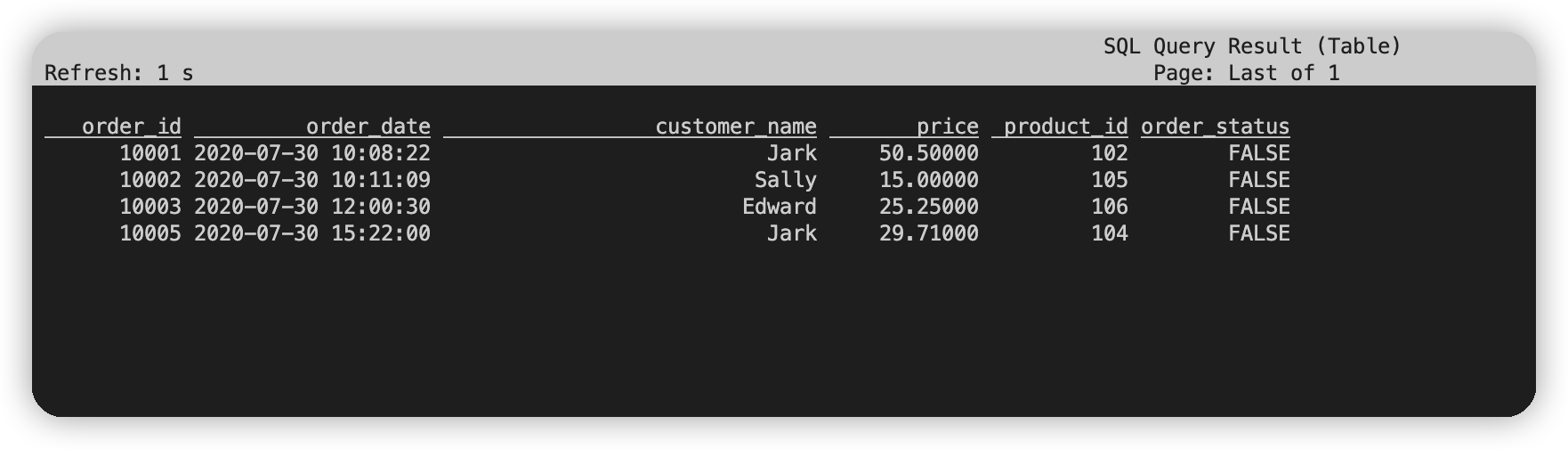
mysql里插入数据, 实时感知变化
-- mysql instance
INSERT INTO orders VALUES (default, '2020-07-30 15:22:00', 'Jark', 29.71, 104, false);
Query OK, 1 row affected (0.01 sec)
测试问题记录
slot.name问题
Flink SQL> INSERT INTO enriched_orders
>  SELECT o.*, p.name, p.description, s.shipment_id, s.origin, s.destination, s.is_arrived
>  FROM orders AS o
>  LEFT JOIN products AS p ON o.product_id = p.id
>  LEFT JOIN shipments AS s ON o.order_id = s.order_id;
[ERROR] Could not execute SQL statement. Reason: org.apache.flink.table.api.ValidationException: One or more required options are missing.
Missing required options are:
slot.name
为每个sql添加slot.name仍然会报错
Flink SQL> INSERT INTO enriched_orders
>  SELECT o.*, p.name, p.description, s.shipment_id, s.origin, s.destination, s.is_arrived
>  FROM orders AS o
>  LEFT JOIN products AS p ON o.product_id = p.id
>  LEFT JOIN shipments AS s ON o.order_id = s.order_id;
[ERROR] Could not execute SQL statement. Reason:
org.apache.flink.table.api.ValidationException: Unsupported options found for 'mysql-cdc'.

Unsupported options:

slot.name

Supported options:

chunk-key.even-distribution.factor.lower-bound
chunk-key.even-distribution.factor.upper-bound
chunk-meta.group.size
connect.max-retries
connect.timeout
connection.pool.size
connector
database-name
heartbeat.interval
hostname
password
port
property-version
scan.incremental.close-idle-reader.enabled
scan.incremental.snapshot.chunk.key-column
scan.incremental.snapshot.chunk.size
scan.incremental.snapshot.enabled
scan.newly-added-table.enabled
scan.snapshot.fetch.size
scan.startup.mode
scan.startup.specific-offset.file
scan.startup.specific-offset.gtid-set
scan.startup.specific-offset.pos
scan.startup.specific-offset.skip-events
scan.startup.specific-offset.skip-rows
scan.startup.timestamp-millis
server-id
server-time-zone
split-key.even-distribution.factor.lower-bound
split-key.even-distribution.factor.upper-bound
table-name
username
只能添加postgresql的slot.name
 CREATE TABLE shipments (
   shipment_id INT,
   order_id INT,
   origin STRING,
   destination STRING,
   is_arrived BOOLEAN,
   PRIMARY KEY (shipment_id) NOT ENFORCED
 ) WITH (
   'connector' = 'postgres-cdc',
   'hostname' = 'localhost',
   'port' = '5432',
   'username' = 'postgres',
   'password' = 'postgres',
   'database-name' = 'postgres',
   'schema-name' = 'public',
   'table-name' = 'shipments',
   'slot.name' = 'pgshipments'
 );
注意slot.name不能包含特殊字符, 一开始使用'slot.name' = 'pgshipments', 导致运行的时候失败
mysql timezone问题
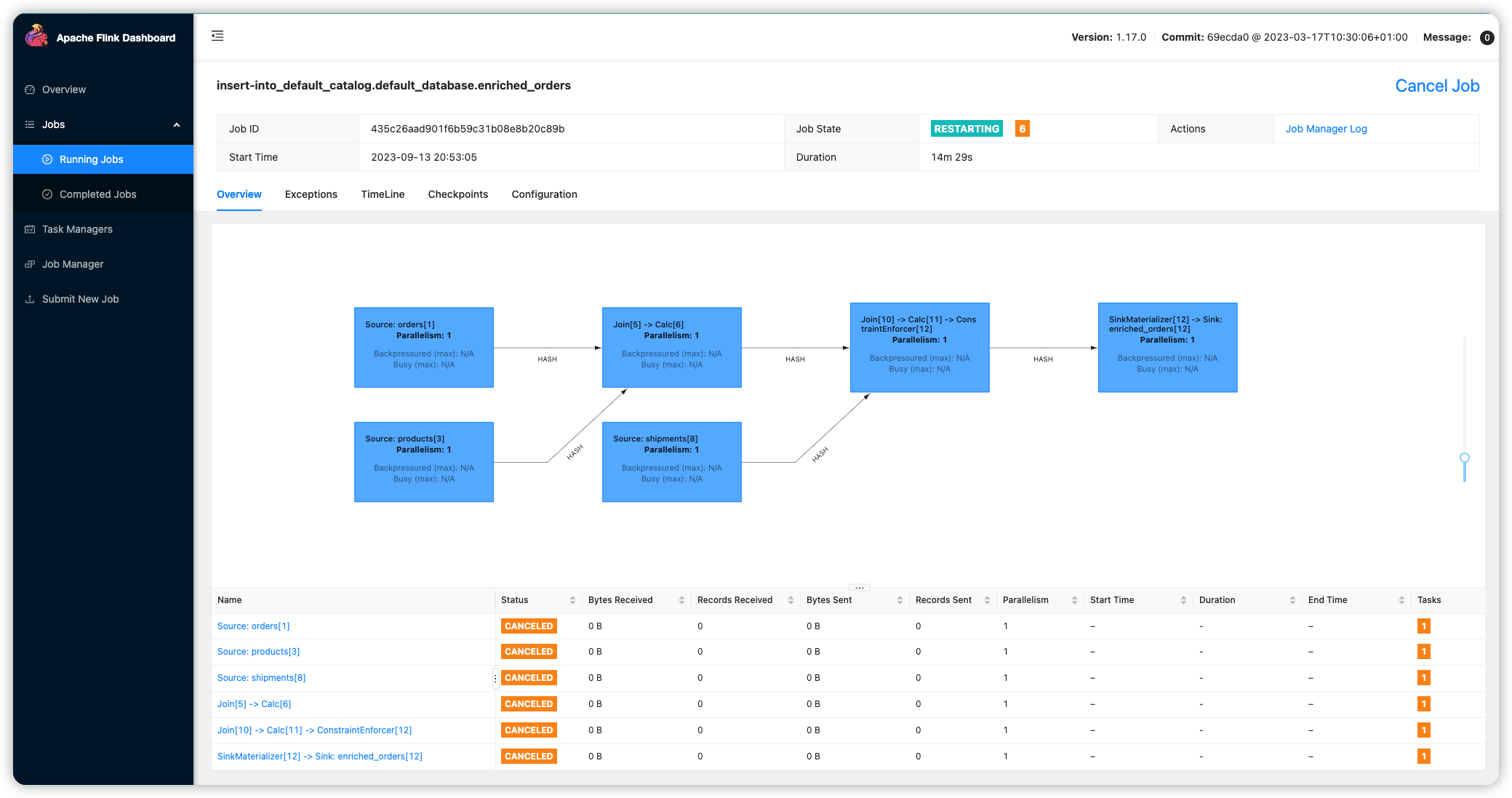
sql顺利执行提交, 但是在kibana里没有搜到数据, 到flink上查看发现人物在restart重启, 在flink web上查看job managerg log日志, 定位是mysql server问题.
 INSERT INTO enriched_orders
>  SELECT o.*, p.name, p.description, s.shipment_id, s.origin, s.destination, s.is_arrived
>  FROM orders AS o
>  LEFT JOIN products AS p ON o.product_id = p.id
>  LEFT JOIN shipments AS s ON o.order_id = s.order_id;
[INFO] Submitting SQL update statement to the cluster...
[INFO] SQL update statement has been successfully submitted to the cluster:
Job ID: 435c26aad901f6b59c31b08e8b20c89b
at java.lang.Thread.run(Thread.java:750) [?:1.8.0_382]
2023-09-13 21:03:29,710 INFO  org.apache.flink.runtime.jobmaster.JobMaster                 [] - Trying to recover from a global failure.
org.apache.flink.util.FlinkException: Global failure triggered by OperatorCoordinator for 'Source: products[3]' (operator feca28aff5a3958840bee985ee7de4d3).
    at org.apache.flink.runtime.operators.coordination.OperatorCoordinatorHolder$LazyInitializedCoordinatorContext.failJob(OperatorCoordinatorHolder.java:600) ~[flink-dist-1.17.0.jar:1.17.0]
    at org.apache.flink.runtime.operators.coordination.RecreateOnResetOperatorCoordinator$QuiesceableContext.failJob(RecreateOnResetOperatorCoordinator.java:237) ~[flink-dist-1.17.0.jar:1.17.0]
    at org.apache.flink.runtime.source.coordinator.SourceCoordinatorContext.failJob(SourceCoordinatorContext.java:374) ~[flink-dist-1.17.0.jar:1.17.0]
    at org.apache.flink.runtime.source.coordinator.SourceCoordinator.start(SourceCoordinator.java:217) ~[flink-dist-1.17.0.jar:1.17.0]
    at org.apache.flink.runtime.operators.coordination.RecreateOnResetOperatorCoordinator$DeferrableCoordinator.resetAndStart(RecreateOnResetOperatorCoordinator.java:405) ~[flink-dist-1.17.0.jar:1.17.0]
    at org.apache.flink.runtime.operators.coordination.RecreateOnResetOperatorCoordinator.lambda$resetToCheckpoint$6(RecreateOnResetOperatorCoordinator.java:150) ~[flink-dist-1.17.0.jar:1.17.0]
    at java.util.concurrent.CompletableFuture.uniWhenComplete(CompletableFuture.java:774) ~[?:1.8.0_382]
    at java.util.concurrent.CompletableFuture$UniWhenComplete.tryFire(CompletableFuture.java:750) ~[?:1.8.0_382]
    at java.util.concurrent.CompletableFuture.postComplete(CompletableFuture.java:488) ~[?:1.8.0_382]
    at java.util.concurrent.CompletableFuture.complete(CompletableFuture.java:1975) ~[?:1.8.0_382]
    at org.apache.flink.runtime.operators.coordination.ComponentClosingUtils.lambda$closeAsyncWithTimeout$0(ComponentClosingUtils.java:77) ~[flink-dist-1.17.0.jar:1.17.0]
    at java.lang.Thread.run(Thread.java:750) ~[?:1.8.0_382]
Caused by: org.apache.flink.table.api.ValidationException: The MySQL server has a timezone offset (0 seconds ahead of UTC) which does not match the configured timezone Asia/Shanghai. Specify the right server-time-zone to avoid inconsistencies for time-related fields.
    at com.ververica.cdc.connectors.mysql.MySqlValidator.checkTimeZone(MySqlValidator.java:191) ~[flink-sql-connector-mysql-cdc-2.4.0.jar:2.4.0]
    at com.ververica.cdc.connectors.mysql.MySqlValidator.validate(MySqlValidator.java:81) ~[flink-sql-connector-mysql-cdc-2.4.0.jar:2.4.0]
    at com.ververica.cdc.connectors.mysql.source.MySqlSource.createEnumerator(MySqlSource.java:172) ~[flink-sql-connector-mysql-cdc-2.4.0.jar:2.4.0]
    at org.apache.flink.runtime.source.coordinator.SourceCoordinator.start(SourceCoordinator.java:213) ~[flink-dist-1.17.0.jar:1.17.0]
尝试解决
CREATE TABLE products (
    id INT,
    name STRING,
    description STRING,
    PRIMARY KEY (id) NOT ENFORCED
  ) WITH (
    'connector' = 'mysql-cdc',
    'hostname' = 'localhost',
    'port' = '3306',
    'username' = 'root',
    'password' = '123456',
    'database-name' = 'mydb',
    'table-name' = 'products',
    'server-time-zone' = 'UTC'
  );
postgresql问题
job manager找到的日志, 看不出来什么问题
2023-09-13 21:30:19,975 INFO  org.apache.flink.runtime.executiongraph.ExecutionGraph       [] - Source: shipments[20] (1/1) (b8e920120577dc6542ab41702b2b8801_605b35e407e90cda15ad084365733fdd_0_825) switched from RUNNING to FAILED on localhost:38963-443ba7 @ VM-120-193-tencentos (dataPort=43529).
com.ververica.cdc.connectors.shaded.org.apache.kafka.connect.errors.ConnectException: Error configuring an instance of PostgresConnectorTask; check the logs for details
    at io.debezium.connector.common.BaseSourceTask.start(BaseSourceTask.java:123) ~[flink-sql-connector-mysql-cdc-2.4.0.jar:2.4.0]
    at io.debezium.embedded.EmbeddedEngine.run(EmbeddedEngine.java:760) ~[flink-sql-connector-mysql-cdc-2.4.0.jar:2.4.0]
    at io.debezium.embedded.ConvertingEngineBuilder$2.run(ConvertingEngineBuilder.java:192) ~[flink-sql-connector-mysql-cdc-2.4.0.jar:2.4.0]
    at java.util.concurrent.ThreadPoolExecutor.runWorker(ThreadPoolExecutor.java:1149) ~[?:1.8.0_382]
    at java.util.concurrent.ThreadPoolExecutor$Worker.run(ThreadPoolExecutor.java:624) ~[?:1.8.0_382]
    at java.lang.Thread.run(Thread.java:750) ~[?:1.8.0_382]
2023-09-13 21:30:19,976 INFO  org.apache.flink.runtime.jobmaster.JobMaster                 [] - 6 tasks will be restarted to recover the failed task b8e920120577dc6542ab41702b2b8801_605b35e407e90cda15ad084365733fdd_0_825.
2023-09-13 21:30:19,976 INFO  org.apache.flink.runtime.executiongraph.ExecutionGrap
在logList的taskExecutor日志里搜索找到的问题
The 'slot.name' value 'pg-shipments' is invalid: Valid replication slot name must contain only digits, lowercase characters and underscores with length <= 63
2023-09-13 21:28:12,684 WARN  com.ververica.cdc.connectors.shaded.org.apache.kafka.connect.runtime.WorkerConfig [] - Variables cannot be used in the 'plugin.path' property, since the property is used by plugin scanning before the config providers that replace the variables are initialized. The raw value 'null' was used for plugin scanning, as opposed to the transformed value 'null', and this may cause unexpected results.
2023-09-13 21:28:12,684 INFO  org.apache.flink.runtime.state.heap.HeapKeyedStateBackendBuilder [] - Finished to build heap keyed state-backend.
2023-09-13 21:28:12,684 INFO  org.apache.flink.runtime.state.heap.HeapKeyedStateBackend    [] - Initializing heap keyed state backend with stream factory.
2023-09-13 21:28:12,684 INFO  org.apache.flink.connector.base.source.reader.fetcher.SplitFetcher [] - Starting split fetcher 0
2023-09-13 21:28:12,684 INFO  com.ververica.cdc.connectors.mysql.source.reader.MySqlSplitReader [] - Handling split change SplitAddition:[[MySqlSnapshotSplit{tableId=mydb.orders, splitId='mydb.orders:0', splitKeyType=[`order_id` INT NOT NULL], splitStart=null, splitEnd=null, highWatermark=null}]]
2023-09-13 21:28:12,684 WARN  io.debezium.connector.mysql.MySqlConnection                  [] - Database configuration option 'serverTimezone' is set but is obsolete, please use 'connectionTimeZone' instead
2023-09-13 21:28:12,684 INFO  org.apache.flink.connector.base.source.reader.fetcher.SplitFetcher [] - Starting split fetcher 0
2023-09-13 21:28:12,684 INFO  com.ververica.cdc.connectors.mysql.source.reader.MySqlSplitReader [] - Handling split change SplitAddition:[[MySqlSnapshotSplit{tableId=mydb.products, splitId='mydb.products:0', splitKeyType=[`id` INT NOT NULL], splitStart=null, splitEnd=null, highWatermark=null}]]
2023-09-13 21:28:12,684 WARN  io.debezium.connector.mysql.MySqlConnection                  [] - Database configuration option 'serverTimezone' is set but is obsolete, please use 'connectionTimeZone' instead
2023-09-13 21:28:12,685 ERROR io.debezium.connector.common.BaseSourceTask                  [] - The 'slot.name' value 'pg-shipments' is invalid: Valid replication slot name must contain only digits, lowercase characters and underscores with length <= 63
2023-09-13 21:28:12,685 WARN  io.debezium.connector.postgresql.PostgresConnectorConfig     [] - Configuration property 'truncate.handling.mode' is deprecated and will be removed in future versions. Please use 'skipped.operations' instead.
2023-09-13 21:28:12,685 WARN  io.debezium.config.Configuration                             [] - Using configuration property "table.whitelist" is deprecated and will be removed in future versions. Please use "table.include.list" instead.
2023-09-13 21:28:12,685 WARN  io.debezium.config.Configuration                             [] - Using configuration property "schema.whitelist" is deprecated and will be removed in future versions. Please use "schema.include.list" instead.
2023-09-13 21:28:12,685 WARN  io.debezium.connector.postgresql.PostgresConnectorConfig     [] - Configuration property 'toasted.value.placeholder' is deprecated and will be removed in future versions. Please use 'unavailable.value.placeholder' instead.
2023-09-13 21:28:12,685 INFO  io.debezium.connector.common.BaseSourceTask                  [] - Stopping down connector
2023-09-13 21:28:12,685 ERROR com.ververica.cdc.debezium.internal.Handover                 [] - Reporting error:
com.ververica.cdc.connectors.shaded.org.apache.kafka.connect.errors.ConnectException: Error configuring an instance of PostgresConnectorTask; check the logs for details
    at io.debezium.connector.common.BaseSourceTask.start(BaseSourceTask.java:123) ~[flink-sql-connector-mysql-cdc-2.4.0.jar:2.4.0]
    at io.debezium.embedded.EmbeddedEngine.run(EmbeddedEngine.java:760) [flink-sql-connector-mysql-cdc-2.4.0.jar:2.4.0]
    at io.debezium.embedded.ConvertingEngineBuilder$2.run(ConvertingEngineBuilder.java:192) [flink-sql-connector-mysql-cdc-2.4.0.jar:2.4.0]
    at java.util.concurrent.ThreadPoolExecutor.runWorker(ThreadPoolExecutor.java:1149) [?:1.8.0_382]
    at java.util.concurrent.ThreadPoolExecutor$Worker.run(ThreadPoolExecutor.java:624) [?:1.8.0_382]
    at java.lang.Thread.run(Thread.java:750) [?:1.8.0_382]
slot.name重新修改下
 CREATE TABLE shipments (
   shipment_id INT,
   order_id INT,
   origin STRING,
   destination STRING,
   is_arrived BOOLEAN,
   PRIMARY KEY (shipment_id) NOT ENFORCED
 ) WITH (
   'connector' = 'postgres-cdc',
   'hostname' = 'localhost',
   'port' = '5432',
   'username' = 'postgres',
   'password' = 'postgres',
   'database-name' = 'postgres',
   'schema-name' = 'public',
   'table-name' = 'shipments',
   'slot.name' = 'pgshipments'
 );
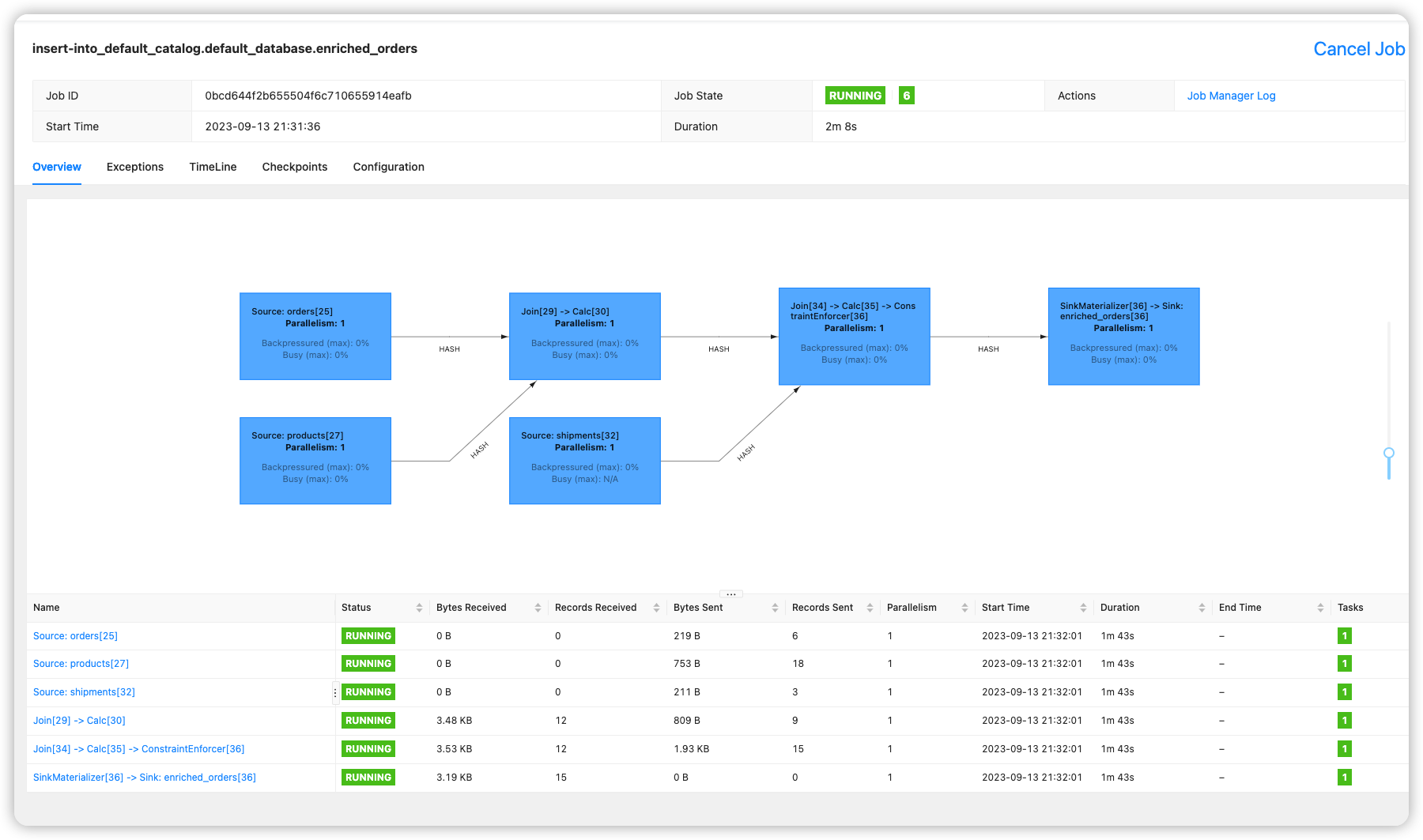
修改后终于成功, 可以看到正常运行.
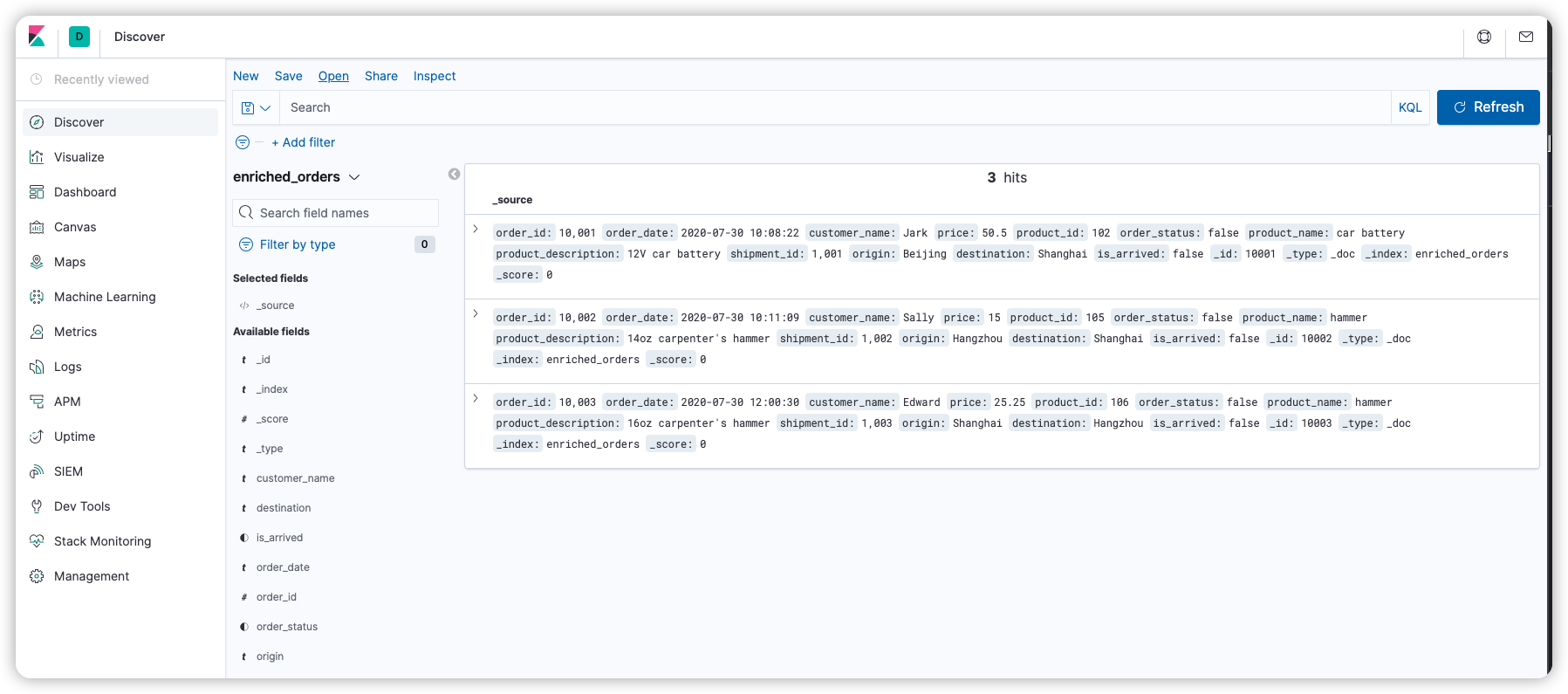
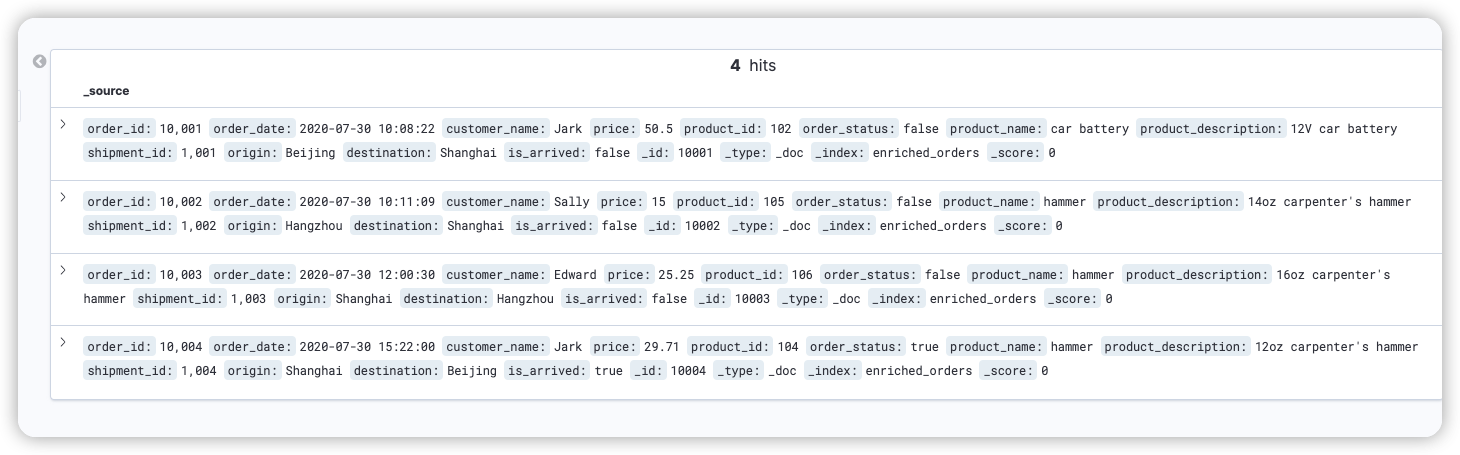
kibana能够看到数据
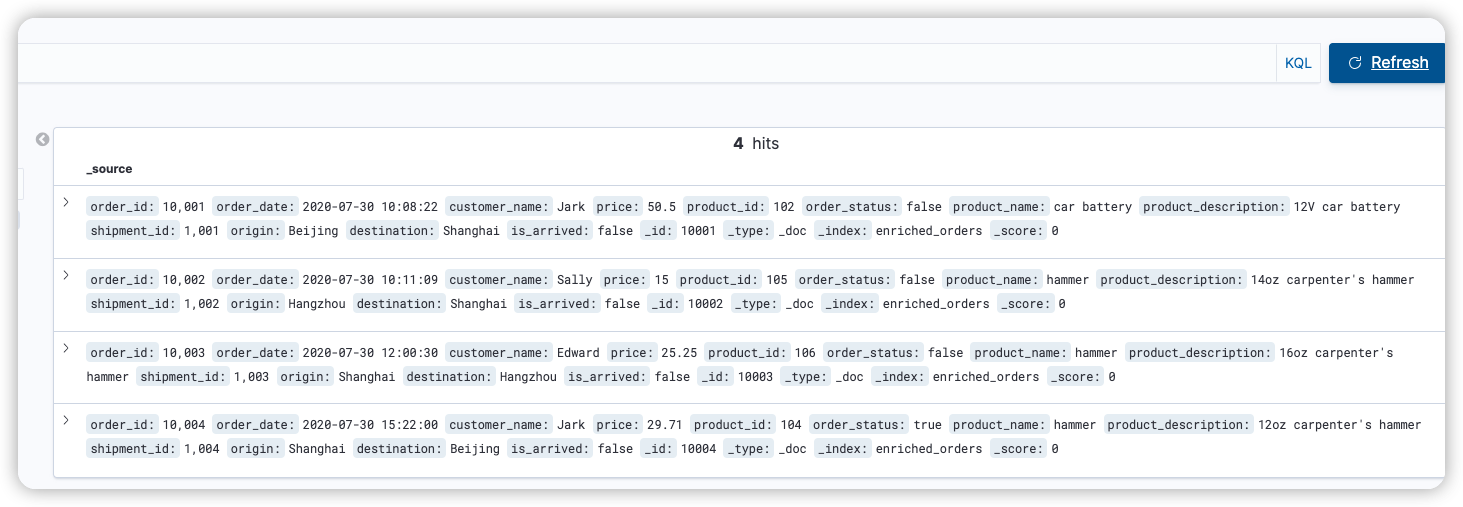
修改数据, 能持续看到不同参数的变化, 太强了.
-- mysql
INSERT INTO orders
VALUES (default, '2020-07-30 15:22:00', 'Jark', 29.71, 104, false);

--PG
INSERT INTO shipments
VALUES (default,10004,'Shanghai','Beijing',false);

--MySQL
UPDATE orders SET order_status = true WHERE order_id = 10004;
--PG
UPDATE shipments SET is_arrived = true WHERE shipment_id = 1004;
--MySQL
DELETE FROM orders WHERE order_id = 10004;
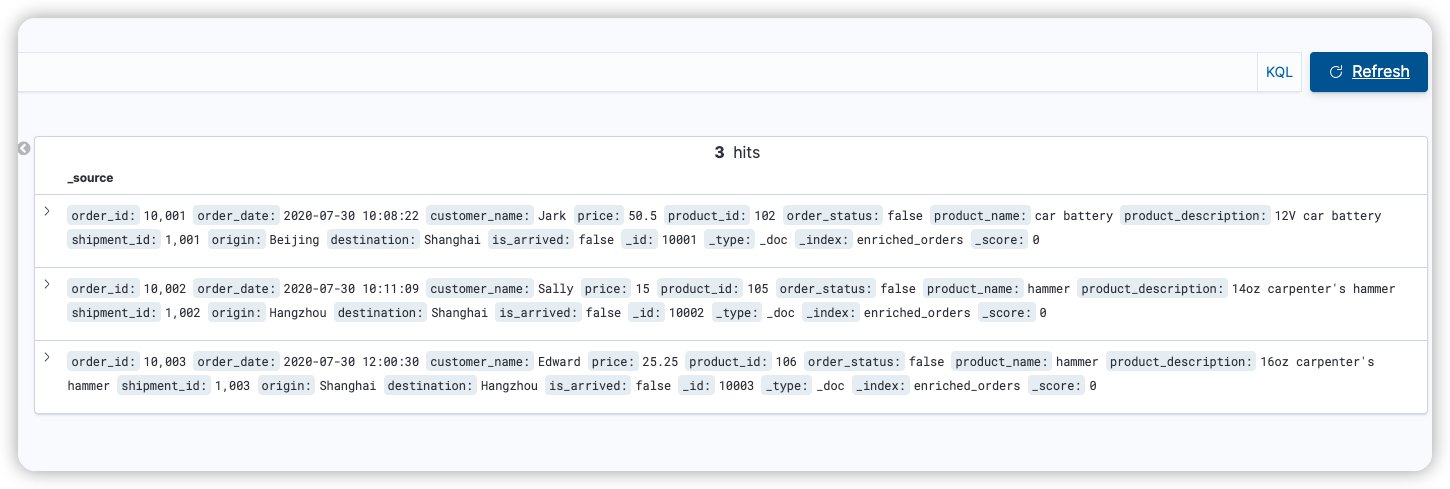
flink sql任务已经不依赖于flink sql客户端了, 客户端关闭也不影响任务运行. 客户端重新启动, 也找不到之前注册的信息, show tables返回为空. 如果需要修改, 需要重新创建flink任务.
mysql docker
https://github.com/debezium/container-images/blob/main/examples/mysql/2.4/Dockerfile
FROM mysql:8.0

LABEL maintainer="Debezium Community"

COPY mysql.cnf /etc/mysql/conf.d/
COPY inventory.sql /docker-entrypoint-initdb.d/
- mysql.cnf
https://github.com/debezium/container-images/blob/main/examples/mysql/2.4/mysql.cnf
# ----------------------------------------------
# Enable the binlog for replication & CDC
# ----------------------------------------------

# Enable binary replication log and set the prefix, expiration, and log format.
# The prefix is arbitrary, expiration can be short for integration tests but would
# be longer on a production system. Row-level info is required for ingest to work.
# Server ID is required, but this will vary on production systems
server-id         = 223344
log_bin           = mysql-bin
expire_logs_days  = 1
binlog_format     = row

default_authentication_plugin = mysql_native_password
- 提前加载执行的sql inventory.sql
# In production you would almost certainly limit the replication user must be on the follower (slave) machine,
# to prevent other clients accessing the log from other machines. For example, 'replicator'@'follower.acme.com'.
#
# However, this grant is equivalent to specifying *any* hosts, which makes this easier since the docker host
# is not easily known to the Docker container. But don't do this in production.
#
CREATE USER 'replicator' IDENTIFIED BY 'replpass';
CREATE USER 'debezium' IDENTIFIED BY 'dbz';
GRANT REPLICATION SLAVE, REPLICATION CLIENT ON *.* TO 'replicator';
GRANT SELECT, RELOAD, SHOW DATABASES, REPLICATION SLAVE, REPLICATION CLIENT  ON *.* TO 'debezium';

# Create the database that we'll use to populate data and watch the effect in the binlog
CREATE DATABASE inventory;
GRANT ALL PRIVILEGES ON inventory.* TO 'mysqluser'@'%';
测试用的一套docker compose
flink sql直接使用官网下载的版本, 然后在lib文件夹里放入几个flink-cdc的数据库jar包.
debezium配置好的数据库, elasticsearch, kibana 完全齐全.
version: '2.1'
services:
  postgres:
    image: debezium/example-postgres:1.1
    ports:
      - "5432:5432"
    environment:
      - POSTGRES_DB=postgres
      - POSTGRES_USER=postgres
      - POSTGRES_PASSWORD=postgres
  mysql:
    image: debezium/example-mysql:1.1
    ports:
      - "3306:3306"
    environment:
      - MYSQL_ROOT_PASSWORD=123456
      - MYSQL_USER=mysqluser
      - MYSQL_PASSWORD=mysqlpw
  elasticsearch:
    image: elastic/elasticsearch:7.6.0
    environment:
      - cluster.name=docker-cluster
      - bootstrap.memory_lock=true
      - "ES_JAVA_OPTS=-Xms512m -Xmx512m"
      - discovery.type=single-node
    ports:
      - "9200:9200"
      - "9300:9300"
    ulimits:
      memlock:
        soft: -1
        hard: -1
      nofile:
        soft: 65536
        hard: 65536
  kibana:
    image: elastic/kibana:7.6.0
    ports:
      - "5601:5601"
具体的mysql-debezium数据库镜像配置了什么内容, 可以参考debezium的docker file
https://github.com/debezium/debezium-examples/blob/main/tutorial/docker-compose-mysql.yaml