kerberos 常用命令
如果只是使用被分配的keytab, 只会用到klist -kt 和kinit -kt命令的话, 对用户和密钥的管理没有接触, 对kerberos这套系统的认知还是迷迷糊糊. 就跟熟悉一个组件需要从安装开始, 熟悉kerberos也需要从kadmin.local开始, 用kadmin.local创建用户, 修改密码, 创建keytab, 查看用户列表, 执行完这些初始的管理操作, 基本上就知道怎么回事了, kerberos kdc 的迷雾也开始散开.
一些测试后摸索的tips:
- kerberos的登录看起来只是执行kinit命令, 其实需要与kdc交互验证用户名密码, 并不是只有文件就可以了. kdc的配置文件默认在
/etc/krb5.conf, 在多集群的执行机器里则需要指定. kdc配置里注明了kdc server的ip地址, 地址错误的话就没法验证登录了. - kdc配置里, 除了指明 kdc server的ip地址, 还指明了 realm 域名, 多集群的keytab可以通过realm域名进行区分.
- kinit 登录后在本地保存了登录态的缓存文件, 默认的缓存文件与linux的用户id
uid相关, 因此同一个linux用户只有一个登录态. 如果不同使用者都使用root账号登录linux, 使用kinit登录不同princiapl后, 其他同名linux用户的kerberos登录态也都会跟着同步. - kerberos的登录除了用keytab文件, 其实还可以直接用密码. 创建用户的时候可以直接配置密码, 存量的用户也可以直接修改密码.
- 通过kadmin生成keytab文件,一般都是随机重置用户的密码, 旧的keytab文件会直接失效, 也无法通过原来的密码直接登录. 如果这时候再去changepw修改密码, 则会导致keytab文件失效.
- kadmin.local 创建密钥的时候, 如果设置参数
-norandkey, 可以维持原来的密码不变. 通过这种方式, 可以实现密码不变, keytab文件不变. 因此也就有了通过代码直接生成keytab文件的可能性, 只要遵循相同的密码加密规则即可. - kadmin操作需要登录, kadmin.local命令则不需要登录.
- 看起来有不同的kerberos命令行, 尤其是windows那边, 认准kadmin local就行.
如果由统一的服务端提供keytab管理, server端一般都是将api转化为命令行操作, 比如创建用户修改密码等.
参考文档
Configure Kerberos for clients to Access Kerberized Kyuubi
kyuubi的几篇kerberos配置说明文档很不错, 能够掌握服务与客户端使用kerberos的基础原理和方法, 快速记录下.
kerberos基础交互的方式
https://kyuubi.readthedocs.io/en/v1.6.0-incubating/client/advanced/kerberos.html
参考kyuubi的kerberos客户端连接文档, 可以了解tgt密钥交互的过程.
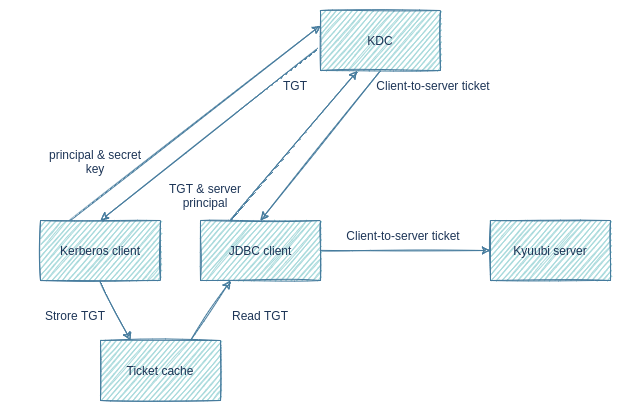
The graph above shows a simplified kerberos authentication procedure:
- Kerberos client sends user principal and secret key to KDC. Secret key can be a password or a keytab file.
- KDC returns a ticket-granting ticket(TGT).
- Kerberos client stores TGT into a ticket cache.
- JDBC client, such as beeline and BI tools, reads TGT from the ticket cache.
- JDBC client sends TGT and server principal to KDC.
- KDC returns a client-to-server ticket.
- JDBC client sends client-to-server ticket to Kyuubi server to prove its identity.
kerberos客户端(命令行kinit)用于登录kdc获取tgt, 存储在本地缓存文件中; jdbc客户端(比如beeline或者java)去连接服务的时候, 需要拿tgt缓存到kdc里换取客户端访问集群的票据(client-to-server ticket), 然后jdbc客户端拿着这个票据去访问kyuubi服务端, 完成认证流程. 估计kyuubi服务端还需要到kdc里校验票据的可靠性, 或者通过私钥独立验证.
kerberos客户端和jvm的环境变量配置
- kerberos客户端使用的kerberos环境变量(比如KRB5_CONFIG配置的krb5.conf配置), 与jdbc客户端jvm使用的环境变量不同. 因此kinit登录kerberos的时候需要指定一批环境变量, 在用java进程的时候也需要再制定一批参数配置.
The JVM, which JDBC client is running on, also needs to read the Kerberos client configuration file. However, JVM uses different default locations from Kerberos client, and does not honour KRB5_CONFIG environment variable.
kerbero客户端
KRB5_CONFIGenvironment variable to overwrite the default location:/etc/krb5.confkinit -c /tmp/krb5cc_beeline -kt kyuubi_user.keytab kyuubi_user@KYUUBI.APACHE.ORG
jvm 配置
- use JVM system property,
java.security.krb5.conf, to overwrite the default location. - JVM determines the ticket cache location in the following order: Path specified by
KRB5CCNAMEenvironment variable.
连接jdbc的配置
https://kyuubi.readthedocs.io/en/master/client/advanced/kerberos.html
jdbc:hive2://<kyuubi_server_address>:<kyuubi_server_port>/<db>;principal=<kyuubi_server_principal>

jdbc:hive2://<kyuubi_server_address>:<kyuubi_server_port>/<db>;kyuubiServerPrincipal=<kyuubi_server_principal>
Note:
- principal is inherited from Hive JDBC Driver and is a little ambiguous, and we could use kyuubiServerPrincipal as its alias.
- kyuubi_server_principal is the value of kyuubi.kinit.principal set in kyuubi-defaults.conf.
- As a command line argument, JDBC URL should be quoted to avoid being split into 2 commands by “;”.
- As to DBeaver,
<db>;principal=<kyuubi_server_principal>or<db>;kyuubiServerPrincipal=<kyuubi_server_principal>should be set as the Database/Schema argument.
kyuubi服务端的principal
- kyuubi服务端需要配置自己的kerberos principal, 以便去与后端的hdfs等其他组件进行交互. 客户端去访问kyuubi的时候, 用的是用户自己的keytab; kyuubi拿到用户的密钥之后, 用的是自己的principal和keytab去访问其他大数据组件, 不过也可以用proxy user的形式, 代理用户身份. kyuubi服务端配置的keytab和principal信息
https://kyuubi.readthedocs.io/en/master/security/kerberos.html
Configure the following properties to $KYUUBI_HOME/conf/kyuubi-defaults.conf on each node where kyuubi server is installed.
kyuubi.authentication=KERBEROS
kyuubi.kinit.principal=superuser/FQDN@REALM
kyuubi.kinit.keytab=/path/to/kyuubi.keytab
kyuubi提供用户代理的方式
Hadoop Credentials Manager
In order to pass the authentication of a kerberos secured hadoop cluster, kyuubi currently submits engines in two ways:
- Submits with current kerberos user and extra SparkSubmit argument
--proxy-user. - Submits with
spark.kerberos.principalandspark.kerberos.keytabspecified.
If engine is submitted with --proxy-user specified, its delegation tokens of hadoop cluster services are obtained by current kerberos user and can not be renewed by itself.
Thus, engine’s lifetime is limited by the lifetime of delegation tokens.
To remove this limitation, kyuubi renews delegation tokens at server side in Hadoop Credentials Manager.
Engine submitted with principal and keytab can renew delegation tokens by itself. But for implementation simplicity, kyuubi server will also renew delegation tokens for it.
Kinit Auxiliary Service
https://kyuubi.readthedocs.io/en/master/security/kinit.html
kyuubi服务端可以配置kinit服务定期刷新时间, 用于kyuubi服务本身
Kinit auxiliary service is a critical service both for authentication between Kyuubi client/server and for authentication between Kyuubi server/Hadoop cluster in a Kerberos environment. It will get a Kerberos Ticket Cache from KDC and periodically re-kinit to keep the Ticket Cache fresh.
Kerberos client is aimed to generate a Ticket Cache file. Then, Kyuubi can use this Ticket Cache to authenticate with those kerberized services, e.g. HDFS, YARN, and Hive Metastore server, etc.
They are valid for relatively short period. So, we always need to refresh it for long-running services like Kyuubi.
kyuubi.kinit.interval : How often will Kyuubi server run kinit -kt [keytab] [principal] to renew the local Kerberos credentials cache
- 配置hive服务端kerberos princiapl的时候, 配置
hive/_HOST@${realm}里的_HOST参数在环境里会被自动配置为正确的host ip地址.
hive.metastore.kerberos.principal: The service principal for the metastore thrift server. The special string _HOST will be replaced automatically with the correct host name.
for example hive/_HOST@${realm}
一些测试
kdc配置信息
/etc/krb5.conf
这里面其实有不少信息, 比如所在域relms是ABCD-HBMGJTQZ, 这样用户的princial里后缀都是@ABCD-HBMGJTQZ.
kdc地址是ABCD-172-16-16-11, kinit之类的命令就需要与kdc通讯验证keytab是否正确.
kerberos通过kinit登录后 登录态其实是有文件缓存的, 缓存地址是/tmp/krb5cc_%{uid}. 可以看到文件名是与用户id绑定的, 因此同一个用户如果在不同地方登录, 由于共用相同的缓存, 没有通过keytab登录不同的用户. 解决方法也很简单, 修改这个配置就行.
[libdefaults]
  renew_lifetime = 7d
  forwardable = true
  default_realm = ABCD-HBMGJTQZ
  ticket_lifetime = 24h
  dns_lookup_realm = false
  dns_lookup_kdc = false
  default_ccache_name = /tmp/krb5cc_%{uid}
  #default_tgs_enctypes = aes des3-cbc-sha1 rc4 des-cbc-md5
  #default_tkt_enctypes = aes des3-cbc-sha1 rc4 des-cbc-md5
[logging]
  default = FILE:/var/log/krb5kdc.log
  admin_server = FILE:/var/log/kadmind.log
  kdc = FILE:/var/log/krb5kdc.log

[realms]
  ABCD-HBMGJTQZ = {
    admin_server = ABCD-172-16-16-11
    kdc = ABCD-172-16-16-11
  }
一些常见登录测试
- ktadd生成keytab文件
这里添加了参数-norandkey, 使用用户的密码生成keytab, 用户仍然可以使用初始密码进行登录.
默认每次创建keytab, 都会重置密码, 旧的keytab也就失效了.
ktadd -k /tmp/gee.keytab -norandkey gee
Entry for principal gee with kvno 1, encryption type aes256-cts-hmac-sha1-96 added to keytab WRFILE:/tmp/gee.keytab.
Entry for principal gee with kvno 1, encryption type aes128-cts-hmac-sha1-96 added to keytab WRFILE:/tmp/gee.keytab.
- keytab 一般是二进制文件, 可以通过base64转化为普通文本保存在数据库中
cat /tmp/gee.keytab
ABCD-HBMGJTQZgeed�

ABCD-HBMGJTQZgeed�؟�ke���J�\7

H:�no1V�n#�u�O
转化为base64以便通过api text传输
base64 /tmp/abc.keytab

BQIAAABKAAEADVRCRFMtUjZYR1NYMlIABndlZGF0YQAAAAFlCpbFAQASACDg0nFyZvZAxRitIoko
jFqalnVa1LAuzeFceFnHrsd3YgAAAAEAAAA6AAEADVRCRFMtUjZYR1NYMlIABndlZGF0YQAAAAFl
CpbFAQARABDvtJ5uZkXqSl+tkEIshor4AAAAAQ==
- klist 可以查看keytab里可以登录的用户
 klist  -kt /tmp/gee.keytab
Keytab name: FILE:/tmp/gee.keytab
KVNO Timestamp           Principal
---- ------------------- ------------------------------------------------------
   1 08/02/2023 15:55:54 gee@ABCD-HBMGJTQZ
   1 08/02/2023 15:55:54 gee@ABCD-HBMGJTQZ
- 通过kinit登录, 用户名不提供realm的话会从kdc配置里获取默认realm.
[root@ABCD-172-16-16-11 ~]# kinit  -kt /tmp/gee.keytab  gee
[root@ABCD-172-16-16-11 ~]#
[root@ABCD-172-16-16-11 ~]# klist
Ticket cache: FILE:/tmp/krb5cc_0
Default principal: gee@ABCD-HBMGJTQZ

Valid starting       Expires              Service principal
08/02/2023 15:58:14  08/03/2023 15:58:14  krbtgt/ABCD-HBMGJTQZ@ABCD-HBMGJTQZ
        renew until 08/05/2023 15:58:14
[root@ABCD-172-16-16-11 ~]# kdestroy
[root@ABCD-172-16-16-11 ~]# klist
klist: No credentials cache found (filename: /tmp/krb5cc_0)
- 可以输入密码登录
密码错误
kinit hive/ABCD-172-16-48-143@ABCD-DQWQPG7S
Password for hive/ABCD-172-16-48-143@ABCD-DQWQPG7S:
kinit: Password incorrect while getting initial credentials
- kinit登录后, 就可以直接访问hdfs, 或是通过beeline访问hive.
beeline连接串里的principal, 是hive server配置里的service principal, 并不是当前登录的用户. 连接beeline后, 查看当前用户, 身份仍然是连接前通过kinit登录的用户.
[root@172 ~]# beeline -u "jdbc:hive2://172.16.16.3:7001/default;principal=hadoop/172.16.16.3@EMR-1MSO7OJ3"

which: no hbase in (/root/.pyenv/bin:/usr/local/service/starrocks/bin:/data/Impala/shell:/usr/local/service/kudu/bin:/usr/local/service/tez/bin:/usr/local/jdk/bin:/usr/local/service/hadoop/bin:/usr/local/service/hive/bin:/usr/local/service/hbase/bin:/usr/local/service/spark/bin:/usr/local/service/storm/bin:/usr/local/service/sqoop/bin:/usr/local/service/kylin/bin:/usr/local/service/alluxio/bin:/usr/local/service/flink/bin:/data/Impala/bin:/usr/local/service/oozie/bin:/usr/local/service/presto/bin:/usr/local/service/slider/bin:/usr/local/service/kudu/bin:/usr/local/jdk//bin:/usr/local/sbin:/usr/local/bin:/usr/sbin:/usr/bin:/root/bin)
SLF4J: Class path contains multiple SLF4J bindings.
SLF4J: Found binding in [jar:file:/usr/local/service/hive/lib/log4j-slf4j-impl-2.17.1.jar!/org/slf4j/impl/StaticLoggerBinder.class]
SLF4J: Found binding in [jar:file:/usr/local/service/hadoop/share/hadoop/common/lib/slf4j-log4j12-1.7.25.jar!/org/slf4j/impl/StaticLoggerBinder.class]
SLF4J: See http://www.slf4j.org/codes.html#multiple_bindings for an explanation.
SLF4J: Actual binding is of type [org.apache.logging.slf4j.Log4jLoggerFactory]
Connecting to jdbc:hive2://172.16.16.3:7001/default;principal=hadoop/172.16.16.3@EMR-1MSO7OJ3
Connected to: Apache Hive (version 3.1.3)
Driver: Hive JDBC (version 3.1.3)
Transaction isolation: TRANSACTION_REPEATABLE_READ
Beeline version 3.1.3 by Apache Hive
0: jdbc:hive2://172.16.16.3:7001/default>
0: jdbc:hive2://172.16.16.3:7001/default> select current_user();
+------+
| _c0  |
+------+
| gee  |
+------+
1 row selected (3.372 seconds)
kadmin.local 的操作
kadmin.local 命令
[root@ABCD-172-16-48-85 ~]# kadmin.local
Authenticating as principal yarn/admin@ABCD-DQWQPG7S with password.
kadmin.local:
kadmin.local:  ?
Available kadmin.local requests:

add_principal, addprinc, ank
                         Add principal
delete_principal, delprinc
                         Delete principal
modify_principal, modprinc
                         Modify principal
rename_principal, renprinc
                         Rename principal
change_password, cpw     Change password
get_principal, getprinc  Get principal
list_principals, listprincs, get_principals, getprincs
                         List principals
add_policy, addpol       Add policy
modify_policy, modpol    Modify policy
delete_policy, delpol    Delete policy
get_policy, getpol       Get policy
list_policies, listpols, get_policies, getpols
                         List policies
get_privs, getprivs      Get privileges
ktadd, xst               Add entry(s) to a keytab
ktremove, ktrem          Remove entry(s) from a keytab
lock                     Lock database exclusively (use with extreme caution!)
unlock                   Release exclusive database lock
purgekeys                Purge previously retained old keys from a principal
get_strings, getstrs     Show string attributes on a principal
set_string, setstr       Set a string attribute on a principal
del_string, delstr       Delete a string attribute on a principal
list_requests, lr, ?     List available requests.
quit, exit, q            Exit program.
- listprincs查看所有kdc里的用户
kadmin.local:  listprincs
HTTP/ABCD-172-16-48-143@ABCD-DQWQPG7S
HTTP/ABCD-172-16-48-55@ABCD-DQWQPG7S
HTTP/ABCD-172-16-48-85@ABCD-DQWQPG7S
K/M@ABCD-DQWQPG7S
aaa/ABCD.instance@ABCD-DQWQPG7S
bbb/ABCD.instance@ABCD-DQWQPG7S
admin/ABCD.instance@ABCD-DQWQPG7S
ccc/ABCD.instance@ABCD-DQWQPG7S
ambari-qa-tdw@ABCD-DQWQPG7S
ambari-qa/ABCD.instance@ABCD-DQWQPG7S
hhhuilli/ABCD.instance@ABCD-DQWQPG7S
hive/ABCD-172-16-48-143@ABCD-DQWQPG7S
hive/ABCD-172-16-48-55@ABCD-DQWQPG7S
hive/ABCD-172-16-48-85@ABCD-DQWQP
...
- add_principal 创建用户gee, 并设置密码为abc
kadmin.local:  add_principal -pw abc gee
No policy specified for gee@ABCD-HBMGJTQZ; defaulting to no policy
Principal "gee@ABCD-HBMGJTQZ" created.
- get_principal 查看用户信息
注意principal不提供realm信息的话, 会使用kdc里的realm进行补全, 因此最好还是加上.
kadmin.local:  get_principal gee
Principal: gee@ABCD-HBMGJTQZ
Expiration date: [never]
Last password change: Wed Aug 02 15:53:12 CST 2023
Password expiration date: [never]
Maximum ticket life: 1 day 00:00:00
Maximum renewable life: 3 days 00:00:00
Last modified: Wed Aug 02 15:53:12 CST 2023 (hive/admin@ABCD-HBMGJTQZ)
Last successful authentication: [never]
Last failed authentication: [never]
Failed password attempts: 0
Number of keys: 2
Key: vno 1, aes256-cts-hmac-sha1-96
Key: vno 1, aes128-cts-hmac-sha1-96
MKey: vno 1
Attributes:
Policy: [none]
- ktadd生成keytab文件
这里添加了参数-norandkey, 使用用户的密码生成keytab, 用户仍然可以使用初始密码进行登录.
默认每次创建keytab, 都会重置密码, 旧的keytab也就失效了.
ktadd -k /tmp/gee.keytab -norandkey gee
Entry for principal gee with kvno 1, encryption type aes256-cts-hmac-sha1-96 added to keytab WRFILE:/tmp/gee.keytab.
Entry for principal gee with kvno 1, encryption type aes128-cts-hmac-sha1-96 added to keytab WRFILE:/tmp/gee.keytab.
- 指定其他位置的krb5.conf文件
https://stackoverflow.com/questions/12306330/pass-kinit-a-custom-krb5-conf-file
env KRB5_CONFIG=/path/to/custom/krb5.conf kinit <your..args..here>
一些文档
service服务本身的kyetab 文件
Administering Keytab Files
https://docs.oracle.com/cd/E19683-01/806-4078/6jd6cjs1l/index.html
除了用户需要keytab文件, 服务本身也需要principal和keytab文件, 这样kdc才能认可, 后面才能与其他组件进行交互. 服务的keytab, 成为service key.
Every host that provides a service must have a local file, called a keytab (short for key table). The keytab contains the principal for the appropriate service, called a service key. A service key is used by a service to authenticate itself to the KDC and is known only by Kerberos and the service itself. For example, if you have a Kerberized NFS server, that server must have a keytab file that contains its nfs service principal.
keytab文件相当于密码
A keytab is analogous to a user's password. Just as it is important for users to protect their passwords, it is equally important for application servers to protect their keytab files. You should always store keytab files on a local disk, and make them readable only by the root user. Also, you should never send a keytab file over an unsecured network.
Adding a Service Principal to a Keytab File
将kadmin/admin和kadmin/changepw两个用户添加到master kdc的keytab文件里, 这两个用户就可以拿这个文件作为密码去登录使用了.
the kadmin/admin and kadmin/changepw principals are added to a master KDC's keytab file
kdc1 # /usr/sbin/kadmin.local
kadmin.local: ktadd -k /etc/krb5/kadm5.keytab kadmin/admin kadmin/changepw
Entry for principal kadmin/admin@EXAMPLE.COM with kvno 3, encryption type DES-CBC-CRC
  added to keytab WRFILE:/etc/krb5/kadm5.keytab.
Entry for principal kadmin/changepw@EXAMPLE.COM with kvno 3, encryption type DES-CBC-CRC
  added to keytab WRFILE:/etc/krb5/kadm5.keytab.
kadmin.local: quit
以某个用户的登录身份去操作, 不指定keytab的话, 对应的用户会添加到当前用户的keytab文件上.
denver's host principal is added to denver's keytab file, so that the KDC can authenticate denver's network services.
denver # /usr/sbin/kadmin
kadmin: ktadd host/denver@example.com@EXAMPLE.COM
kadmin: Entry for principal host/denver@example.com@EXAMPLE.COM with kvno 2,
  encryption type DES-CBC-CRC added to keytab WRFILE:/etc/krb5/krb5.keytab.
kadmin: quit
Creating a Kerberos service principal name and keytab file
通过 addprinc创建用户, ktadd添加用户到某个默认的keytab.
Create a Kerberos service principal name and keytab file by using iSeries, Linux, Solaris and MIT KDCs.
Create a Kerberos service principal for Kerberos authentication, for example: WAS/testmach.austin.ibm.com
kadmin.local: addprinc WAS/testmach.austin.ibm.com
Add the newly-created Kerberos service principal, WAS/testmach.austin.ibm.com to a default krb5.keytab file, for example:
kadmin.local: ktadd WAS/testmach.austin.ibm.com
其他地方的参考
- 新增账号
kadmin -q "addprinc -pw 123456 root123/admin " -w 123456 -p root/admin
- 修改密码
kadmin -q "cpw -pw 111111 zzz/aaa" -w 123456 -p root/admin
代码生成keytab
    private File generateKeytab(String username, String passPhrase) {
        File keytabFile = null;

        try {
            keytabFile = File.createTempFile("kerberos", username);
            keytabFile.deleteOnExit();
            keytabFile.getParentFile().mkdirs();
            KerberosTime timeStamp = new KerberosTime(System.currentTimeMillis());
            Keytab keytab = Keytab.getInstance();
            String principal = getPrincipalByUsername(username);
            List<KeytabEntry> entries = new ArrayList();
            Iterator var7 = KerberosKeyFactory.getKerberosKeys(principal, passPhrase).entrySet().iterator();

            while (var7.hasNext()) {
                Map.Entry<EncryptionType, EncryptionKey> keyEntry = (Map.Entry) var7.next();
                EncryptionKey key = (EncryptionKey) keyEntry.getValue();
                byte keyVersion = (byte) key.getKeyVersion();
                entries.add(new KeytabEntry(principal, PrincipalNameType.KRB_NT_PRINCIPAL.getValue(), timeStamp, keyVersion, key));
            }

            keytab.setEntries(entries);
            keytab.write(keytabFile);
        } catch (IOException var11) {
            LOG.error("[generateKeytab] Failed to save keytab to file" + keytabFile, var11);
        }

        LOG.info("[generateKeytab] Generated keytab " + keytabFile + " for user " + username);
        return keytabFile;
    }

    /**
     * 通过username获取principal
     * realm通过配置文件获取核心集群的realm
     *
     * @param username
     * @return principal
     */
    public String getPrincipalByUsername(String username) {

        String principal = username + "/" + "abc.instance" + "@" + realm.toUpperCase();
        LOG.info("getPrincipalByUsername by username {}, principal {}", username, principal);
        return principal;
    }