presto/trino 入坑记
trino真是神奇, 实现了多个数据源实例之间直接读取关联查询, 这样不少场景就不需要etl什么事了, 再次体会到了所谓数据湖的概念.
bingo, 世界流动起来了.
悲催测试从presto转向trino
2023-10-12
首次使用, 测试了presto + hive metastore + cos, 简直是一片混乱. 一个是hive metastore单独安装初始化有各种报错, 对derby数据库也不熟悉,一开始都没成功启动起来. 其次是cos在网上的实践文档太少了, 各种demo都是拿aws举例, sdk用的也都是aws的sdk, 跟大数据的一套无缝衔接, 拿cos来测试就会处于不知道自己少了什么依赖的场景里, 非常头疼. 三是后来连接hive一直报错连接, thrift socket timeout. 后来从最简单的mysql测试起来, 结果也一直网络问题无法连接, 压根不知道发生什么事情.
听从同事的建议, 放弃presto, 使用开源版的trino, 测试突然就顺利起来了. hive metastore确实启动了, trino 也能正常连接读取元数据了, 先前估计是connector关于hive2和hive3的问题. 不过还是无法成功插入数据, 因为没有配置可用的hdfs warehouse location. 决定放弃, 从最简单的mysql走起. 发现其实mysql端口配置错误了. 配置好两个实例后, 远程join表查询, bingo, 世界流动起来了.
trino真是神奇, 实现了多个数据源实例之间直接读取关联查询, 这样不少场景就不需要etl什么事了, 再次体会到了所谓数据湖的概念.
一些文档
trino文档
trino文档: https://trino.io/docs/current/installation/deployment.html
github: https://github.com/trinodb/trino
presto 文档
presto文档: https://prestodb.io/docs/current/installation/deployment.html
deploying presto, 并且提供了不少demo, 包括查询hive on s3
github: https://github.com/prestodb/presto
- MySQL Connector: https://prestodb.io/docs/current/connector/mysql.html
- Hive Connector: https://prestodb.io/docs/0.283/connector/hive.html
trino + alluxio
Tutorial: Presto + Alluxio + Hive Metastore on Your Laptop in 10 min
https://www.alluxio.io/blog/tutorial-presto-alluxio-hive-metastore-on-your-laptop-in-10-min/
presto + alluxio + hive metastore, 其中alluxio 作为s3的缓存加速.
入门级配置
trino文档: https://trino.io/docs/current/installation/deployment.html
下载安装trino非常容易, 不过需要手动配置几个参数, 还是提前复制好比较方便.
 tree
.
├── catalog
│   ├── hive.properties
│   ├── mysql2.properties
│   └── mysql.properties
├── config.properties
├── jvm.config
└── node.properties
节点基础配置
- 测试节点同时作为协调节点coordinator和worker. 生产环境需要分开.
- discovery.url是coordinator节点的地址, 用于worker的注册通讯.
# config.properties
coordinator=true
node-scheduler.include-coordinator=true
http-server.http.port=8082
discovery.uri=http://gpu.ocxx.cn:8082
- jvm的一些基础配置
# jvm.config

-server
-Xmx16G
-XX:+UseG1GC
-XX:G1HeapRegionSize=32M
-XX:+UseGCOverheadLimit
-XX:+ExplicitGCInvokesConcurrent
-XX:+HeapDumpOnOutOfMemoryError
-XX:+ExitOnOutOfMemoryError
- node.id 每个节点都不一样
- node.data-dir 用于配置日志等存储文件
#node.properties

node.environment=production
node.id=ffffffff-ffff-ffff-ffff-fffffffffffa
node.data-dir=/data/geedev/trino/trino-server-428/data
数据库catalog入门配置
mysql配置
$ cat mysql.properties

connector.name=mysql
connection-url=jdbc:mysql://mysql.demo.cn:8306?useSSL=false
connection-user=geedev
connection-password=fake


```bash
$ cat mysql2.properties

connector.name=mysql
connection-url=jdbc:mysql://mysql.demo2.cn:8306
connection-user=laji
connection-password=fake
失败的hive cos配置
$ cat hive.properties

connector.name=hive
hive.metastore.uri=thrift://localhost:9083
hive.s3.aws-access-key=fakekey
hive.s3.aws-secret-key=fakekey
hive.s3.endpoint=https://cos.ap-guangzhou.myqcloud.com
Hive connector with Amazon S3#
https://trino.io/docs/current/connector/hive-s3.html#s3-configuration-properties
启动presto server
./bin/launcher start
 ./bin/launcher restart
Stopped 2410269
Started as 2415105
通过cli连接preto server
需要下载trino cli jar包进行测试: https://trino.io/download
./trino-cli-428-executable.jar http://localhost:8082
添加--debug参数, 可以在执行过程中打印更多日志.
Connection Issue for Presto with Hive :Read timed out Exception
查看日志定位
/data/geedev/trino/trino-server-428/data/var/log

[]$ ls
http-request.log  http-request.log-2023-10-11.0.log.gz  launcher.log  server.log  server.log-20231011.175425  server.log-20231011.175850  server.log-20231011.191628  server.log-20231011.192841  server.log-20231011.193550
有两个常用的日志,launcher.log 和server.log
launcher.log启动日志
launcher.log可以查看启动过程失败的日志, 比如使用的java sdk版本过低;
Improperly specified VM option 'InitialRAMPercentage=80'
Error: Could not create the Java Virtual Machine.
Error: A fatal exception has occurred. Program will exit.
ERROR: Trino requires Java 17+ (found 1.8.0_382)
server.log运行日志
server.log可以查看web和执行过程的日志, 比如catalog数据源无法连接上之类.
2023-10-11T18:27:00.606+0800    INFO    main    io.trino.server.Server  ======== SERVER STARTED ========
2023-10-11T18:27:00.610+0800    ERROR   Announcer-0     io.airlift.discovery.client.Announcer   Cannot connect to discovery server for announce
io.airlift.discovery.client.DiscoveryException: Announcement failed with status code 502:
        at io.airlift.discovery.client.HttpDiscoveryAnnouncementClient$1.handle(HttpDiscoveryAnnouncementClient.java:103)
        at io.airlift.discovery.client.HttpDiscoveryAnnouncementClient$1.handle(HttpDiscoveryAnnouncementClient.java:96)
        at io.airlift.http.client.jetty.JettyResponseFuture.processResponse(JettyResponseFuture.java:128)
        at io.airlift.http.client.jetty.JettyResponseFuture.completed(JettyResponseFuture.java:102)
        at io.airlift.http.client.jetty.BufferingResponseListener.onComplete(BufferingResponseListener.java:89)
        at org.eclipse.jetty.client.ResponseNotifier.notifyComplete(ResponseNotifier.java:213)
        at org.eclipse.jetty.client.ResponseNotifier.notifyComplete(ResponseNotifier.java:205)
        at org.eclipse.jetty.client.HttpReceiver.terminateResponse(HttpReceiver.java:477)
        at org.eclipse.jetty.client.HttpReceiver.terminateResponse(HttpReceiver.java:457)
        at org.eclipse.jetty.client.HttpReceiver.responseSuccess(HttpReceiver.java:420)
        at org.eclipse.jetty.client.http.HttpReceiverOverHTTP.messageComplete(HttpReceiverOverHTTP.java:386)
        at org.eclipse.jetty.http.HttpParser.handleContentMessage(HttpParser.java:587)
trino web 查看
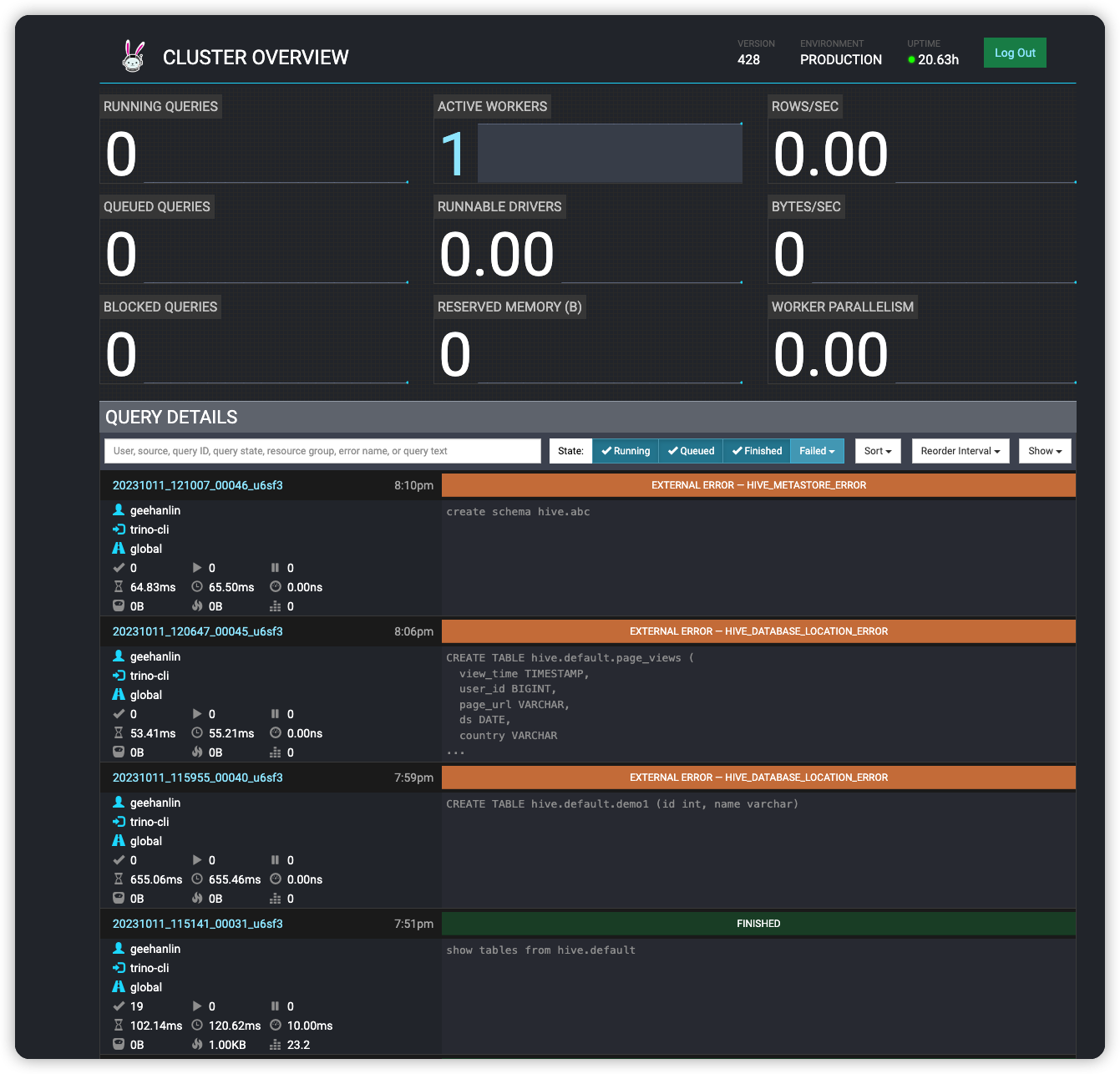
coordinator里配置的地址就是trino web的地址, 可以进行全局状态查看.
web主页面, 包含所有执行的sql
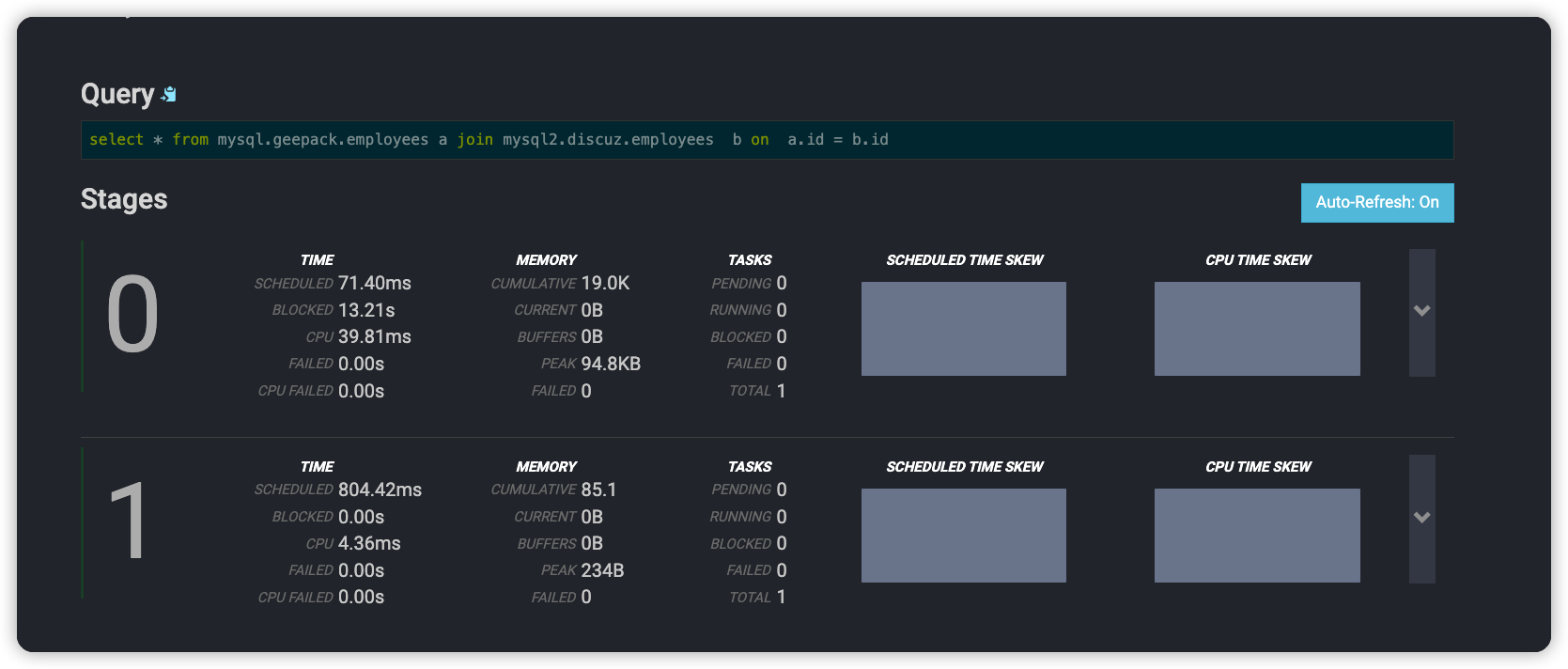
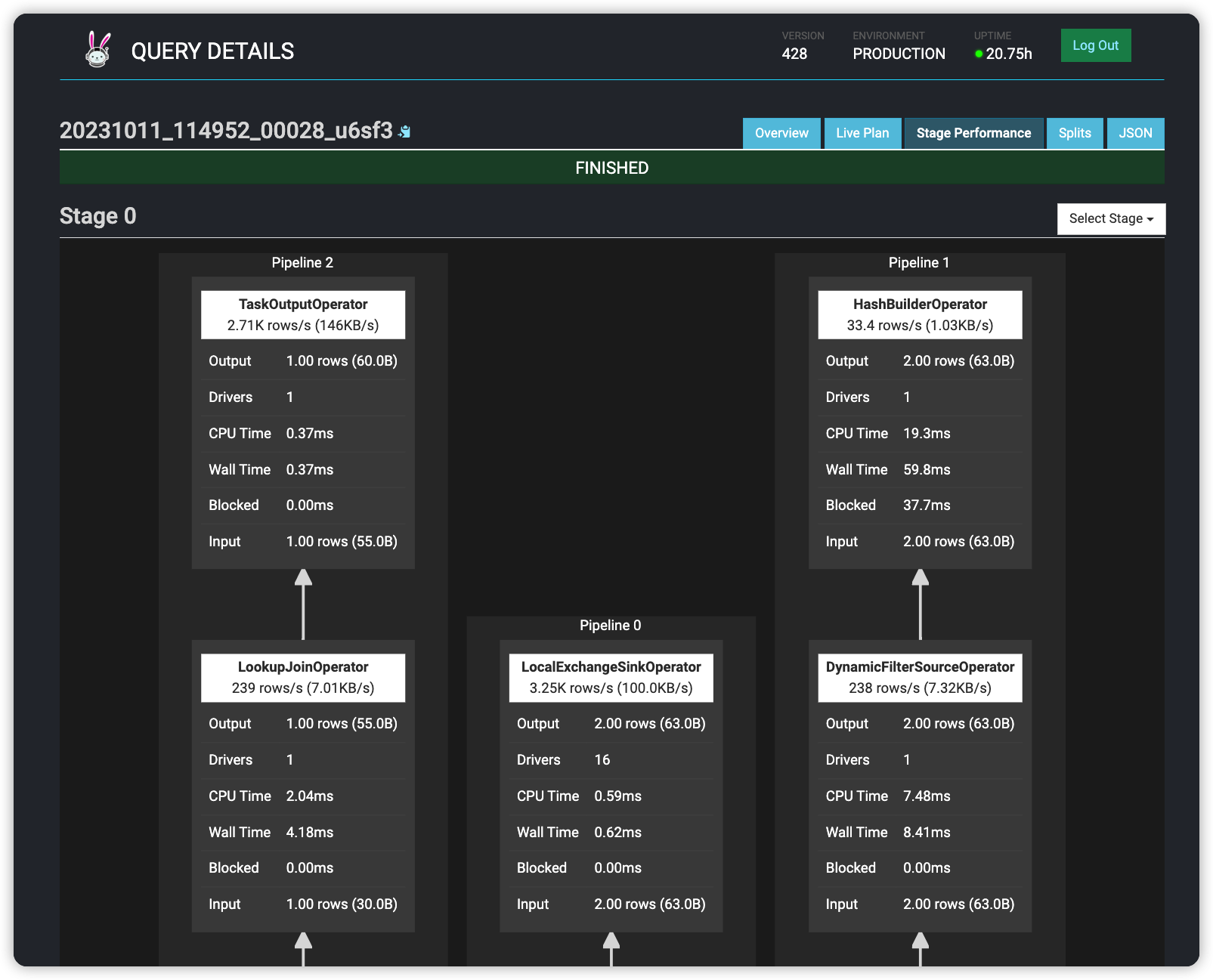
两个mysql实例的join连接
"query": "select * from mysql.geepack.employees a join mysql2.discuz.employees b on a.id = b.id"
详细点进去, 可以看到执行的资源使用情况, log日志信息
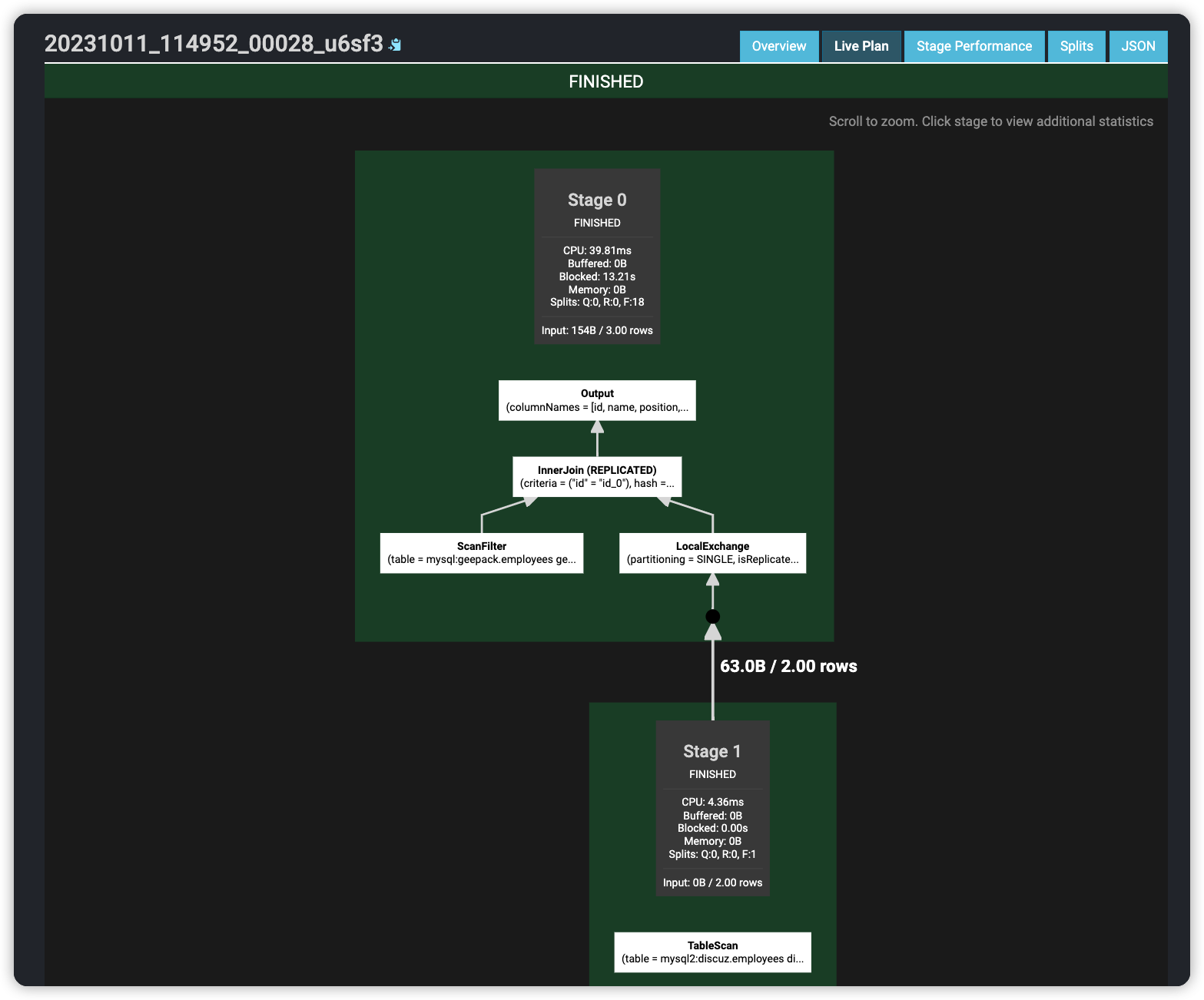
执行计划
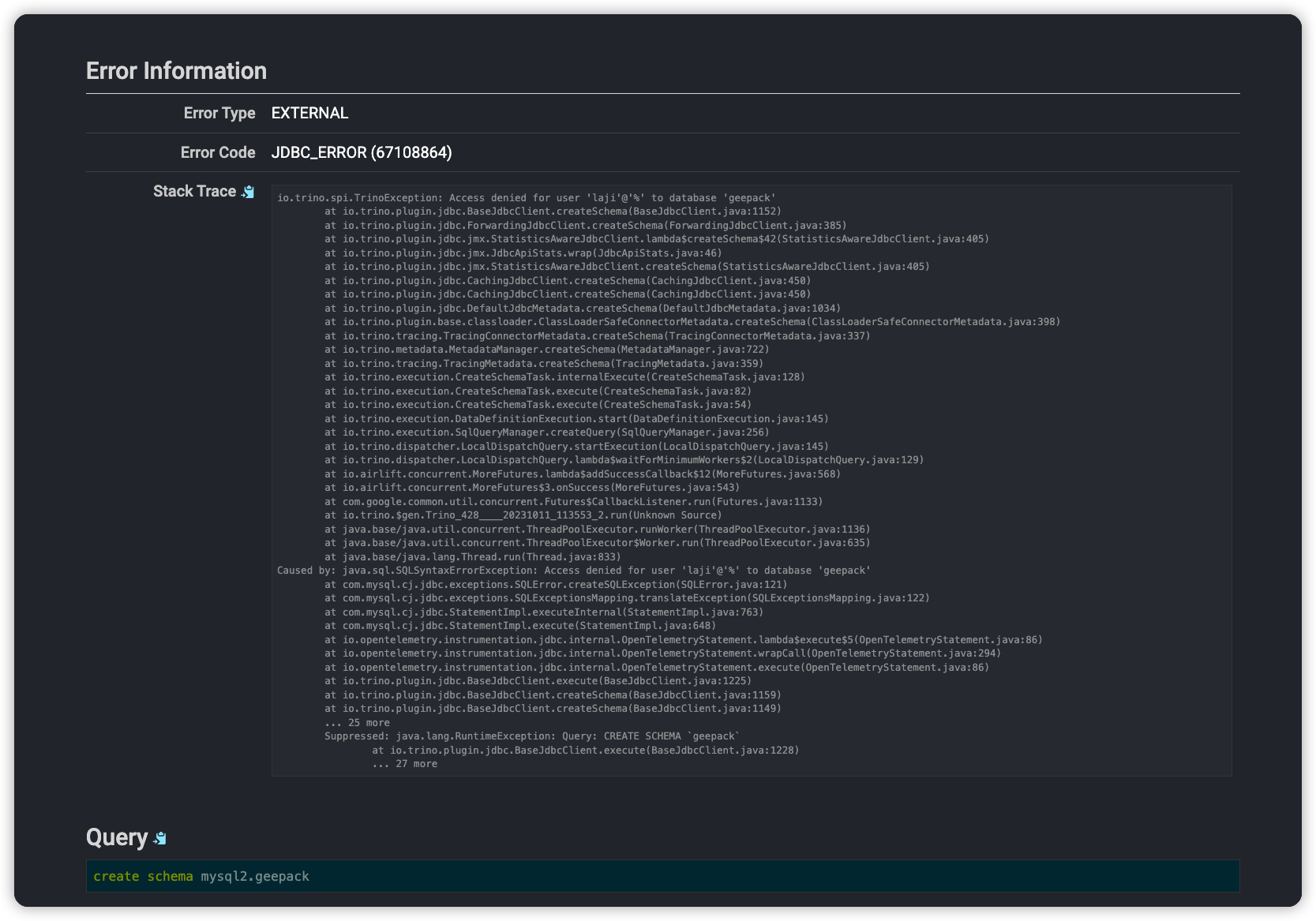
其他报错的查询, 可以直接看到日志信息, 非常方便
测试常见概念与问题
trino 语法问题
测试了才发现, 原来presto使用统一的sql语法处理不同类型的数据源, 包括hive/mysql/elasticsearch等, 实现了大一统. 真是厉害, 好处是不用去了解其他引擎语法的差异, 一套打遍天下; 缺点是入门需要花点时间, 一些ddl sql得重新查询下写法. 比如hive的create external table语法得修改了; 数据类型也有差异, 比如hive使用string类型, 在prestosql里需要改用varchar类型.
trino> create external table if not exists hive.default.presto_on_cos (id int,name string) ROW FORMAT DELIMITED FIELDS TERMINATED BY ',';
Query 20231011_120146_00043_u6sf3 failed: line 1:8: mismatched input 'external'. Expecting: 'CATALOG', 'MATERIALIZED', 'OR', 'ROLE', 'SCHEMA', 'TABLE', 'VIEW'
create external table if not exists hive.default.presto_on_cos (id int,name string) ROW FORMAT DELIMITED FIELDS TERMINATED BY ','
注册catalog
注册新数据源作为catalog, 竟然需要手动修改配置文件, 并在所有coordinator和worker之间同步. 记得以前使用其他云平台, 直接使用Create catalog 的sql进行数据源注册, 不知道是自己还没找到方法, 还是这并不是开源版本有的功能.
有了catalog后, 如果连接的session没有制定默认catalog, 都需要在sql里进行指明, 比如select * from cataloga.schemab.tablec. 好处是可以直接多个catalog进行join表关联, 缺点是以前的sql解析都得改写下, 不然识别不到数据结构, 而且还需要考虑隐藏默认catalog和schema.
常用trino sql
- 通过cli指定presto server连接
需要下载trino cli jar包进行测试: https://trino.io/download
./trino-cli-428-executable.jar http://localhost:8082
- 查看当前注册的catalog
trino> show catalogs;

 Catalog
 ---------
 hive
 mysql
 mysql2
 system
(4 rows)

Query 20231011_112149_00000_xua5x, FINISHED, 1 node
Splits: 19 total, 19 done (100.00%)
1.15 [0 rows, 0B] [0 rows/s, 0B/s]
- 查看catalog里的数据库
trino> show schemas from mysql2;
       Schema
--------------------
 discuz
 information_schema
 performance_schema
(3 rows)

Query 20231011_113414_00006_huv7t, FINISHED, 1 node
Splits: 19 total, 19 done (100.00%)
6.91 [3 rows, 57B] [0 rows/s, 8B/s]
- 创建数据表进行测试
trino> CREATE TABLE mysql.geepack.employees (
->     id integer,
->     name varchar(40),
->     position varchar(20)
-> );
CREATE TABLE

trino> INSERT INTO mysql.geepack.employees (id, name, position) VALUES (1, 'John Doe', 'Manager');

INSERT: 1 row
- 跨catalog查询
trino> select * from mysql.geepack.employees a join mysql2.discuz.employees  b on  a.id = b.id;
 id |   name   | position | id |   name   | position
 ----+----------+----------+----+----------+----------
  1 | John Doe | Manager  |  1 | John Doe | Manager
  (1 row)
  Query 20231011_114952_00028_u6sf3, FINISHED, 1 node
  Splits: 19 total, 19 done (100.00%)
  8.00 [5 rows, 154B] [0 rows/s, 19B/s]
presto 访问 hive on cos
demo文档
没有测试成功, 估计因为没有使用aws s3, 使用的也是presto, 而不是trino.
Hands-On Presto Tutorial: Presto 104
https://dzone.com/articles/hands-on-presto-tutorial-presto-103
Running Presto with Hive Metastore on a Laptop in 10 Minutes
配置 s3 密钥等参数的文档
Hive connector with Amazon S3#
https://trino.io/docs/current/connector/hive-s3.html
The Hive connector can read and write tables that are stored in Amazon S3 or S3-compatible systems. This is accomplished by having a table or database location that uses an S3 prefix, rather than an HDFS prefix.
Trino uses its own S3 filesystem for the URI prefixes s3://, s3n:// and s3a://.
腾讯云cos文档
使用 AWS S3 SDK 访问 COS
https://cloud.tencent.com/document/product/436/37421#java
AWS SDK 的默认配置文件通常在用户目录下,可以参考 配置和证书文件。 在配置文件(文件位置是~/.aws/config)中添加以下配置信息:
[default]
s3 =
addressing_style = virtual
在证书文件(文件位置是~/.aws/credentials)中配置腾讯云的密钥:
[default]
aws_access_key_id = [COS_SECRETID]
aws_secret_access_key = [COS_SECRETKEY]
AmazonS3 s3Client = AmazonS3ClientBuilder.standard()
    .withEndpointConfiguration(new AwsClientBuilder.EndpointConfiguration(
            "http://cos.ap-guangzhou.myqcloud.com",
            "ap-guangzhou"))
    .build();
emr hive 文档
使用 Hive 在 COS/CHDFS 中创建库表
https://cloud.tencent.com/document/product/589/97891
create database hivewithcos location 'cosn://${bucketname}/${path}';

hive> create table record(id int, name string) row format delimited fields terminated by ',' stored as textfile;

create table record(id int, name string) row format delimited fields terminated by ',' stored as textfile location 'cosn://$bucketname/$path';

hive> create table record(id int, name string) row format delimited fields terminated by ',' stored as textfile location 'cosn://$mountpoint/$path';
emr presto 文档
https://cloud.tencent.com/document/product/589/12325
hdfs加载csv文件到cos中, 竟然不是用cos的shell
hdfs dfs -put cos.txt cosn://$bucketname/
hive创建cos外表
create database if not exists test;
use test;
create external table if not exists presto_on_cos (id int,name string) ROW FORMAT DELIMITED FIELDS TERMINATED BY ',';
insert into presto_on_cos values (12,'hello'),(13,'world');
load data inpath "cosn://$bucketname/cos.txt" into table presto_on_cos;
load data local inpath "/$yourpath/lzo.txt.lzo" into table presto_on_cos;
hive -f "presto_on_cos_test.sql"
presto连接hive进行数据分析
./presto --server $host:$port --catalog hive --schema test
presto:test> select * from presto_on_cos ;
 id |    name
----+-------------
  5 | cos_patrick
  6 | cos_stone
 10 | lzo_pop
 11 | lzo_tim
 12 | hello
 13 | world
(6 rows)


Query 20180702_150000_00011_c4qzg, FINISHED, 3 nodes
Splits: 4 total, 4 done (100.00%)
0:03 [6 rows, 127B] [1 rows/s, 37B/s]
hive metastore
hive单独启动
平时都是直接使用ambari或是云上emr, 没有从头启动过hive, 导致对hive metastore元数据的初始化流程理解有些欠缺.
- 需要使用schema tool初始化数据库
- 需要启动hcat_server提供元数据服务
- 可以启动 webhcat_server提供api服务
https://cwiki.apache.org/confluence/display/Hive/GettingStarted
Running Hive
Hive uses Hadoop, so you must have Hadoop in your path OR
export HADOOP_HOME=<hadoop-install-dir>
In addition, you must use below HDFS commands to create /tmp and /user/hive/warehouse (aka hive.metastore.warehouse.dir) and set them chmod g+w before you can create a table in Hive.
  $ $HADOOP_HOME/bin/hadoop fs -mkdir       /tmp
  $ $HADOOP_HOME/bin/hadoop fs -mkdir       /user/hive/warehouse
  $ $HADOOP_HOME/bin/hadoop fs -chmod g+w   /tmp
  $ $HADOOP_HOME/bin/hadoop fs -chmod g+w   /user/hive/warehouse
You may find it useful, though it's not necessary, to set HIVE_HOME:
$ export HIVE_HOME=<hive-install-dir>
Running Hive CLI
To use the Hive command line interface (CLI) from the shell:
$ $HIVE_HOME/bin/hive
Running HiveServer2 and Beeline
Starting from Hive 2.1, we need to run the schematool command below as an initialization step. For example, we can use "derby" as db type.
$ $HIVE_HOME/bin/schematool -dbType <db type> -initSchema
HiveServer2 (introduced in Hive 0.11) has its own CLI called Beeline. HiveCLI is now deprecated in favor of Beeline, as it lacks the multi-user, security, and other capabilities of HiveServer2. To run HiveServer2 and Beeline from shell:
$ $HIVE_HOME/bin/hiveserver2

$ $HIVE_HOME/bin/beeline -u jdbc:hive2://$HS2_HOST:$HS2_PORT
Running HCatalog
To run the HCatalog server from the shell in Hive release 0.11.0 and later:
$ $HIVE_HOME/hcatalog/sbin/hcat_server.sh
To use the HCatalog command line interface (CLI) in Hive release 0.11.0 and later:
$ $HIVE_HOME/hcatalog/bin/hcat
For more information, see HCatalog Installation from Tarball and HCatalog CLI in the HCatalog manual.
Running WebHCat (Templeton)
To run the WebHCat server from the shell in Hive release 0.11.0 and later:
$ $HIVE_HOME/hcatalog/sbin/webhcat_server.sh
For more information, see WebHCat Installation in the WebHCat manual.
hive WebHCat
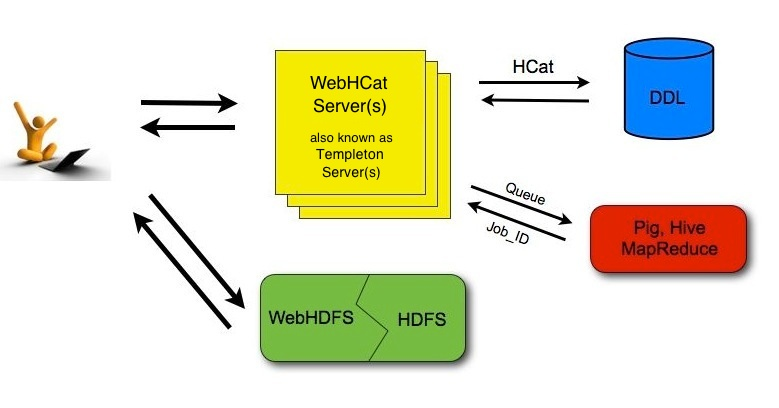
没想到hive metastore竟然还提供了http版本, 以前都没见过. 跟web hdfs一样, 支持通过api调用hive, 执行元数据查询, 执行sql, 并且异步获取查询结果. 执行sql就当作提交任务, 然后通过任务id获取查询结果. 这么看, hive早就在jdbc之外, 提供了云api之类的连接方式了.
Using the HCatalog REST API (WebHCat)
https://cwiki.apache.org/confluence/display/Hive/WebHCat+UsingWebHCat
As shown in the figure below, developers make HTTP requests to access Hadoop MapReduce (or YARN), Pig, Hive, and HCatalog DDL from within applications. Data and code used by this API are maintained in HDFS. HCatalog DDL commands are executed directly when requested. MapReduce, Pig, and Hive jobs are placed in queue by WebHCat (Templeton) servers and can be monitored for progress or stopped as required. Developers specify a location in HDFS into which Pig, Hive, and MapReduce results should be placed.