Trino hive
关键文章 A gentle introduction to the Hive connector
这篇文章很给力, 直接区分了hiveserver和只使用hive metastore的组件的区别, 对于做大数据平台多种组件数据治理的也很有收获.
hiveserver的生态很完善, sql血缘(表血缘字段血缘), ranger管控(表管控, 字段管控), 脱敏(字段脱敏, 行级管控) 都有, 数据治理几乎是开箱即用. 但是使用spark, trino, impala之类, 会发现什么都没有, 权限管控总有漏洞, sql血缘也都没有, 什么都需要去找新方案进行补全. 重点就是不少新的大数据组件, 只使用了hive的metastore用来了解库表与hdfs存储之间的关系, 其他的sql解析和执行等等, 都是由组件自己完成的.
trino的hive connector也是一样, 说是hive connector, 很多人(包括我)以为就是trino去连接hive server的jdbc, 但看源码才知道原来只是去连接hive metastore. 毕竟facebook当年开发presto/trino的背景就是觉得hive server太慢了, 如果仍然使用hive server, 那trino/presto的存在合理性就很奇怪了. trino的hive connector只是用于获取元数据与库表之间的关系, 并且继续维护这层关系, 就跟spark, impala一样.
trino自己实现了sql执行, 所以速度其实是比hive server要快的. 至于trino连接mysql/postgresql等, 则是直接使用jdbc connector了, 主要目的不是加速, 而是跨数据源连接查询.
https://trino.io/blog/2020/10/20/intro-to-hive-connector.html
hive architecture
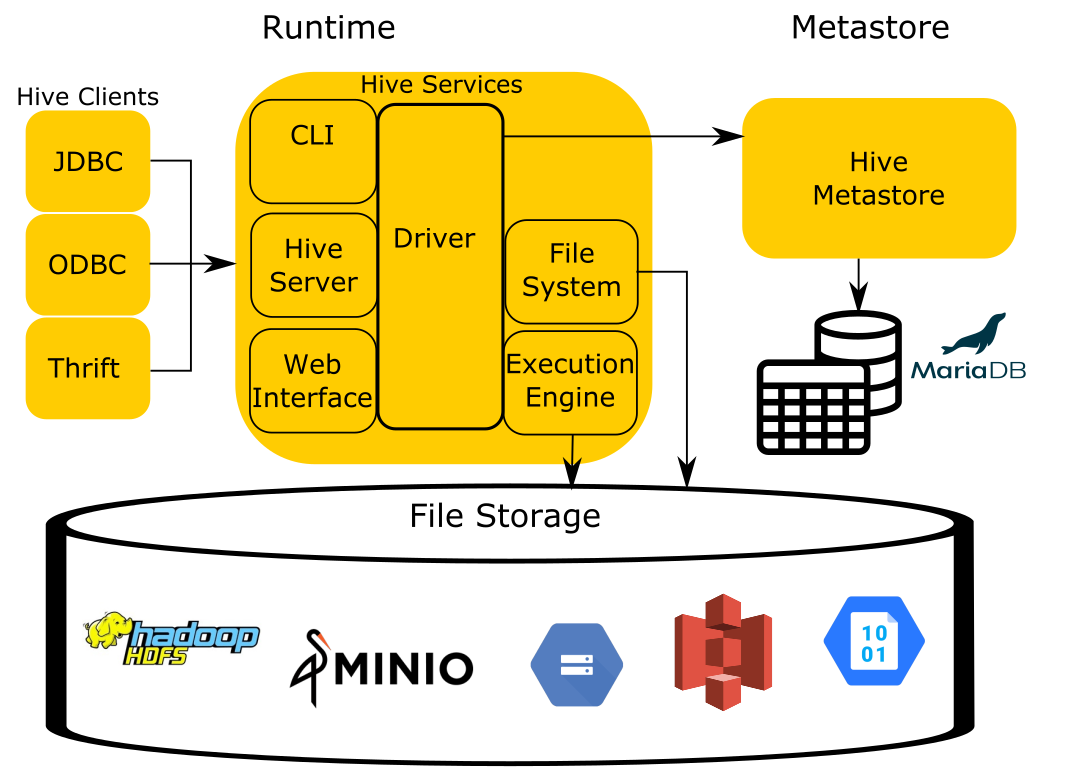
You can simplify the Hive architecture to four components:
The runtime contains the logic of the query engine that translates the SQL -esque Hive Query Language(HQL) into MapReduce jobs that run over files stored in the filesystem.
The storage component is simply that, it stores files in various formats and index structures to recall these files. The file formats can be anything as simple as JSON and CSV, to more complex files such as columnar formats like ORC and Parquet. Traditionally, Hive runs on top of the Hadoop Distributed Filesystem (HDFS). As cloud-based options became more prevalent, object storage like Amazon S3, Azure Blob Storage, Google Cloud Storage, and others needed to be leveraged as well and replaced HDFS as the storage component.
In order for Hive to process these files, it must have a mapping from SQL tables in the runtime to files and directories in the storage component. To accomplish this, Hive uses the Hive Metastore Service (HMS), often shortened to the metastore to manage the metadata about the files such as table columns, file locations, file formats, etc…
The last component not included in the image is Hive’s data organization specification. The documentation of this element only exists in the code in Hive and has been reverse engineered to be used by other systems like Trino to remain compatible with other systems.
Trino reuses all of these components except for the runtime. This is the same approach most compute engines take when dealing with data in object stores, specifically, Trino, Spark, Drill, and Impala. When you think of the Hive connector, you should think about a connector that is capable of reading data organized by the unwritten Hive specification.
trino runtime replaces Hive runtime
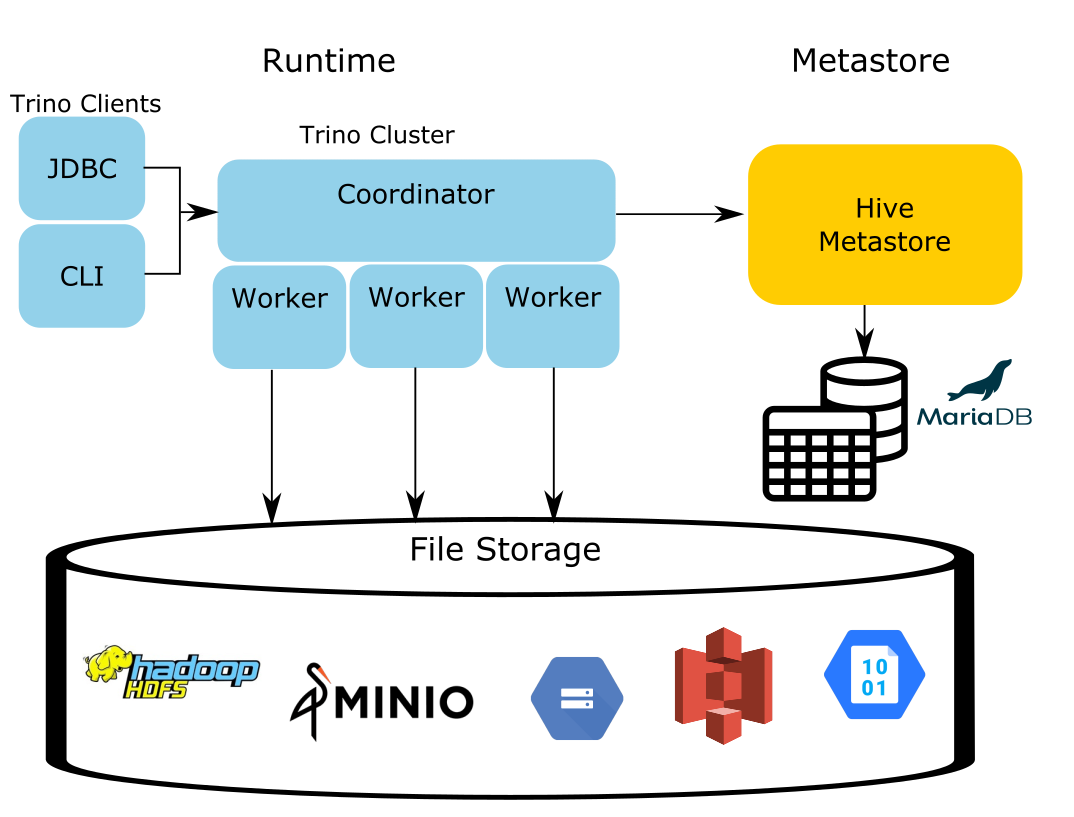
Data in storage is cumbersome to move and the data in the metastore takes a long time to repopulate in other formats. Since only the runtime that executed Hive queries needs replacement, the Trino engine utilizes the existing metastore metadata and files residing in storage, and the Trino runtime effectively replaces the Hive runtime responsible for analyzing the data.
trino 兼容hmc, 主要是为了让存量系统可以直接替换使用trino, 同时hive能够继续存在. 为了工程上的平滑升级兼容需求, hive metastore就这么在多个大数据组件里共用了下来, 包括spark, impala.
trino连接s3, minIO, 与连接hdfs一样, 只需要一个hive hms元数据connector.
Typically, you look for an S3 connector, a GCS connector or a MinIO connector. All you need is the Hive connector and the HMS to manage the metadata of the objects in your storage.
对应的 github 例子
对应的github也很不错, 对于不了解hive metastore的, 看一下就能够知道所谓sql库表与文件hdfs/s3位置之间的关系是什么意思了.
https://github.com/bitsondatadev/trino-getting-started/tree/main/hive/trino-minio
- minio connector
hive metastore的minio connector properties
connector.name=hive
hive.metastore.uri=thrift://hive-metastore:9083
hive.s3.path-style-access=true
hive.s3.endpoint=http://minio:9000
hive.s3.aws-access-key=minio
hive.s3.aws-secret-key=minio123
hive.non-managed-table-writes-enabled=true
hive.s3select-pushdown.enabled=true
hive.storage-format=ORC

hive.allow-drop-table=true
- minIO建库表
Back in the terminal create the minio.tiny SCHEMA. This will be the first call to the metastore to save the location of the S3 schema location in MinIO.
CREATE SCHEMA minio.tiny
WITH (location = 's3a://tiny/');
CREATE TABLE minio.tiny.customer
WITH (
    format = 'ORC',
    external_location = 's3a://tiny/customer/'
)
AS SELECT * FROM tpch.tiny.customer;
SELECT * FROM minio.tiny.customer LIMIT 50;
- database
First, let's look at the databases stored in the metastore.
SELECT
 DB_ID,
 DB_LOCATION_URI,
 NAME,
 OWNER_NAME,
 OWNER_TYPE,
 CTLG_NAME
FROM metastore_db.DBS;
+-------+---------------------------+---------+------------+------------+-----------+
| DB_ID | DB_LOCATION_URI           | NAME    | OWNER_NAME | OWNER_TYPE | CTLG_NAME |
+-------+---------------------------+---------+------------+------------+-----------+
|     1 | file:/user/hive/warehouse | default | public     | ROLE       | hive      |
|     2 | s3a://tiny/               | tiny    | trino      | USER       | hive      |
+-------+---------------------------+---------+------------+------------+-----------+
Since Trino follows the traditional 3 level ANSI SQL catalog standard, schema is equivalent to a database. So just as a database contains multiple tables, a schema will contain multiple tables. Notice the DB_LOCATION_URI is in the bucket location created before in MinIO and set when you created this schema. The owner is the trino user coming from the user in the trino instance. Also note the CTLG_NAME references the trino catalog.
- table
The next command will show us metadata about the customer table created in the previous step
SELECT
 t.TBL_ID,
 t.DB_ID,
 t.OWNER,
 t.TBL_NAME,
 t.TBL_TYPE,
 t.SD_ID
FROM metastore_db.TBLS t
 JOIN metastore_db.DBS d
  ON t.DB_ID= d.DB_ID
WHERE d.NAME = 'tiny';
+--------+-------+-------+----------+----------------+-------+
| TBL_ID | DB_ID | OWNER | TBL_NAME | TBL_TYPE       | SD_ID |
+--------+-------+-------+----------+----------------+-------+
|      1 |     2 | trino | customer | EXTERNAL_TABLE |     1 |
+--------+-------+-------+----------+----------------+-------+
sql数据表所关联的hdfs/s3位置, 这里展示的是数据表对应minIO的位置
You may notice the location for the table seems to be missing but that information is actually on another table. The next query will show this location. Take note of the SD_ID before running the next query.
SELECT
 s.SD_ID,
 s.INPUT_FORMAT,
 s.LOCATION,
 s.SERDE_ID
FROM metastore_db.TBLS t
 JOIN metastore_db.DBS d
  ON t.DB_ID = d.DB_ID
 JOIN metastore_db.SDS s
  ON t.SD_ID = s.SD_ID
WHERE t.TBL_NAME = 'customer'
 AND d.NAME='tiny';
+-------+-------------------------------------------------+---------------------+----------+
| SD_ID | INPUT_FORMAT                                    | LOCATION            | SERDE_ID |
+-------+-------------------------------------------------+---------------------+----------+
|     1 | org.apache.hadoop.hive.ql.io.orc.OrcInputFormat | s3a://tiny/customer |        1 |
+-------+-------------------------------------------------+---------------------+----------+
查找对应使用的序列化类
To find out the serializer used, run the following query:
SELECT
 sd.SERDE_ID,
 sd.NAME,
 sd.SLIB
FROM metastore_db.TBLS t
 JOIN metastore_db.DBS d
  ON t.DB_ID = d.DB_ID
 JOIN metastore_db.SDS s
  ON t.SD_ID = s.SD_ID
 JOIN metastore_db.SERDES sd
  ON s.SERDE_ID = sd.SERDE_ID
WHERE t.TBL_NAME = 'customer'
 AND d.NAME='tiny';
+----------+----------+-------------------------------------------+
| SERDE_ID | NAME     | SLIB                                      |
+----------+----------+-------------------------------------------+
|        1 | customer | org.apache.hadoop.hive.ql.io.orc.OrcSerde |
+----------+----------+-------------------------------------------+
- column
Our last metadata query is looking at the columns on the table.
SELECT c.*
FROM metastore_db.TBLS t
 JOIN metastore_db.DBS d
  ON t.DB_ID = d.DB_ID
 JOIN metastore_db.SDS s
  ON t.SD_ID = s.SD_ID
 JOIN metastore_db.COLUMNS_V2 c
  ON s.CD_ID = c.CD_ID
WHERE t.TBL_NAME = 'customer'
 AND d.NAME='tiny'
ORDER by CD_ID, INTEGER_IDX;
+-------+---------+-------------+--------------+-------------+
| CD_ID | COMMENT | COLUMN_NAME | TYPE_NAME    | INTEGER_IDX |
+-------+---------+-------------+--------------+-------------+
|     1 | NULL    | custkey     | bigint       |           0 |
|     1 | NULL    | name        | varchar(25)  |           1 |
|     1 | NULL    | address     | varchar(40)  |           2 |
|     1 | NULL    | nationkey   | bigint       |           3 |
|     1 | NULL    | phone       | varchar(15)  |           4 |
|     1 | NULL    | acctbal     | double       |           5 |
|     1 | NULL    | mktsegment  | varchar(10)  |           6 |
|     1 | NULL    | comment     | varchar(117) |           7 |
+-------+---------+-------------+--------------+-------------+
connector例子
- hive hdfs connector
connector.name=hive-hadoop2
hive.config.resources=/etc/hadoop/conf/core-site.xml,/etc/hadoop/conf/hdfs-site.xml
hive.metastore.uri=thrift://hadoop-node:9083
hive.non-managed-table-writes-enabled=true
hive.s3select-pushdown.enabled=true
hive.storage-format=ORC

hive.allow-drop-table=true

hive.translate-hive-views=true
trino ranger
https://towardsdatascience.com/integrating-trino-and-apache-ranger-b808f6b96ad8
trino hive connector
https://trino.io/docs/current/connector/hive.html
Hive connector#
Hive is a combination of three components:
- Data files in varying formats, that are typically stored in the Hadoop Distributed File System (HDFS) or in object storage systems such as Amazon S3.
- Metadata about how the data files are mapped to schemas and tables. This metadata is stored in a database, such as MySQL, and is accessed via the Hive metastore service.
- A query language called HiveQL. This query language is executed on a distributed computing framework such as MapReduce or Tez.
Trino only uses the first two components: the data and the metadata. It does not use HiveQL or any part of Hive’s execution environment.
trino使用hive, 只需要填写hive metastore地址即可. trino通过metastore获取元数据地址, 直接与底层的hdfs/s3打交道, 不需要经过hive server2.
If you are using a Hive metastore, hive.metastore.uri must be configured:
connector.name=hive
hive.metastore.uri=thrift://example.net:9083
If you are using AWS Glue as your metastore, you must instead set hive.metastore to glue:
connector.name=hive
hive.metastore=glue
默认的hdfs路径一般在安装阶段完成, 如果需要考虑hdfs联邦查询或者namenode高可用, 可以添加hdfs配置.
HDFS configuration#
For basic setups, Trino configures the HDFS client automatically and does not require any configuration files. In some cases, such as when using federated HDFS or NameNode high availability, it is necessary to specify additional HDFS client options in order to access your HDFS cluster. To do so, add the hive.config.resources property to reference your HDFS config files:
hive.config.resources=/etc/hadoop/conf/core-site.xml,/etc/hadoop/conf/hdfs-site.xml
trino postgresql
看trino的代码, 数据库结构都是三层级. trino注册了catalog, 下面就是database/table/column, 在database与table之间没有schema之类的层级. 很好奇对于postgresql这种四层级结构, trino是如何处理的? 以前在处理多数据库元数据采集的时候, 也需要考虑处理这种问题.
看了下trino文档, 原来还是使用路径上绕过了. 注册catalog的时候, 就带上postgresql的db信息, 后面的database其实只是pg的schema.
https://trino.io/docs/current/connector/postgresql.html
Multiple PostgreSQL databases or servers#
The PostgreSQL connector can only access a single database within a PostgreSQL server. Thus, if you have multiple PostgreSQL databases, or want to connect to multiple PostgreSQL servers, you must configure multiple instances of the PostgreSQL connector.
To add another catalog, simply add another properties file to etc/catalog with a different name, making sure it ends in .properties. For example, if you name the property file sales.properties, Trino creates a catalog named sales using the configured connector.
For example, to access a database as the example catalog, create the file etc/catalog/example.properties. Replace the connection properties as appropriate for your setup:
connector.name=postgresql
connection-url=jdbc:postgresql://example.net:5432/database
connection-user=root
connection-password=secret