flink 入门记
最简单的安装入门
本地模式安装
https://nightlies.apache.org/flink/flink-docs-master/zh/docs/try-flink/local_installation/
下载: https://flink.apache.org/zh/downloads/
启停本地集群
启动本地集群, 非常快就进入后台模式, 发现cpu占用还是挺小的
./bin/start-cluster.sh
Starting cluster.
Starting standalonesession daemon on host VM-152-104-centos.
Starting taskexecutor daemon on host VM-152-104-centos.
./bin/stop-cluster.sh
Stopping taskexecutor daemon (pid: 24186) on host VM-152-104-centos.
Stopping standalonesession daemon (pid: 23866) on host VM-152-104-centos.
提交demo测试任务
任务源码比较简单, 看一下就了解: https://github.com/apache/flink/blob/master/flink-examples/flink-examples-batch/src/main/java/org/apache/flink/examples/java/wordcount/WordCount.java
文本 -> 分词为 (word, 1) -> 统计.
./bin/flink run examples/streaming/WordCount.jar
Executing example with default input data.
Use --input to specify file input.
Printing result to stdout. Use --output to specify output path.
Job has been submitted with JobID 8686dd670d5c14aa5ffda69c5e579a70
Program execution finished
Job with JobID 8686dd670d5c14aa5ffda69c5e579a70 has finished.
Job Runtime: 147 ms
如果不启动集群, 直接运行任务, 则会报错无法连接到8081端口
[root@VM-152-104-centos ~/flink-1.17.1]# ./bin/stop-cluster.sh
Stopping taskexecutor daemon (pid: 24186) on host VM-152-104-centos.
Stopping standalonesession daemon (pid: 23866) on host VM-152-104-centos.
[root@VM-152-104-centos ~/flink-1.17.1]# ./bin/flink run examples/streaming/WordCount.jar
Executing example with default input data.
Use --input to specify file input.
Printing result to stdout. Use --output to specify output path.

------------------------------------------------------------
 The program finished with the following exception:

org.apache.flink.client.program.ProgramInvocationException: The main method caused an error: Failed to execute job 'WordCount'.
        at org.apache.flink.client.program.PackagedProgram.callMainMethod(PackagedProgram.java:372)
        at org.apache.flink.client.program.PackagedProgram.invokeInteractiveModeForExecution(PackagedProgram.java:222)
        at org.apache.flink.client.ClientUtils.executeProgram(ClientUtils.java:105)
        at org.apache.flink.client.cli.CliFrontend.executeProgram(CliFrontend.java:851)
        at org.apache.flink.client.cli.CliFrontend.run(CliFrontend.java:245)
        at org.apache.flink.client.cli.CliFrontend.parseAndRun(CliFrontend.java:1095)
        at org.apache.flink.client.cli.CliFrontend.lambda$mainInternal$9(CliFrontend.java:1189)
        at org.apache.flink.runtime.security.contexts.NoOpSecurityContext.runSecured(NoOpSecurityContext.java:28)
        at org.apache.flink.client.cli.CliFrontend.mainInternal(CliFrontend.java:1189)
        at org.apache.flink.client.cli.CliFrontend.main(CliFrontend.java:1157)
Caused by: org.apache.flink.util.FlinkException: Failed to execute job 'WordCount'.

...

Caused by: org.apache.flink.shaded.netty4.io.netty.channel.AbstractChannel$AnnotatedConnectException: Connection refused: localhost/127.0.0.1:8081
Caused by: java.net.ConnectException: Connection refused
        at sun.nio.ch.SocketChannelImpl.checkConnect(Native
...
查看任务输出
$ tail log/flink-*-taskexecutor-*.out
  (nymph,1)
  (in,3)
  (thy,1)
  (orisons,1)
  (be,4)
  (all,2)
  (my,1)
  (sins,1)
  (remember,1)
  (d,4)
任务代码-batch 版本
text = env.fromElements(WordCountData.WORDS);

DataStream<Tuple2<String, Integer>> counts =
    // split up the lines in pairs (2-tuples) containing: (word,1)
    text.flatMap(new Tokenizer())
    // group by the tuple field "0" and sum up tuple field "1"
    .keyBy(0).sum(1);

/**
 * Implements the string tokenizer that splits sentences into words as a
 * user-defined FlatMapFunction. The function takes a line (String) and
 * splits it into multiple pairs in the form of "(word,1)" ({@code Tuple2<String,
 * Integer>}).
 */
public static final class Tokenizer implements FlatMapFunction<String, Tuple2<String, Integer>> {

    @Override
    public void flatMap(String value, Collector<Tuple2<String, Integer>> out) {
        // normalize and split the line
        String[] tokens = value.toLowerCase().split("\\W+");

        // emit the pairs
        for (String token : tokens) {
            if (token.length() > 0) {
                out.collect(new Tuple2<>(token, 1));
            }
        }
    }
}
任务代码, streaming版本, 看起来没什么区别
package org.apache.flink.streaming.examples.wordcount;

    public static void main(String[] args) throws Exception {
        final CLI params = CLI.fromArgs(args);

        // Create the execution environment. This is the main entrypoint
        // to building a Flink application.
        final StreamExecutionEnvironment env = StreamExecutionEnvironment.getExecutionEnvironment();

        // Apache Flink’s unified approach to stream and batch processing means that a DataStream
        // application executed over bounded input will produce the same final results regardless
        // of the configured execution mode. It is important to note what final means here: a job
        // executing in STREAMING mode might produce incremental updates (think upserts in
        // a database) while in BATCH mode, it would only produce one final result at the end. The
        // final result will be the same if interpreted correctly, but getting there can be
        // different.
        //
        // The “classic” execution behavior of the DataStream API is called STREAMING execution
        // mode. Applications should use streaming execution for unbounded jobs that require
        // continuous incremental processing and are expected to stay online indefinitely.
        //
        // By enabling BATCH execution, we allow Flink to apply additional optimizations that we
        // can only do when we know that our input is bounded. For example, different
        // join/aggregation strategies can be used, in addition to a different shuffle
        // implementation that allows more efficient task scheduling and failure recovery behavior.
        //
        // By setting the runtime mode to AUTOMATIC, Flink will choose BATCH if all sources
        // are bounded and otherwise STREAMING.
        env.setRuntimeMode(params.getExecutionMode());

        // This optional step makes the input parameters
        // available in the Flink UI.
        env.getConfig().setGlobalJobParameters(params);

        DataStream<String> text;
        if (params.getInputs().isPresent()) {
            // Create a new file source that will read files from a given set of directories.
            // Each file will be processed as plain text and split based on newlines.
            FileSource.FileSourceBuilder<String> builder =
                    FileSource.forRecordStreamFormat(
                            new TextLineInputFormat(), params.getInputs().get());

            // If a discovery interval is provided, the source will
            // continuously watch the given directories for new files.
            params.getDiscoveryInterval().ifPresent(builder::monitorContinuously);

            text = env.fromSource(builder.build(), WatermarkStrategy.noWatermarks(), "file-input");
        } else {
            text = env.fromElements(WordCountData.WORDS).name("in-memory-input");
        }

        DataStream<Tuple2<String, Integer>> counts =
                // The text lines read from the source are split into words
                // using a user-defined function. The tokenizer, implemented below,
                // will output each word as a (2-tuple) containing (word, 1)
                text.flatMap(new Tokenizer())
                        .name("tokenizer")
                        // keyBy groups tuples based on the "0" field, the word.
                        // Using a keyBy allows performing aggregations and other
                        // stateful transformations over data on a per-key basis.
                        // This is similar to a GROUP BY clause in a SQL query.
                        .keyBy(value -> value.f0)
                        // For each key, we perform a simple sum of the "1" field, the count.
                        // If the input data stream is bounded, sum will output a final count for
                        // each word. If it is unbounded, it will continuously output updates
                        // each time it sees a new instance of each word in the stream.
                        .sum(1)
                        .name("counter");

        if (params.getOutput().isPresent()) {
            // Given an output directory, Flink will write the results to a file
            // using a simple string encoding. In a production environment, this might
            // be something more structured like CSV, Avro, JSON, or Parquet.
            counts.sinkTo(
                            FileSink.<Tuple2<String, Integer>>forRowFormat(
                                            params.getOutput().get(), new SimpleStringEncoder<>())
                                    .withRollingPolicy(
                                            DefaultRollingPolicy.builder()
                                                    .withMaxPartSize(MemorySize.ofMebiBytes(1))
                                                    .withRolloverInterval(Duration.ofSeconds(10))
                                                    .build())
                                    .build())
                    .name("file-sink");
        } else {
            counts.print().name("print-sink");
        }

        // Apache Flink applications are composed lazily. Calling execute
        // submits the Job and begins processing.
        env.execute("WordCount");
    }
查看web ui
flink真的是非常方便, 啥都有.
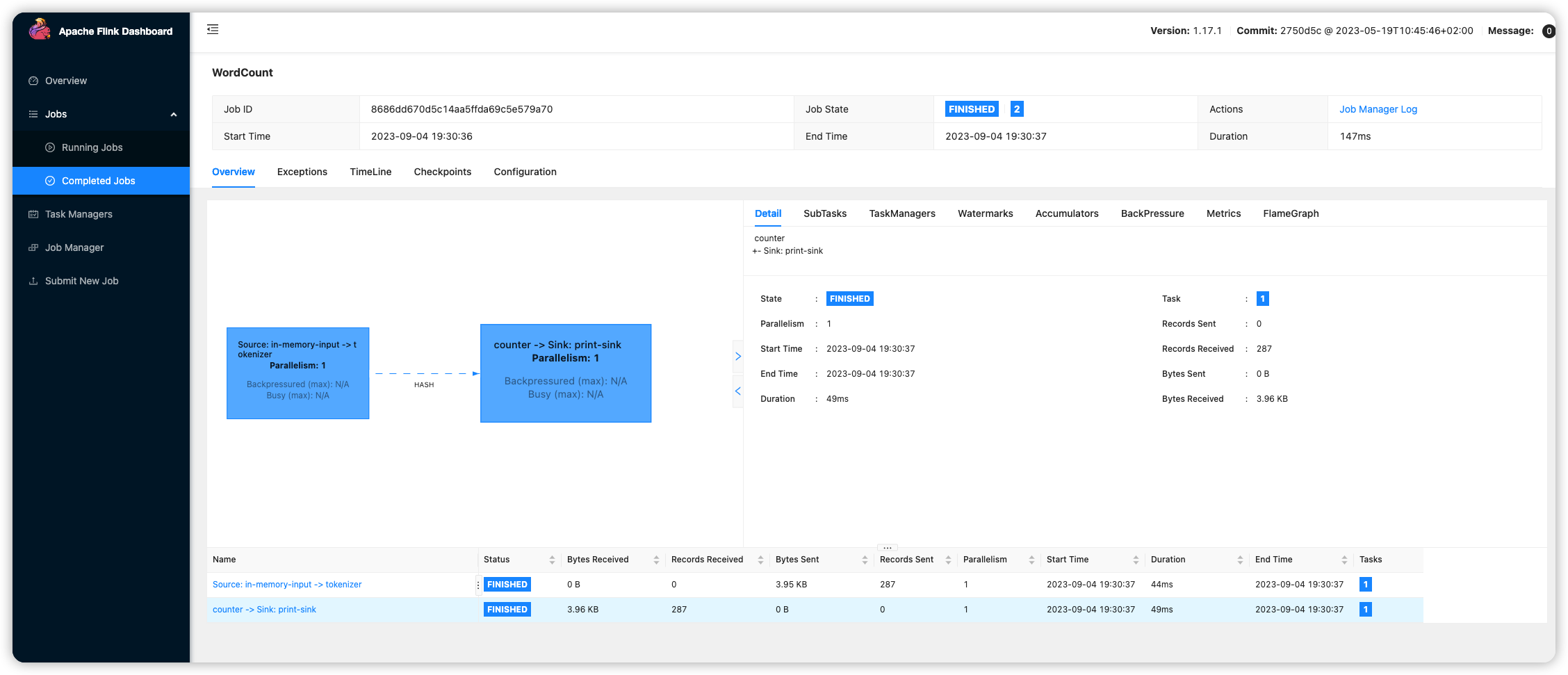
- 完成的任务详情
input/out非常清晰, 还包括了传送的数据量, 并行度, 执行时间等信息.
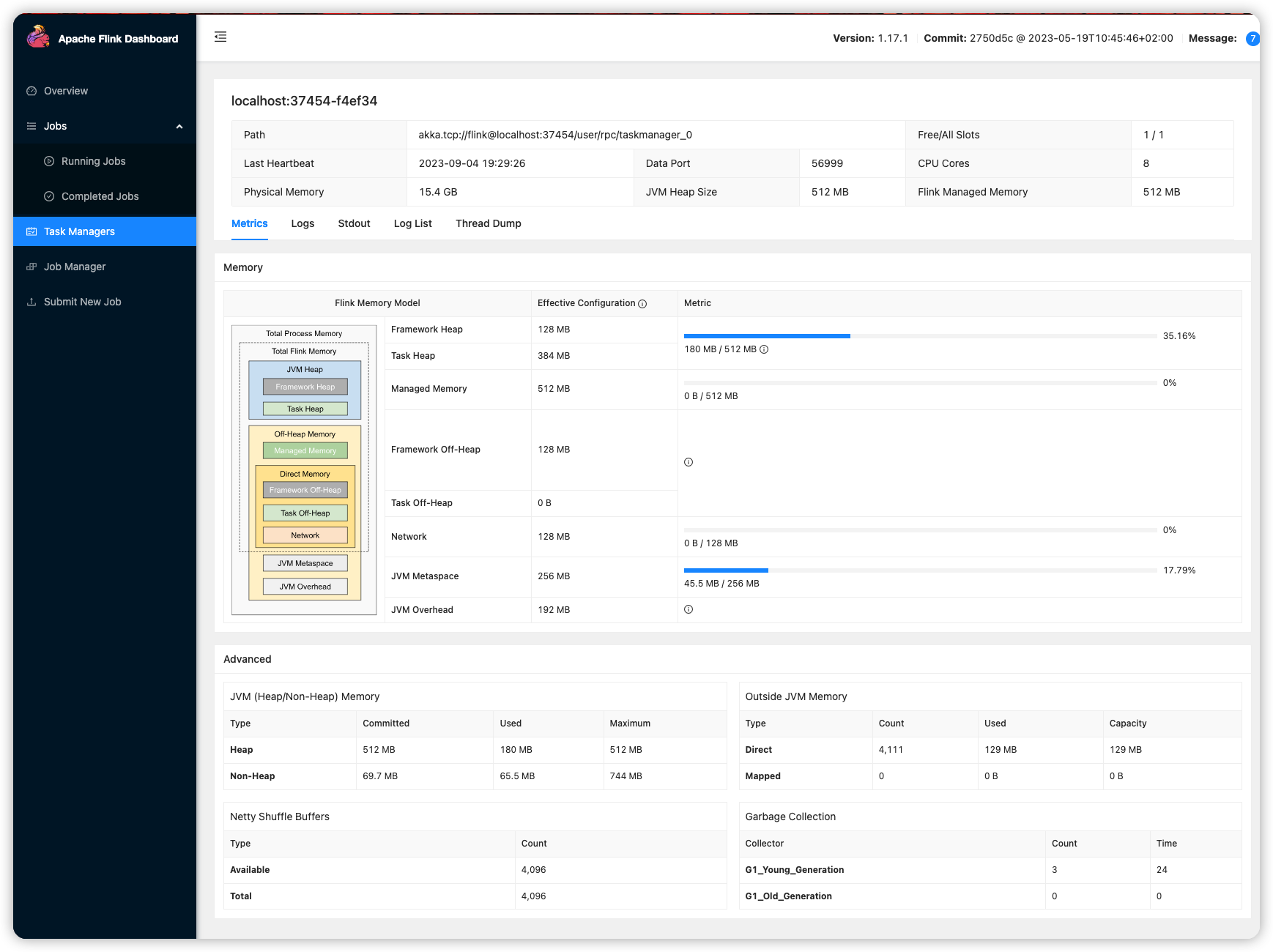
- task manager 状态
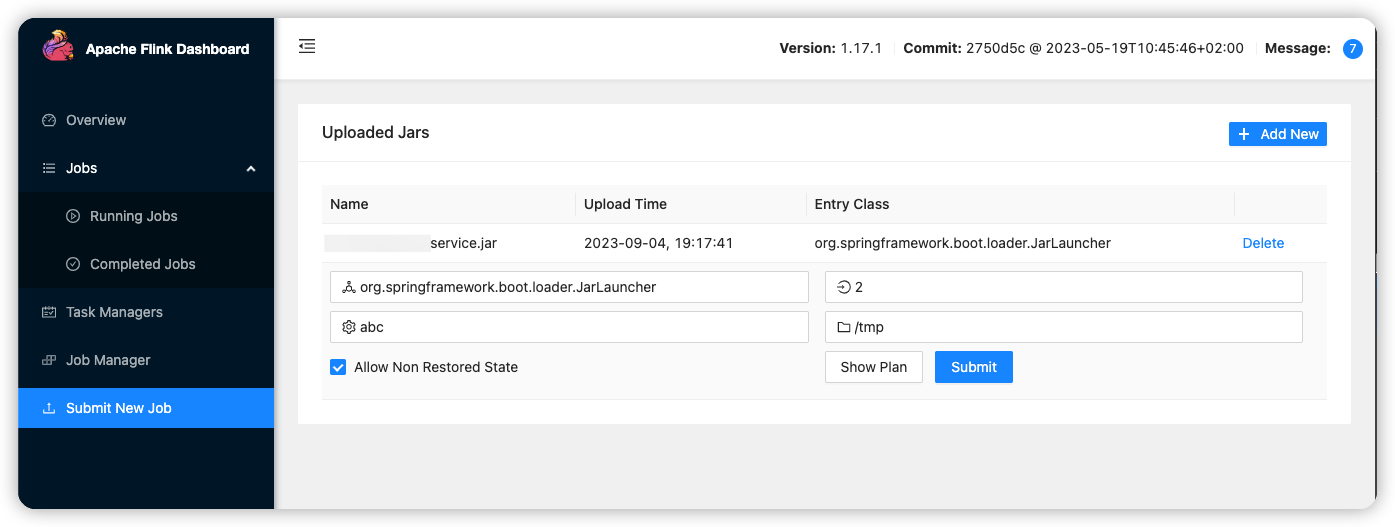
- 支持上传jar包运行flink任务
- 配置web ui开放外部访问
conf/flink-conf.yaml可以配置, 比如配置flink webui接受外部访问.
# The address that the REST & web server binds to
# By default, this is localhost, which prevents the REST & web server from
# being able to communicate outside of the machine/container it is running on.
#
# To enable this, set the bind address to one that has access to outside-facing
# network interface, such as 0.0.0.0.
#
# rest.bind-address: localhost
rest.bind-address: 0.0.0.0
docker 安装启动 flink
insufficient memory
机器有几十GB的内存, 但是启动docker flink却报错内存不足. 搜了下stackoverflow, 其实是docker版本需要升级到20版本.
The solution would be to upgrade the failing server to at least Docker 20.10.10.
jobmanager_1   | Starting Job Manager
taskmanager_1  | Starting Task Manager
jobmanager_1   | [ERROR] The execution result is empty.jobmanager_1   | [ERROR] Could not get JVM parameters and dynamic configurations properly.
jobmanager_1   | [ERROR] Raw output from BashJavaUtils:
jobmanager_1   | [0.002s][warning][os,thread] Failed to start thread "GC Thread#0" - pthread_create failed (EPERM) for attributes: stacksize: 1024k, guardsize: 4k, detached.
jobmanager_1   | #
jobmanager_1   | # There is insufficient memory for the Java Runtime Environment to continue.
jobmanager_1   | # Cannot create worker GC thread. Out of system resources.jobmanager_1   | # An error report file with more information is saved as:
jobmanager_1   | # /opt/flink/hs_err_pid156.log
docker -v
Docker version 19.03.1, build 74b1e89
 docker info
Client:
 Debug Mode: false

Server:
 Containers: 7
  Running: 0
  Paused: 0
  Stopped: 7
 Images: 12
 Server Version: 19.03.1
 Storage Driver: overlay2
  Backing Filesystem: extfs
  Supports d_type: true
  Native Overlay Diff: false
 Logging Driver: json-file
 Cgroup Driver: cgroupfs
 Plugins:
  Volume: local
  Network: bridge host ipvlan macvlan null overlay
  Log: awslogs fluentd gcplogs gelf journald json-file local logentries splunk syslog
 Swarm: inactive
 Runtimes: runc
 Default Runtime: runc
 Init Binary: docker-init containerd version: 894b81a4b802e4eb2a91d1ce216b8817763c29fb
 runc version: 425e105d5a03fabd737a126ad93d62a9eeede87f
 init version: fec3683
 Security Options:
  seccomp
   Profile: default Kernel Version: 3.10.107-1-tlinux2_kvm_guest-0049

...
maven 问题
直接用tutorial的命令生成maven脚手架会有问题, 发现其实是版本问题, 可能太新了导致主流仓库没有, 换个版本号就没问题了.
$ mvn archetype:generate                \
  -DarchetypeGroupId=org.apache.flink   \
  -DarchetypeArtifactId=flink-quickstart-java \
  -DarchetypeVersion=1.19-SNAPSHOT
[ERROR] Failed to execute goal org.apache.maven.plugins:maven-archetype-plugin:3.2.0:generate (default-cli) on project standalone-pom: The desired archetype does not exist (org.apache.flink:flink-walkthrough-datastream-java:1.19-SNAPSHOT)
可以正常执行的命令
mvn archetype:generate                \
  -DarchetypeGroupId=org.apache.flink   \
  -DarchetypeArtifactId=flink-quickstart-java \
  -DarchetypeVersion=1.17.1
生成的脚手架里, 提供了flink依赖, 并且配置了uber jar相关的maven package插件, 靠自己从头摸索就比较浪费时间了.
flink docker
非常方便就能够快速启动一个flink集群, 不过提交任务还是需要在外面有个flink的client bin文件才行
session mode, application mode都有, application mode附带了需要启动的jar包.
session mode
session mode支持外部提交jar包, 在外面有个flink的client bin文件就行
./bin/flink run abc.jar
version: "2.2"
services:
  jobmanager:
    image: flink:latest
    ports:
      - "8081:8081"
    command: jobmanager
    environment:
      - |
        FLINK_PROPERTIES=
        jobmanager.rpc.address: jobmanager

  taskmanager:
    image: flink:latest
    depends_on:
      - jobmanager
    command: taskmanager
    scale: 1
    environment:
      - |
        FLINK_PROPERTIES=
        jobmanager.rpc.address: jobmanager
        taskmanager.numberOfTaskSlots: 2
application mode
- application mode主要是命令有
standalone-job, 并且指定了要启动的jar包任务, 一个集群只为一个应用启动
version: "2.2"
services:
  jobmanager:
    image: flink:latest
    ports:
      - "8081:8081"
    command: standalone-job --job-classname com.job.ClassName [--job-id <job id>] [--fromSavepoint /path/to/savepoint [--allowNonRestoredState]] [job arguments]
    volumes:
      - /host/path/to/job/artifacts:/opt/flink/usrlib
    environment:
      - |
        FLINK_PROPERTIES=
        jobmanager.rpc.address: jobmanager
        parallelism.default: 2

  taskmanager:
    image: flink:latest
    depends_on:
      - jobmanager
    command: taskmanager
    scale: 1
    volumes:
      - /host/path/to/job/artifacts:/opt/flink/usrlib
    environment:
      - |
        FLINK_PROPERTIES=
        jobmanager.rpc.address: jobmanager
        taskmanager.numberOfTaskSlots: 2
        parallelism.default: 2