flink 动手入门
flin官方文档的walkthrough非常给力, 仔细看完github的demo代码, 跟着文档动手操作一遍, 许多flink基础概念就有了了解, 领进门了.
对于flink这种热门组件, 网上到处都是tutorial, 眼花缭乱. 其实官方的demo就是最好的入门.
在官方tutorial中学会了
- 如何启动一个flink session group, 附带kafka, mysql, es等常用搭配组件
- kafka直接持续入库mysql的case
- kafka直接持续入库es的case
- window + watermark的概念和用法
- flink的etl概念
- flink对source和sink都需要注册table, 相当于etl里的extract和load
- finksql作为etl中的transfer, 对数据进行变更
- 持续生成数据的简单写法, throttle限速
- backpressure的测试方法, map里进行sleep
测试完了有一个感慨, 在用flink流式处理之后, 还是觉得不太放心, 想用离线处理再补充一遍, 至少也要做下对账. 初学者对流式链路还是不放心, 除非后面对整条链路从源码到实践都非常熟悉. 难怪以前的流式处理lambda架构最先出现, 流一遍, 批一遍.
官方代码
- flink walkthrough
https://github.com/apache/flink-playgrounds
- flink training
https://github.com/apache/flink-training/tree/master/
文档-基于 Table API 实现实时报表
https://nightlies.apache.org/flink/flink-docs-master/zh/docs/try-flink/table_api/
文档-Flink 常用操作
https://nightlies.apache.org/flink/flink-docs-master/zh/docs/try-flink/flink-operations-playground/
常用命令操作
flink客户端命令行操作, 一般都有对应的api操作. 有的命令行可能需要几条api组合才能完成, 比如提交flink jar包任务并运行, flink命令行一般是flink run -d xxx.jar, 对于api而言就需要先执行jar包上传, 然后再执行启动命令.
查看运行中的 flink job
docker-compose run --no-deps client flink list

Waiting for response...
------------------ Running/Restarting Jobs -------------------
10.09.2023 14:51:30 : d3b73713a4153d616d89006b19e08931 : Click Event Count (RUNNING)
--------------------------------------------------------------
No scheduled jobs.
 docker-compose run --no-deps client curl jobmanager:8081/jobs

{"jobs":[{"id":"d3b73713a4153d616d89006b19e08931","status":"RUNNING"}]}
停止 flink taskmanager
docker-compose kill taskmanager
[+] Killing 1/1
 ✔ Container operations-playground-taskmanager-1  Killed                                                                          0.3s
job manager里面, 运行中的任务被重新提交, 但是由于没有tm可用, 一直在重新提交运行阶段
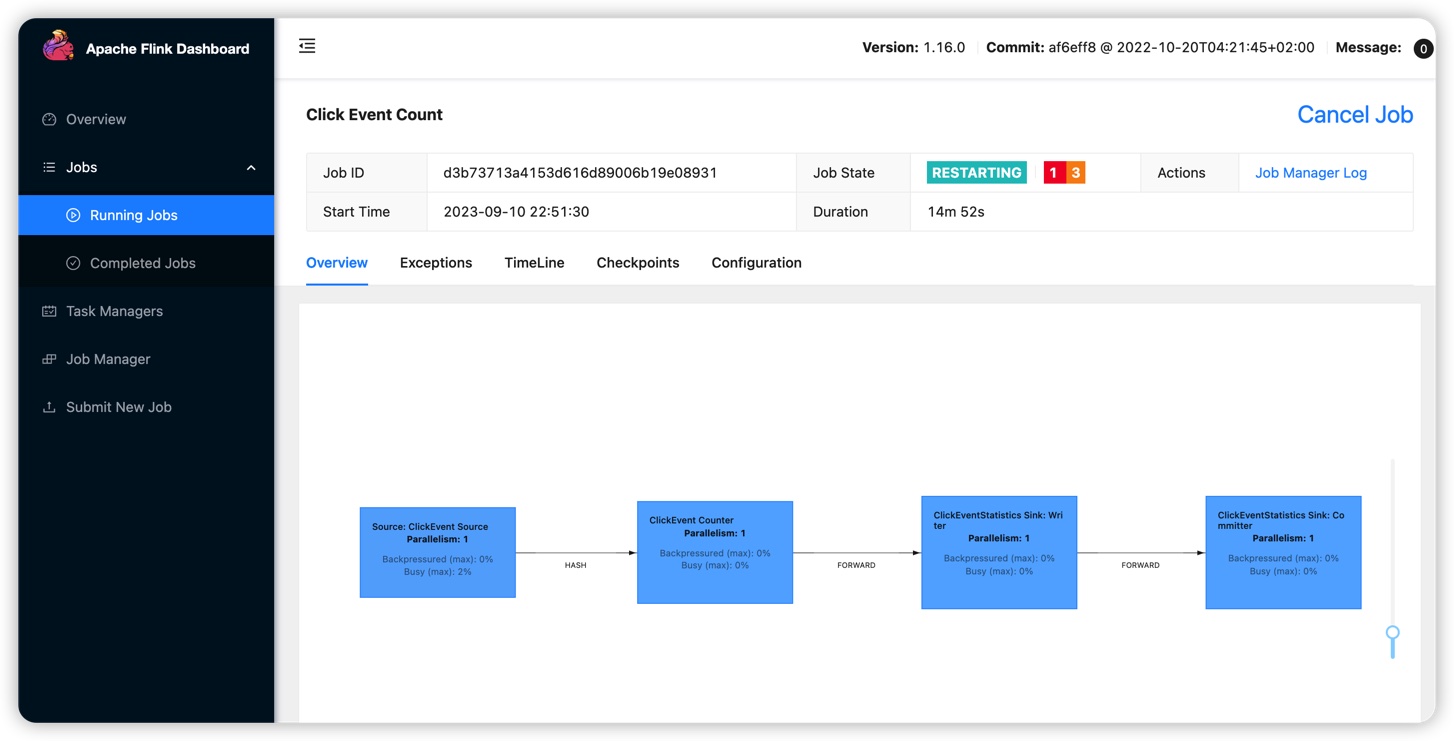
job manager日志里面, 自动提交任务失败
2023-09-10 15:08:38,868 INFO  org.apache.flink.runtime.executiongraph.ExecutionGraph       [] - Source: ClickEvent Source (1/1) (b1467af81ce4d534df9a6d88be23704d_bc764cd8ddf7a0cff126f51c16239658_0_131) switched from CREATED to SCHEDULED.
2023-09-10 15:08:38,868 INFO  org.apache.flink.runtime.executiongraph.ExecutionGraph       [] - ClickEvent Counter (1/1) (b1467af81ce4d534df9a6d88be23704d_0a448493b4782967b150582570326227_0_131) switched from CREATED to SCHEDULED.
2023-09-10 15:08:38,868 INFO  org.apache.flink.runtime.executiongraph.ExecutionGraph       [] - ClickEventStatistics Sink: Writer (1/1) (b1467af81ce4d534df9a6d88be23704d_ea632d67b7d595e5b851708ae9ad79d6_0_131) switched from CREATED to SCHEDULED.
2023-09-10 15:08:38,868 INFO  org.apache.flink.runtime.executiongraph.ExecutionGraph       [] - ClickEventStatistics Sink: Committer (1/1) (b1467af81ce4d534df9a6d88be23704d_6d2677a0ecc3fd8df0b72ec675edf8f4_0_131) switched from CREATED to SCHEDULED.
2023-09-10 15:08:38,868 INFO  org.apache.flink.runtime.resourcemanager.slotmanager.DeclarativeSlotManager [] - Received resource requirements from job d3b73713a4153d616d89006b19e08931: [ResourceRequirement{resourceProfile=ResourceProfile{UNKNOWN}, numberOfRequiredSlots=1}]
2023-09-10 15:08:38,934 WARN  org.apache.flink.runtime.resourcemanager.slotmanager.DeclarativeSlotManager [] - Could not fulfill resource requirements of job d3b73713a4153d616d89006b19e08931. Free slots: 0
2023-09-10 15:08:38,935 WARN  org.apache.flink.runtime.jobmaster.slotpool.DeclarativeSlotPoolBridge [] - Could not acquire the minimum required resources, failing slot requests. Acquired: []. Current slot pool status: Registered TMs: 0, registered slots: 0 free slots: 0
2023-09-10 15:08:38,935 INFO  org.apache.flink.runtime.executiongraph.ExecutionGraph       [] - Source: ClickEvent Source (1/1) (b1467af81ce4d534df9a6d88be23704d_bc764cd8ddf7a0cff126f51c16239658_0_131) switched from SCHEDULED to FAILED on [unassigned resource].
org.apache.flink.runtime.jobmanager.scheduler.NoResourceAvailableException: Could not acquire the minimum required resources.
2023-09-10 15:08:38,935 INFO  org.apache.flink.runtime.executiongraph.ExecutionGraph       [] - Discarding the results produced by task execution b1467af81ce4d534df9a6d88be23704d_bc764cd8ddf7a0cff126f51c16239658_0_131.
2023-09-10 15:08:38,936 INFO  org.apache.flink.runtime.source.coordinator.SourceCoordinator [] - Removing registered reader after failure for subtask 0 (#131) of source Source: ClickEvent Source.
2023-09-10 15:08:38,936 INFO  org.apache.flink.runtime.jobmaster.JobMaster                 [] - 4 tasks will be restarted to recover the failed task b1467af81ce4d534df9a6d88be23704d_bc764cd8ddf7a0cff126f51c16239658_0_131.
重新启动, 可以观察到任务恢复.
在task manager停止期间进入的kafka数据并没有丢失, 结果重新正确输出.
问题: 这时候进入的kafka数据是存储在内存中吗? 还是能够暂停kafka消费?
docker-compose up -d  taskmanager
[+] Running 2/2
 ✔ Container operations-playground-jobmanager-1   Running                                                                         0.0s
 ✔ Container operations-playground-taskmanager-1  Started
停止flink job
返回的id据说是trigger id, 可以用来继续查找checkpoint保存的详情
docker-compose run --no-deps client curl jobmanager:8081/jobs/d3b73713a4153d616d89006b19e08931/stop -d '{"drain": false}'

{"request-id":"a5fbbb5adfc7a3b0f20cf58413baea64"}
测试job详情, 不过有点问题
docker-compose run --no-deps client curl jobmanager:8081/jobs/d3b73713a4153d616d89006b19e08931/savepoints/a5fb31bb5adfc7a3b0f20cf58413baea64
curl localhost:8081/jobs
curl localhost:8081/jobs/d3b73713a4153d616d89006b19e08931/stop -d '{"drain": false}'
curl localhost:8081/jobs/d3b73713a4153d616d89006b19e08931/savepoints/a5fb31bb5adfc7a3b0f20cf58413baea64
curl localhost:8081/jobs/d3b73713a4153d616d89006b19e08931/savepoints/8aebc5d6be9fbb59ce4b31de40b0524e
backpressure
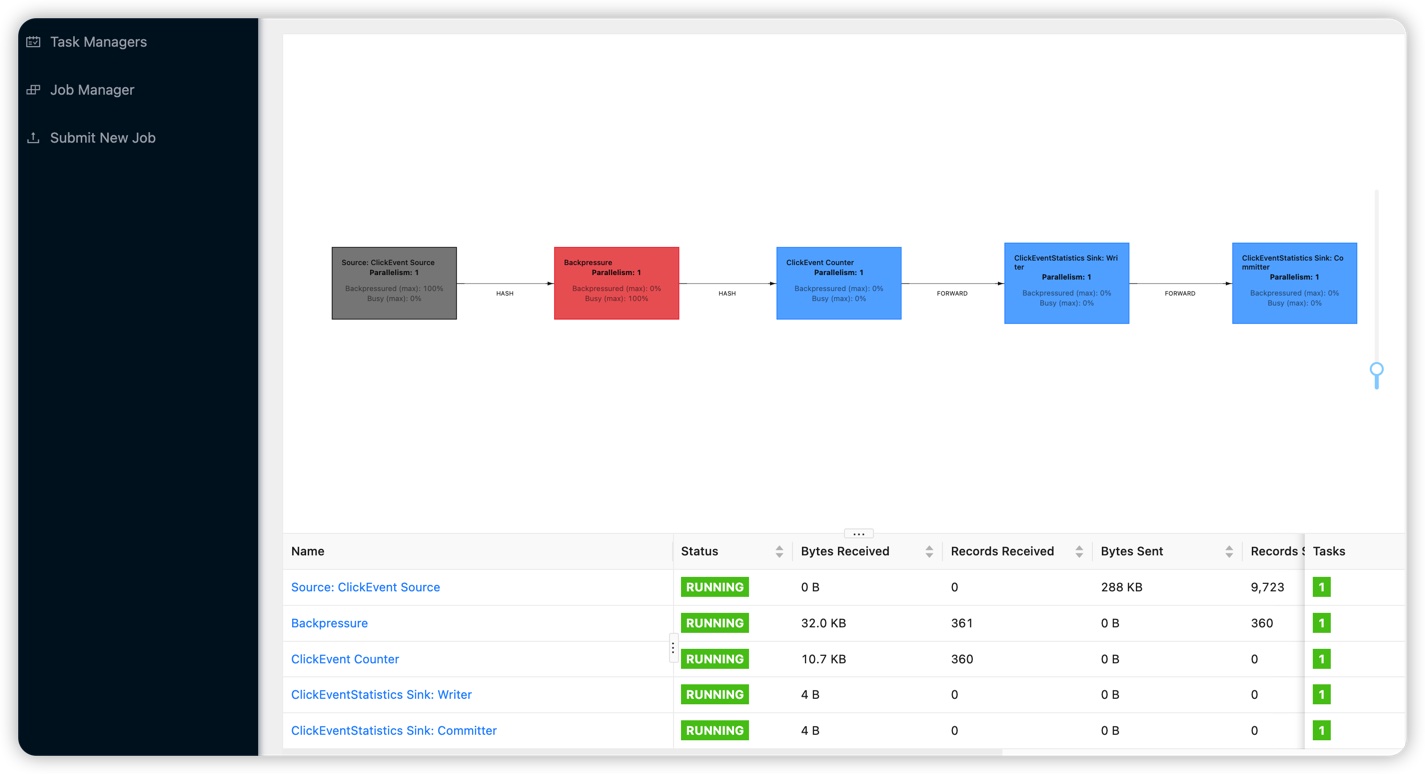
在flink map操作里, 在偶数分钟的时候添加一个100ms的sleep操作, 将速率降低到1秒10个, 任务显示起来就是busy状态.
关于watermark与window
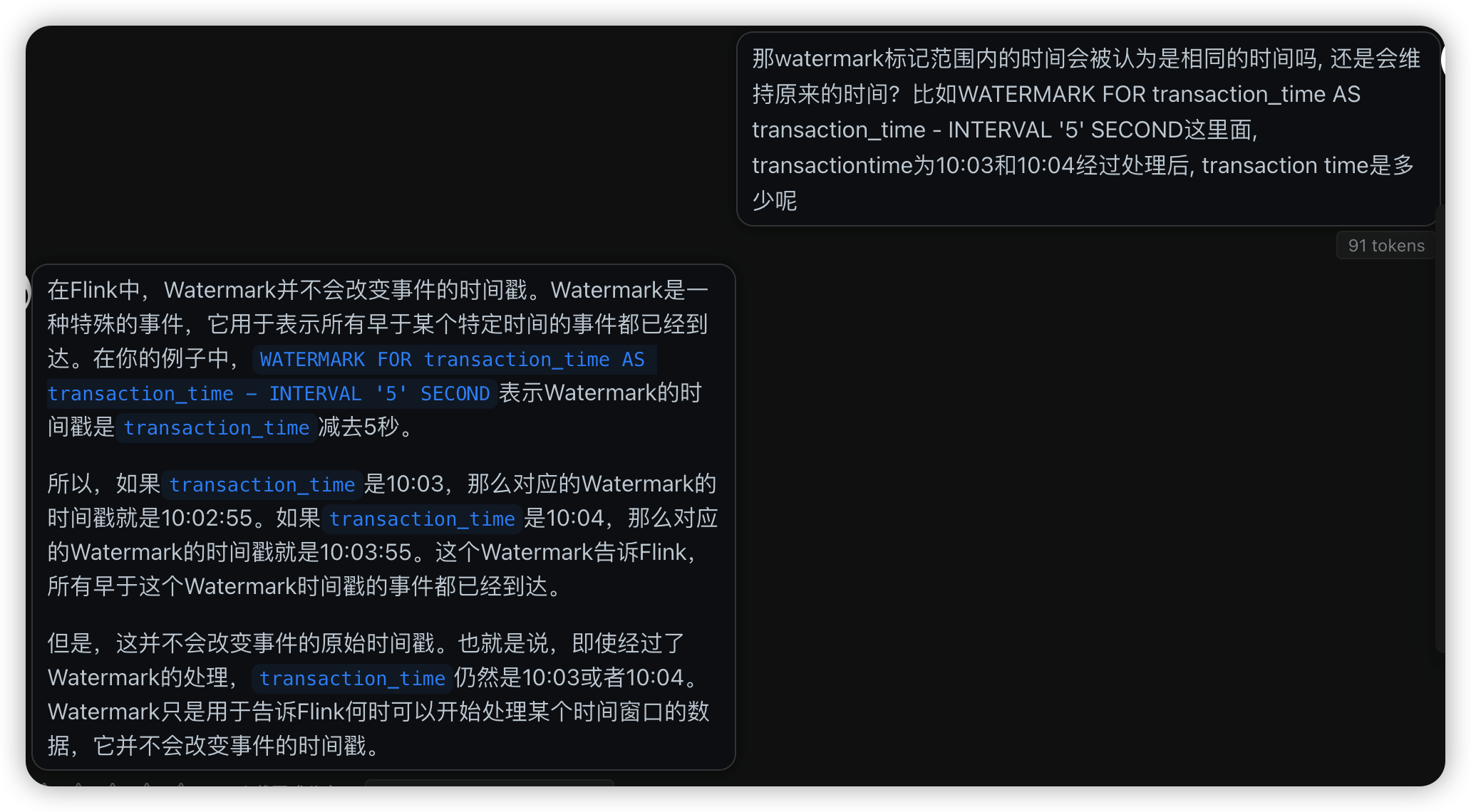
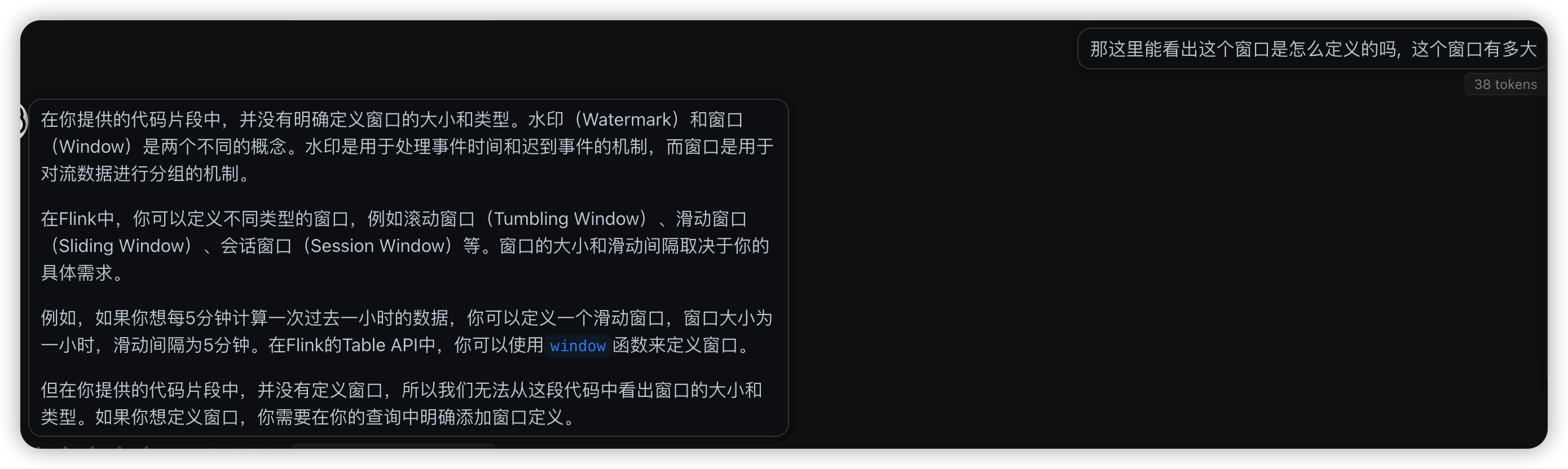
问了chatgpt才知道, watermark与window不是一回事. window用于提供一个时间窗口, 用于对流式数据进行汇总, 然后在这个汇总的时间段内进行计算.watermark则是用于对流式数据的有序性和时效性进行补救, 可以定义flink会等待多少时间才认为上一个时间批次已经完成, 在这个延时时间里可以对晚到达的数据进行补救和重新排序.
tEnv.executeSql("CREATE TABLE transactions (\n" +
                "    account_id  BIGINT,\n" +
                "    amount      BIGINT,\n" +
                "    transaction_time TIMESTAMP(3),\n" +
                "    WATERMARK FOR transaction_time AS transaction_time - INTERVAL '5' SECOND\n" +
                ") WITH (\n" +
                "    'connector' = 'kafka',\n" +
                "    'topic'     = 'transactions',\n" +
                "    'properties.bootstrap.servers' = 'kafka:9092',\n" +
                "    'scan.startup.mode' = 'earliest-offset',\n" +
                "    'format'    = 'csv'\n" +
                ")");
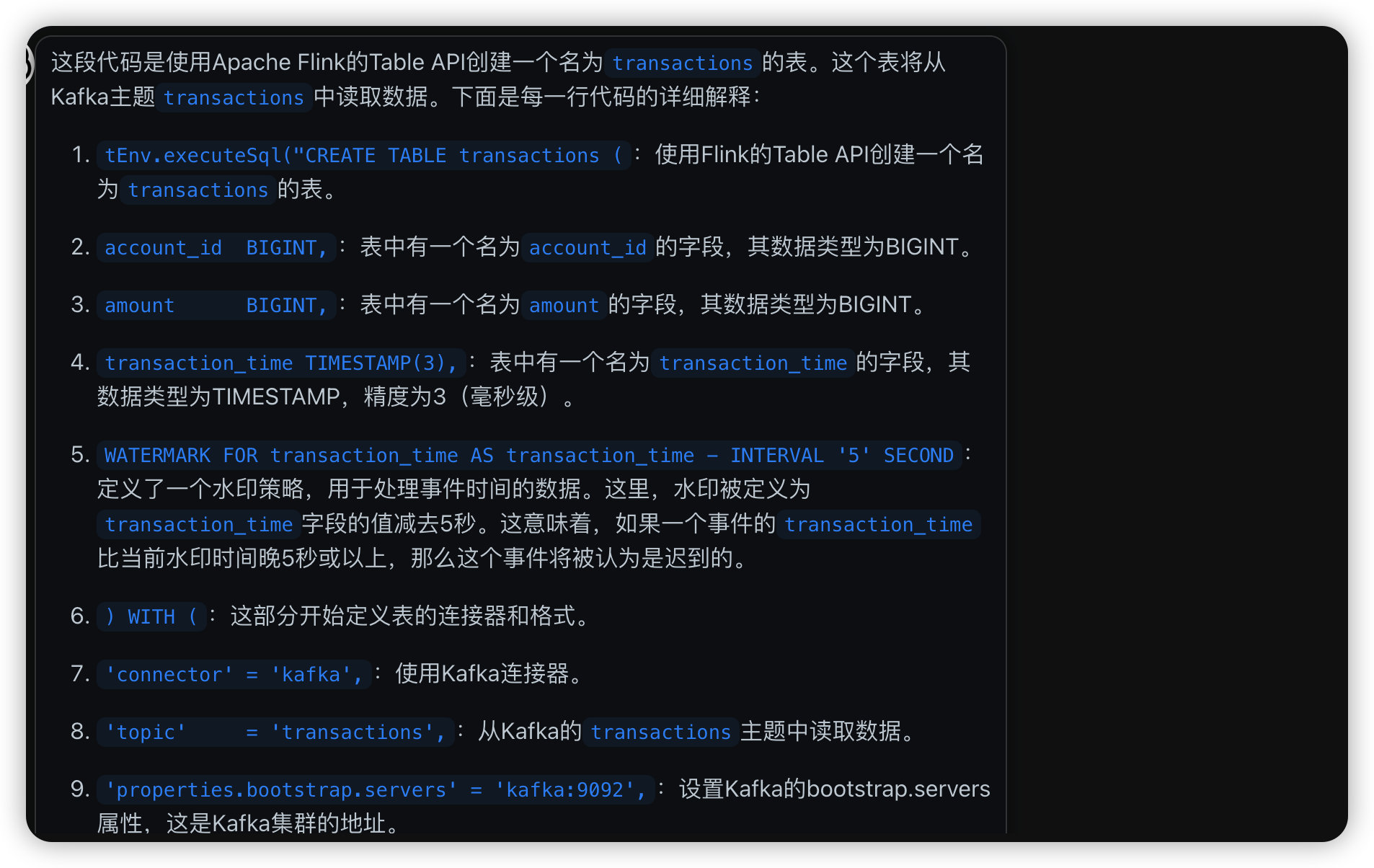
这段解释很有意思, 原来往前追溯的watermark是这么个意思: 当前时间戳的时间到达时, 当前时间戳的上一个interval的时间戳可以关门.
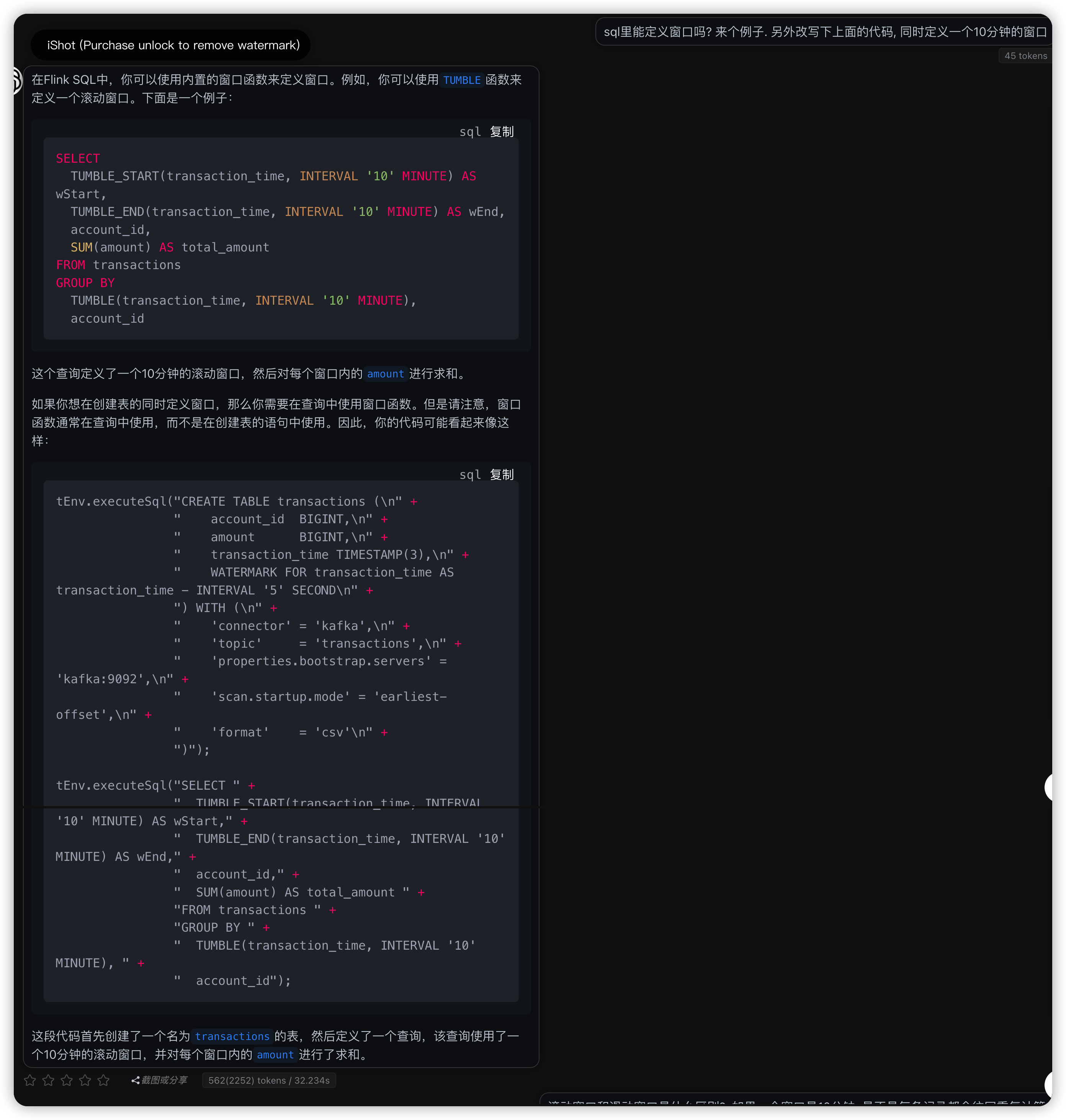
SELECT
  TUMBLE_START(transaction_time, INTERVAL '10' MINUTE) AS wStart,
  TUMBLE_END(transaction_time, INTERVAL '10' MINUTE) AS wEnd,
  account_id,
  SUM(amount) AS total_amount
FROM transactions
GROUP BY
  TUMBLE(transaction_time, INTERVAL '10' MINUTE),
  account_id
tEnv.executeSql("CREATE TABLE transactions (\n" +
                "    account_id  BIGINT,\n" +
                "    amount      BIGINT,\n" +
                "    transaction_time TIMESTAMP(3),\n" +
                "    WATERMARK FOR transaction_time AS transaction_time - INTERVAL '5' SECOND\n" +
                ") WITH (\n" +
                "    'connector' = 'kafka',\n" +
                "    'topic'     = 'transactions',\n" +
                "    'properties.bootstrap.servers' = 'kafka:9092',\n" +
                "    'scan.startup.mode' = 'earliest-offset',\n" +
                "    'format'    = 'csv'\n" +
                ")");

tEnv.executeSql("SELECT " +
                "  TUMBLE_START(transaction_time, INTERVAL '10' MINUTE) AS wStart," +
                "  TUMBLE_END(transaction_time, INTERVAL '10' MINUTE) AS wEnd," +
                "  account_id," +
                "  SUM(amount) AS total_amount " +
                "FROM transactions " +
                "GROUP BY " +
                "  TUMBLE(transaction_time, INTERVAL '10' MINUTE), " +
                "  account_id");
后面仔细看才发现文档里确实提供了window的写法
public static Table report(Table transactions) {
    return transactions
        .window(Tumble.over(lit(1).hour()).on($("transaction_time")).as("log_ts"))
        .groupBy($("account_id"), $("log_ts"))
        .select(
            $("account_id"),
            $("log_ts").start().as("log_ts"),
            $("amount").sum().as("amount"));
}
chatgpt4 咨询
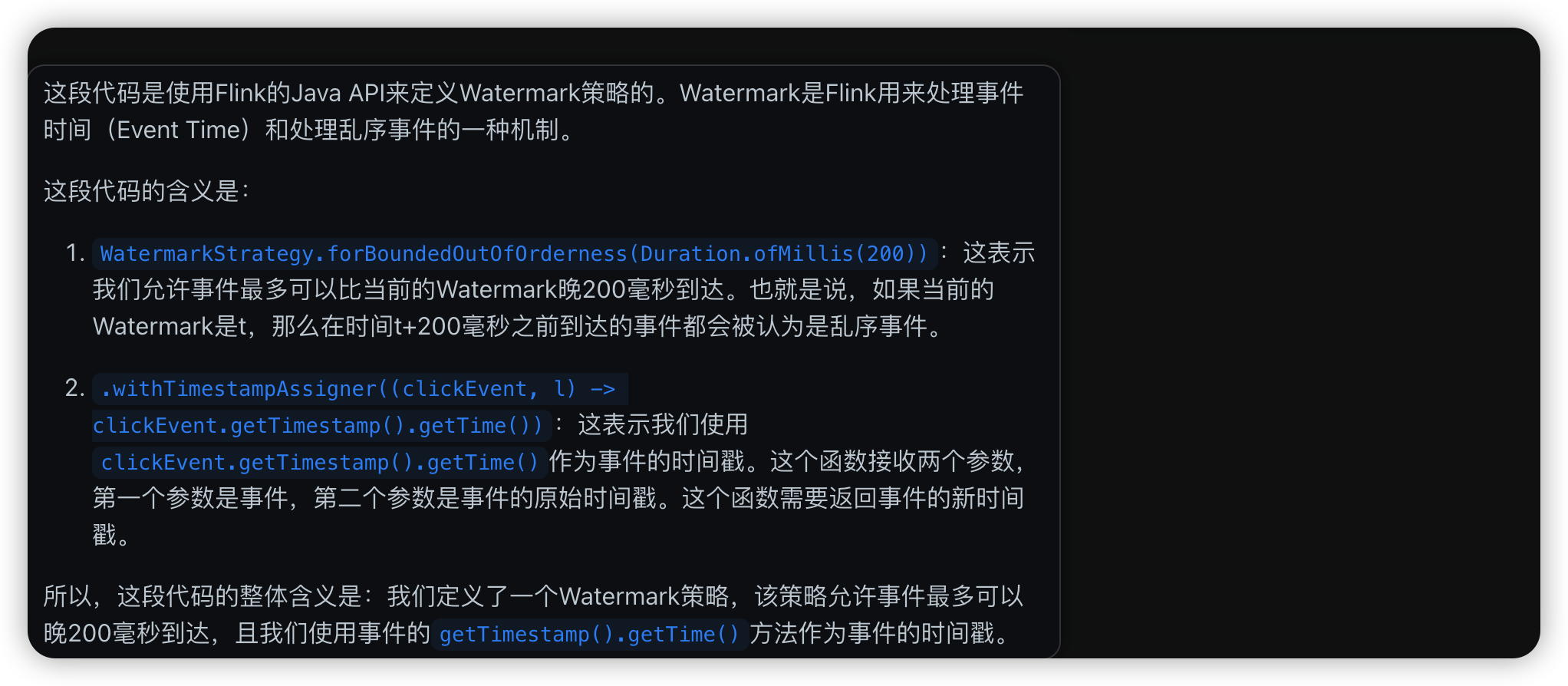
WatermarkStrategy<ClickEvent> watermarkStrategy = WatermarkStrategy
                .<ClickEvent>forBoundedOutOfOrderness(Duration.ofMillis(200))
                .withTimestampAssigner((clickEvent, l) -> clickEvent.getTimestamp().getTime());
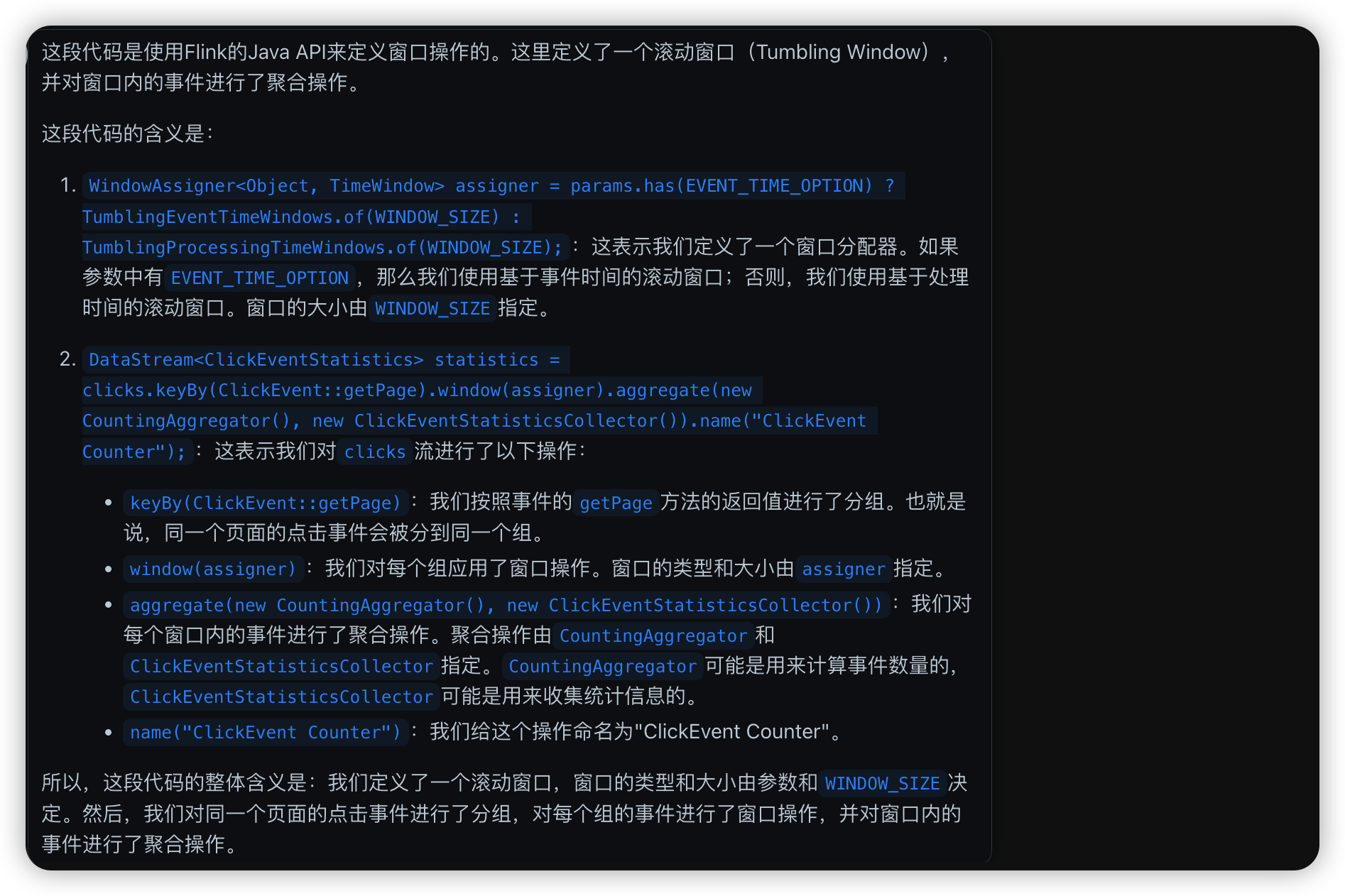
WindowAssigner<Object, TimeWindow> assigner = params.has(EVENT_TIME_OPTION) ?
                TumblingEventTimeWindows.of(WINDOW_SIZE) :
                TumblingProcessingTimeWindows.of(WINDOW_SIZE);


        DataStream<ClickEventStatistics> statistics = clicks
            .keyBy(ClickEvent::getPage)
            .window(assigner)
            .aggregate(new CountingAggregator(),
                new ClickEventStatisticsCollector())
            .name("ClickEvent Counter");
flink run -d /opt/ClickCountJob.jar:这表示我们要运行的Flink作业的JAR文件是/opt/ClickCountJob.jar。-d参数表示我们要在后台运行这个作业。
throttle 限速与 backpressure 反压的写法
在官方demo代码里都有, 这些有意思的写法得到处看看才知道.
https://github.com/apache/flink-playgrounds
throttle
在1秒内分成20个batch, 生成这个时间段需要的数量后, 就进行sleep操作, 非常简单.
所以限速并没有所谓的匀速限速, 能做到的只是把时间切分成小分段, 在这个小分段里全力生产数据, 到了就缓一缓.
package org.apache.flink.playground.datagen;

/** A data throttler that controls the rate at which data is written out to Kafka. */
final class Throttler {

  private final long throttleBatchSize;
  private final long nanosPerBatch;

  private long endOfNextBatchNanos;
  private int currentBatch;

  Throttler(long maxRecordsPerSecond) {
    if (maxRecordsPerSecond == -1) {
      // unlimited speed
      throttleBatchSize = -1;
      nanosPerBatch = 0;
      endOfNextBatchNanos = System.nanoTime() + nanosPerBatch;
      currentBatch = 0;
      return;
    }
    final float ratePerSubtask = (float) maxRecordsPerSecond;

    if (ratePerSubtask >= 10000) {
      // high rates: all throttling in intervals of 2ms
      throttleBatchSize = (int) ratePerSubtask / 500;
      nanosPerBatch = 2_000_000L;
    } else {
      throttleBatchSize = ((int) (ratePerSubtask / 20)) + 1;
      nanosPerBatch = ((int) (1_000_000_000L / ratePerSubtask)) * throttleBatchSize;
    }
    this.endOfNextBatchNanos = System.nanoTime() + nanosPerBatch;
    this.currentBatch = 0;
  }

  void throttle() throws InterruptedException {
    if (throttleBatchSize == -1) {
      return;
    }
    if (++currentBatch != throttleBatchSize) {
      return;
    }
    currentBatch = 0;

    final long now = System.nanoTime();
    final int millisRemaining = (int) ((endOfNextBatchNanos - now) / 1_000_000);

    if (millisRemaining > 0) {
      endOfNextBatchNanos += nanosPerBatch;
      Thread.sleep(millisRemaining);
    } else {
      endOfNextBatchNanos = now + nanosPerBatch;
    }
  }
}
/** Generates CSV transaction records at a rate */
public class Producer implements Runnable, AutoCloseable {

  private volatile boolean isRunning;

  private final String brokers;

  private final String topic;

  public Producer(String brokers, String topic) {
    this.brokers = brokers;
    this.topic = topic;
    this.isRunning = true;
  }

  @Override
  public void run() {
    KafkaProducer<Long, Transaction> producer = new KafkaProducer<>(getProperties());

    Throttler throttler = new Throttler(100);

    TransactionSupplier transactions = new TransactionSupplier();

    while (isRunning) {

      Transaction transaction = transactions.get();

      long millis = transaction.timestamp.atZone(ZoneOffset.UTC).toInstant().toEpochMilli();

      ProducerRecord<Long, Transaction> record =
          new ProducerRecord<>(topic, null, millis, transaction.accountId, transaction);
      producer.send(record);

      try {
        throttler.throttle();
      } catch (InterruptedException e) {
        isRunning = false;
      }
    }

    producer.close();
  }
    @Override
  public void close() {
    isRunning = false;
  }
}
backpressure
这个实现也很神奇, 在flink map操作里, 每次sleep100ms, 相当于1秒操作10次map. 看起来是利用了map操作是单线程序列化.
/**
 * This MapFunction causes severe backpressure during even-numbered minutes.
 * E.g., from 10:12:00 to 10:12:59 it will only process 10 events/sec,
 * but from 10:13:00 to 10:13:59 events will pass through unimpeded.
 */
public class BackpressureMap implements MapFunction<ClickEvent, ClickEvent> {

    private boolean causeBackpressure() {
        return ((LocalTime.now().getMinute() % 2) == 0);
    }

    @Override
    public ClickEvent map(ClickEvent event) throws Exception {
        if (causeBackpressure()) {
            Thread.sleep(100);
        }

        return event;
    }

}
backpressure的使用
    KafkaSource<ClickEvent> source = KafkaSource.<ClickEvent>builder()
                .setTopics(inputTopic)
                .setValueOnlyDeserializer(new ClickEventDeserializationSchema())
                .setProperties(kafkaProps)
                .build();

        WatermarkStrategy<ClickEvent> watermarkStrategy = WatermarkStrategy
                .<ClickEvent>forBoundedOutOfOrderness(Duration.ofMillis(200))
                .withTimestampAssigner((clickEvent, l) -> clickEvent.getTimestamp().getTime());

        DataStream<ClickEvent> clicks = env.fromSource(source, watermarkStrategy, "ClickEvent Source");

        if (inflictBackpressure) {
            // Force a network shuffle so that the backpressure will affect the buffer pools
            clicks = clicks
                .keyBy(ClickEvent::getPage)
                .map(new BackpressureMap())
                .name("Backpressure");
        }

        WindowAssigner<Object, TimeWindow> assigner = params.has(EVENT_TIME_OPTION) ?
                TumblingEventTimeWindows.of(WINDOW_SIZE) :
                TumblingProcessingTimeWindows.of(WINDOW_SIZE);


        DataStream<ClickEventStatistics> statistics = clicks
            .keyBy(ClickEvent::getPage)
            .window(assigner)
            .aggregate(new CountingAggregator(),
                new ClickEventStatisticsCollector())
            .name("ClickEvent Counter");

        statistics.sinkTo(
                KafkaSink.<ClickEventStatistics>builder()
                        .setBootstrapServers(kafkaProps.getProperty(ProducerConfig.BOOTSTRAP_SERVERS_CONFIG))
                        .setKafkaProducerConfig(kafkaProps)
                        .setRecordSerializer(
                                KafkaRecordSerializationSchema.builder()
                                        .setTopic(outputTopic)
                                        .setValueSerializationSchema(new ClickEventStatisticsSerializationSchema())
                                        .build())
                        .setDeliverGuarantee(DeliveryGuarantee.AT_LEAST_ONCE)
                        .build())
                .name("ClickEventStatistics Sink");

        env.execute("Click Event Count");
一些source与sink的demo
sql版本的 kafka source 与 mysql sink
public class SpendReport {

    public static Table report(Table transactions) {
        return transactions.select(
                $("account_id"),
                $("transaction_time").floor(TimeIntervalUnit.HOUR).as("log_ts"),
                $("amount"))
            .groupBy($("account_id"), $("log_ts"))
            .select(
                $("account_id"),
                $("log_ts"),
                $("amount").sum().as("amount"));
        }


    public static void main(String[] args) throws Exception {
        EnvironmentSettings settings = EnvironmentSettings.newInstance().build();
        TableEnvironment tEnv = TableEnvironment.create(settings);

        tEnv.executeSql("CREATE TABLE transactions (\n" +
                "    account_id  BIGINT,\n" +
                "    amount      BIGINT,\n" +
                "    transaction_time TIMESTAMP(3),\n" +
                "    WATERMARK FOR transaction_time AS transaction_time - INTERVAL '5' SECOND\n" +
                ") WITH (\n" +
                "    'connector' = 'kafka',\n" +
                "    'topic'     = 'transactions',\n" +
                "    'properties.bootstrap.servers' = 'kafka:9092',\n" +
                "    'scan.startup.mode' = 'earliest-offset',\n" +
                "    'format'    = 'csv'\n" +
                ")");

        tEnv.executeSql("CREATE TABLE spend_report (\n" +
                "    account_id BIGINT,\n" +
                "    log_ts     TIMESTAMP(3),\n" +
                "    amount     BIGINT\n," +
                "    PRIMARY KEY (account_id, log_ts) NOT ENFORCED" +
                ") WITH (\n" +
                "  'connector'  = 'jdbc',\n" +
                "  'url'        = 'jdbc:mysql://mysql:3306/sql-demo',\n" +
                "  'table-name' = 'spend_report',\n" +
                "  'driver'     = 'com.mysql.jdbc.Driver',\n" +
                "  'username'   = 'sql-demo',\n" +
                "  'password'   = 'demo-sql'\n" +
                ")");

        Table transactions = tEnv.from("transactions");
        report(transactions).executeInsert("spend_report");
    }
}
java版本的kafka source与kafka target
    public static void main(String[] args) throws Exception {
        final ParameterTool params = ParameterTool.fromArgs(args);

        final StreamExecutionEnvironment env = StreamExecutionEnvironment.getExecutionEnvironment();

        configureEnvironment(params, env);

        boolean inflictBackpressure = params.has(BACKPRESSURE_OPTION);

        String inputTopic = params.get("input-topic", "input");
        String outputTopic = params.get("output-topic", "output");
        String brokers = params.get("bootstrap.servers", "localhost:9092");
        Properties kafkaProps = new Properties();
        kafkaProps.setProperty(ProducerConfig.BOOTSTRAP_SERVERS_CONFIG, brokers);
        kafkaProps.setProperty(ConsumerConfig.GROUP_ID_CONFIG, "click-event-count");

        KafkaSource<ClickEvent> source = KafkaSource.<ClickEvent>builder()
                .setTopics(inputTopic)
                .setValueOnlyDeserializer(new ClickEventDeserializationSchema())
                .setProperties(kafkaProps)
                .build();

        WatermarkStrategy<ClickEvent> watermarkStrategy = WatermarkStrategy
                .<ClickEvent>forBoundedOutOfOrderness(Duration.ofMillis(200))
                .withTimestampAssigner((clickEvent, l) -> clickEvent.getTimestamp().getTime());

        DataStream<ClickEvent> clicks = env.fromSource(source, watermarkStrategy, "ClickEvent Source");

        if (inflictBackpressure) {
            // Force a network shuffle so that the backpressure will affect the buffer pools
            clicks = clicks
                .keyBy(ClickEvent::getPage)
                .map(new BackpressureMap())
                .name("Backpressure");
        }

        WindowAssigner<Object, TimeWindow> assigner = params.has(EVENT_TIME_OPTION) ?
                TumblingEventTimeWindows.of(WINDOW_SIZE) :
                TumblingProcessingTimeWindows.of(WINDOW_SIZE);

        DataStream<ClickEventStatistics> statistics = clicks
            .keyBy(ClickEvent::getPage)
            .window(assigner)
            .aggregate(new CountingAggregator(),
                new ClickEventStatisticsCollector())
            .name("ClickEvent Counter");

        statistics.sinkTo(
                KafkaSink.<ClickEventStatistics>builder()
                        .setBootstrapServers(kafkaProps.getProperty(ProducerConfig.BOOTSTRAP_SERVERS_CONFIG))
                        .setKafkaProducerConfig(kafkaProps)
                        .setRecordSerializer(
                                KafkaRecordSerializationSchema.builder()
                                        .setTopic(outputTopic)
                                        .setValueSerializationSchema(new ClickEventStatisticsSerializationSchema())
                                        .build())
                        .setDeliverGuarantee(DeliveryGuarantee.AT_LEAST_ONCE)
                        .build())
                .name("ClickEventStatistics Sink");

        env.execute("Click Event Count");
    }
python版本的kafka source与es sink
from pyflink.datastream import StreamExecutionEnvironment, TimeCharacteristic
from pyflink.table import StreamTableEnvironment, DataTypes, EnvironmentSettings
from pyflink.table.expressions import call, col
from pyflink.table.udf import udf


provinces = ("Beijing", "Shanghai", "Hangzhou", "Shenzhen", "Jiangxi", "Chongqing", "Xizang")


@udf(input_types=[DataTypes.STRING()], result_type=DataTypes.STRING())
def province_id_to_name(id):
    return provinces[id]


def log_processing():
    env = StreamExecutionEnvironment.get_execution_environment()
    t_env = StreamTableEnvironment.create(stream_execution_environment=env)
    t_env.get_config().get_configuration().set_boolean("python.fn-execution.memory.managed", True)

    create_kafka_source_ddl = """
            CREATE TABLE payment_msg(
                createTime VARCHAR,
                orderId BIGINT,
                payAmount DOUBLE,
                payPlatform INT,
                provinceId INT
            ) WITH (
              'connector' = 'kafka',
              'topic' = 'payment_msg',
              'properties.bootstrap.servers' = 'kafka:9092',
              'properties.group.id' = 'test_3',
              'scan.startup.mode' = 'latest-offset',
              'format' = 'json'
            )
            """

    create_es_sink_ddl = """
            CREATE TABLE es_sink(
                province VARCHAR PRIMARY KEY,
                pay_amount DOUBLE
            ) with (
                'connector' = 'elasticsearch-7',
                'hosts' = 'http://elasticsearch:9200',
                'index' = 'platform_pay_amount_1',
                'document-id.key-delimiter' = '$',
                'sink.bulk-flush.max-size' = '42mb',
                'sink.bulk-flush.max-actions' = '32',
                'sink.bulk-flush.interval' = '1000',
                'sink.bulk-flush.backoff.delay' = '1000',
                'format' = 'json'
            )
    """

    t_env.execute_sql(create_kafka_source_ddl)
    t_env.execute_sql(create_es_sink_ddl)
    t_env.register_function('province_id_to_name', province_id_to_name)

    t_env.from_path("payment_msg") \
        .select(call('province_id_to_name', col('provinceId')).alias("province"), col('payAmount')) \
        .group_by(col('province')) \
        .select(col('province'), call('sum', col('payAmount').alias("pay_amount"))) \
        .execute_insert("es_sink")