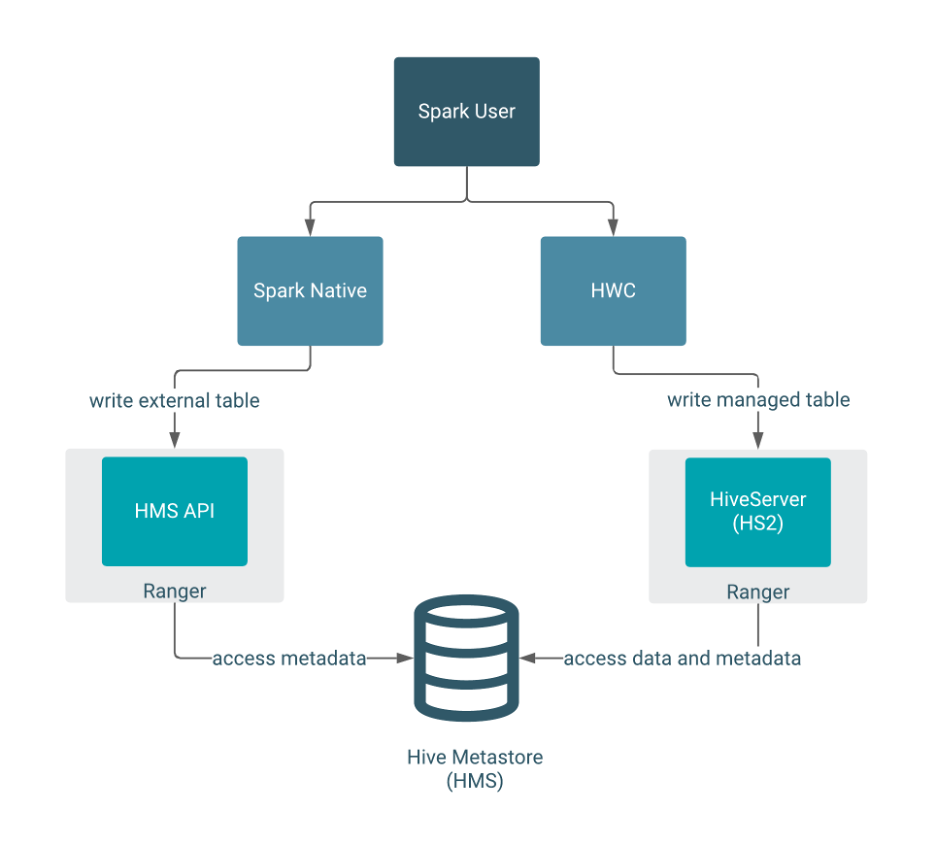
spark ranger
初步调研结论
- spark jdbc 如果通过hive server, 那么会触发hive server的ranger鉴权机制
- spark jdbc 如果只是读取hive metastore, 旧版本ranger hive plugin 无法管控到权限. 但是新版本的hive里 metastore 支持使用hive server的鉴权信息, 估计也能够管理到.
- spark jar 读取, 从原理上来说hdfs的权限应该能够生效, 也就是storage based authorization.
- update: 其实使用spark kyuubi体系也能解决问题, kyubbi提供了spark ranger插件.
没有看这些开源组件的源码, 得到的结论总归是比较浅薄, 过阵子也就都忘了. 代码还是得看起来.
hive metastore ranger support spark
ranger的hive管控是通过hive server的交互实现的, 所以如果通过jdbc与hive server链接, 那么ranger管控能够生效. 但是如果spark直接与metastore连接而不是使用jdbc方式, 则ranger的策略正常来说无法生效. 但是后来hive-metastore也支持ranger对hive server的授权, 这样spark这种单独读取metastore的应用也能被ranger管控.
Update HiveMetastore authorization to enable use of HiveAuthorizer implementation
https://issues.apache.org/jira/browse/HIVE-21753
Currently HMS supports authorization using StorageBasedAuthorizationProvider which relies on permissions at filesystem – like HDFS. Hive supports a pluggable authorization interface, and multiple authorizer implementations (like SQLStd, Ranger, Sentry) are available to authorizer access in Hive. Extending HiveMetastore to use the same authorization interface as Hive will enable use of pluggable authorization implementations; and will result in consistent authorization across Hive, HMS and other services that use HMS (like Spark).
ranger hive-metastore 管理
https://lrting.top/backend/3341/
hive standalone metastore 3.1.2可作为独立服务,作为spark、flink、presto等服务的元数据管理中心,然而在现有的hive授权方案中只有针对hiveserver2的授权,所以本文针对hive standalone metastore独立服务使用ranger对连接到hive metastore的用户进行授权访问,以解决hive standalone metastore无权限验证问题。
测试验证代码, java 直接读取hive metastore 被拦截了.
package com.zh.ch.bigdata.hms;

import org.apache.hadoop.conf.Configuration;
import org.apache.hadoop.hive.metastore.IMetaStoreClient;
import org.apache.hadoop.hive.metastore.RetryingMetaStoreClient;
import org.apache.hadoop.hive.metastore.api.*;
import org.slf4j.Logger;
import org.slf4j.LoggerFactory;

import java.util.ArrayList;
import java.util.HashMap;
import java.util.List;
import java.util.Map;

public class HMSClient {

    public static final Logger LOGGER = LoggerFactory.getLogger(HMSClient.class);

    /**
     * 初始化HMS连接
     * @param conf org.apache.hadoop.conf.Configuration
     * @return IMetaStoreClient
     * @throws MetaException 异常
     */
    public static IMetaStoreClient init(Configuration conf) throws MetaException {
        try {
            return RetryingMetaStoreClient.getProxy(conf, false);
        } catch (MetaException e) {
            LOGGER.error("hms连接失败", e);
            throw e;
        }
    }

    public static void main(String[] args) throws Exception {

        Configuration conf = new Configuration();
        conf.set("hive.metastore.uris", "thrift://192.168.241.134:9083");
        IMetaStoreClient client = HMSClient.init(conf);

        boolean enablePartitionGrouping = true;
        String tableName = "test_table";
        String dbName = "hive_metastore_test";

        List<FieldSchema> columns = new ArrayList<>();
        columns.add(new FieldSchema("foo", "string", ""));
        columns.add(new FieldSchema("bar", "string", ""));
        List<FieldSchema> partColumns = new ArrayList<>();
        partColumns.add(new FieldSchema("dt", "string", ""));
        partColumns.add(new FieldSchema("blurb", "string", ""));
        SerDeInfo serdeInfo = new SerDeInfo("LBCSerDe",
                "org.apache.hadoop.hive.serde2.lazy.LazySimpleSerDe", new HashMap<>());
        StorageDescriptor storageDescriptor
                = new StorageDescriptor(columns, null,
                "org.apache.hadoop.hive.ql.io.RCFileInputFormat",
                "org.apache.hadoop.hive.ql.io.RCFileOutputFormat",
                false, 0, serdeInfo, null, null, null);
        Map<String, String> tableParameters = new HashMap<>();
        tableParameters.put("hive.hcatalog.partition.spec.grouping.enabled", enablePartitionGrouping ? "true":"false");
        Table table = new Table(tableName, dbName, "", 0, 0, 0, storageDescriptor, partColumns, tableParameters, "", "", "");

        client.createTable(table);

        System.out.println("----------------------------查看表是否创建成功-------------------------------------");
        System.out.println(client.getTable(dbName, tableName).toString());
    }
}
spark与hive的交互
建议 spark 直接与 hive metastore交互
当然spark也能够直接通过jdbc与hive server交互.
https://community.cloudera.com/t5/Support-Questions/Spark-with-HIVE-JDBC-connection/td-p/233221
Spark connects to the Hive metastore directly via a HiveContext. It does not (nor should, in my opinion) use JDBC.
First, you must compile Spark with Hive support, then you need to explicitly call enableHiveSupport() on the SparkSession bulider.
Additionally, Spark2 will need you to provide either
A hive-site.xml file in the classpath
Setting hive.metastore.uris . Refer: https://stackoverflow.com/questions/31980584/how-to-connect-to-a-hive-metastore-programmatically-in-...
Additional resources
https://spark.apache.org/docs/latest/sql-programming-guide.html#hive-tables
https://jaceklaskowski.gitbooks.io/mastering-apache-spark/spark-sql-hive-integration.html
cdw hive3 支持 hive metastore
看起来一部分应用直接连接 hive server, 一部分只使用 hive metastore.
https://developer.aliyun.com/article/786098
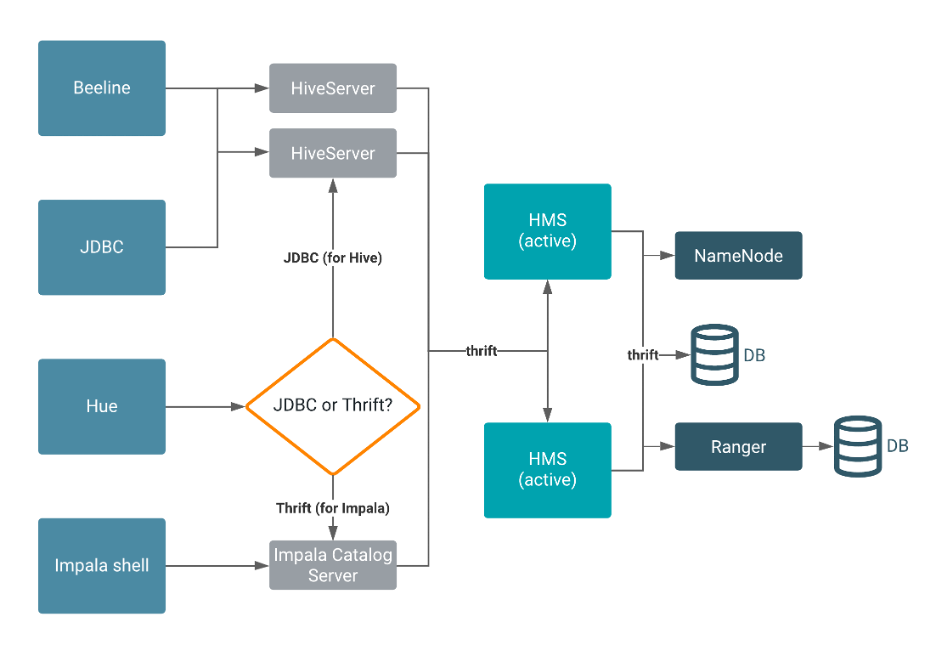
Hive Metastore (HMS) 是一种服务,用于在后端 RDBMS(例如 MySQL 或 PostgreSQL)中存储与 Apache Hive 和其他服务相关的元数据。Impala、Spark、Hive 和其他服务共享元存储。与 HMS 的连接包括 HiveServer、Ranger 和代表 HDFS 的 NameNode。
Beeline、Hue、JDBC 和 Impala shell客户端通过 thrift 或 JDBC 向 HiveServer 发出请求。HiveServer 实例向 HMS 读/写数据。默认情况下,冗余的 HMS 以主动/主动模式运行。物理数据驻留在后端 RDBMS 中,一个用于 HMS的RDBMS。所有的 HMS 实例使用相同的后端数据库。一个单独的 RDBMS 支持安全服务,例如 Ranger。在任何给定时间,所有连接都路由到单一的 RDBMS 服务。HMS 通过thrift与 NameNode 对话,并充当 HDFS 的客户端。
spark 直接读取不支持ranger授权管理

典型的读授权流程:

典型的写授权流程: