Ranger Restful API 测试记录
General
api 文档:
https://ranger.apache.org/apidocs/resource_AssetREST.html
使用密码访问
curl -u admin:admin -H "Accept: application/json" -H "Content-Type: application/json" -v -i -s -X GET http://172.16.48.143:6080/service/xusers/secure/users/1
or 自行计算加密header
curl -H "Accept: application/json" -H "Content-Type: application/json" -H "Authorization: Basic YWRtaW46YWRtaW4=" -v -i -s -X GET http://172.16.48.143:6080/service/xusers/secure/users/1
密码错误返回401
curl -H "Accept: application/json" -H "Content-Type: application/json" -H "Authorization: Basic 123YWRtaW46YWRtaW4=" -X GET http://172.16.48.143:6080/service/xusers/secure/users/1

{"statusCode":401,"msgDesc":"Authentication Failed"}
curl -H "Accept: application/json" -H "Content-Type: application/json" -H "Authorization: Basic 123YWRtaW46YWRtaW4=" -X GET http://172.16.48.143:6080/service/xusers/secure/users/1 -v
* About to connect() to 172.16.48.143 port 6080 (#0)
*   Trying 172.16.48.143...
* Connected to 172.16.48.143 (172.16.48.143) port 6080 (#0)
> GET /service/xusers/secure/users/1 HTTP/1.1
> User-Agent: curl/7.29.0
> Host: 172.16.48.143:6080
> Accept: application/json
> Content-Type: application/json
> Authorization: Basic 123YWRtaW46YWRtaW4=
>
< HTTP/1.1 401 Unauthorized
< Set-Cookie: RANGERADMINSESSIONID=04AAD02E526A020B70A3FFB8F0943D46; Path=/; HttpOnly
< X-Frame-Options: DENY
< Cache-Control: no-cache, no-store, max-age=0, must-revalidate
< Pragma: no-cache
< Expires: 0
< X-XSS-Protection: 1; mode=block
< X-Content-Type-Options: nosniff
< Content-Security-Policy: default-src 'none'; script-src 'self' 'unsafe-inline' 'unsafe-eval'; connect-src 'self'; img-src 'self'; style-src 'self' 'unsafe-inline';font-src 'self'
< Content-Length: 52
< Date: Mon, 03 Jul 2023 07:46:35 GMT
< Server: Apache Ranger
<
* Connection #0 to host 172.16.48.143 left intact
{"statusCode":401,"msgDesc":"Authentication Failed"}
ranger api 默认返回xml格式
ranger不设置json header, 默认返回的是xml格式
curl -u admin:admin -v -i -s -X GET http://172.16.48.143:6080/service/xusers/secure/users/1
<?xml version="1.0" encoding="UTF-8" standalone="yes"?><vxUser><createDate>2023-06-20T02:41:44Z</createDate><id>1</id><owner>Admin</owner><updateDate>2023-06-20T03:05:24Z</updateDate><updatedBy>Admin</updatedBy><description>admin - add from Unix box</description><firstName>Admin</firstName><isVisible>1</isVisible><lastName></lastName><name>admin</name><password>*****</password><userRoleList>ROLE_SYS_ADMIN</userRoleList><userSource>0</userSource></vxUser>[root@tcs-172-16-48-140 ~]#
添加json header后能顺利返回json
curl -H "Accept: application/json" -H "Content-Type: application/json" -H "Authorization: Basic YWRtaW46YWRtaW4=" -X GET http://172.16.48.143:6080/service/xusers/secure/users/1 -v
{"id":1,"createDate":"2023-06-20T02:41:44Z","updateDate":"2023-06-20T03:05:24Z","owner":"Admin","updatedBy":"Admin","name":"admin","firstName":"Admin","lastName":"","password":"*****","description":"admin - add from Unix box","groupIdList":[],"groupNameList":[],"status":1,"isVisible":1,"userSource":0,"userRoleList":["ROLE_SYS_ADMIN"]}[root@tcs-172-16-48-140 ~]#
检查集群状态
看起来查询集群状态, 并不需要验证用户名信息.
curl -H "Accept: application/json" -H "Content-Type: application/json" -H "Authorization: Basic YWRtaW46YWRtaW4=" -X GET http://172.16.48.143:6080/service/metrics -v
  curl -H "Accept: application/json" -H "Content-Type: application/json"   -X GET http://172.16.16.11:6080/service/metrics/status -v
* About to connect() to 172.16.16.11 port 6080 (#0)
*   Trying 172.16.16.11...
* Connected to 172.16.16.11 (172.16.16.11) port 6080 (#0)
> GET /service/metrics/status HTTP/1.1
> User-Agent: curl/7.29.0
> Host: 172.16.16.11:6080
> Accept: application/json
> Content-Type: application/json
>
< HTTP/1.1 200 OK
< Content-Type: application/json
< Transfer-Encoding: chunked
< Date: Fri, 14 Jul 2023 07:51:35 GMT
< Server: Apache Ranger
<
* Connection #0 to host 172.16.16.11 left intact

{"data":{"jvm":{"JVM Machine Actual Name":"OpenJDK 64-Bit Server VM","version":"11.0.15+2","JVM Machine Representation Name":"17@tbds-172-16-16-11","Up time of JVM":860605847,"JVM Vendor Name":"Tencent","os.spec":"Linux, amd64, 3.10.0-1160.88.1.el7.x86_64","os.vcpus":"32","memory":{"heapInit":"1073741824","heapMax":"1073741824","heapCommitted":"1073741824","heapUsed":"303115264","nonHeapInit":"7667712","nonHeapMax":"662700032","nonHeapCommitted":"240517120","nonHeapUsed":"228365392","memory_pool_usages":{"G1 Eden Space":{"init":56623104,"used":148897792,"committed":658505728,"max":-1},"G1 Old Gen":{"init":1017118720,"used":136391680,"committed":397410304,"max":1073741824},"G1 Survivor Space":{"init":0,"used":17825792,"committed":17825792,"max":-1}}}}}}
用户相关API
https://stackoverflow.com/questions/38524571/how-to-add-users-to-apache-ranger-via-rest-api
检查所有用户返回
了, 后面修改了.
{"startIndex":0,"pageSize":200,"totalCount":220,"resultSize":200,"sortType":"asc","sortBy":"id","queryTimeMS":1689674816102,"vXUsers":[{"id":1,"createDate":"2023-06-30T13:36:26Z","updateDate":"2023-06-30T13:39:24Z","owner":"Admin","updatedBy":"Admin","name":"admin","firstName":"Admin","lastName":"","password":"*****","description":"admin - add from Unix box","groupIdList":[],"groupNameList":[],"status":1,"isVisible":1,"userSource":0,"userRoleList":["ROLE_SYS_ADMIN"]},{"id":2,"createDate":"2023-06-30T13:36:26Z","updateDate":"2023-06-30T13:36:26Z","name":"rangerusersync","firstName":"rangerusersync","lastName":"","password":"*****","description":"rangerusersync","groupIdList":[],"groupNameList":[],"status":1,"isVisible":1,"userSource":0,"userRoleList":["ROLE_SYS_ADMIN"]},{"id":3,"createDate":"2023-06-30T13:36:26Z","updateDate":"2023-06-30T13:36:26Z","name":"keyadmin","firstName":"keyadmin","lastName":"","password":"*****","description":"keyadmin","groupIdList":[],"groupNameList":[],"status":1,"isVisible":1,"userSource":0,"userRoleList":["ROLE_KEY_ADMIN"]},{"id":4,"createDate":"2023-06-30T13:36:26Z","updateDate":"2023-06-30T13:36:26Z","name":"rangertagsync","firstName":"rangertagsync","lastName":"","password":"*****","description":"rangertagsync","groupIdList":[],"groupNameList":[],"status":1,"isVisible":1,"userSource":0,"userRoleList":["ROLE_SYS_ADMIN"]},{"id":5,"createDate":"2023-06-30T13:36:54Z","updateDate":"2023-06-30T13:36:54Z","owner":"Admin","updatedBy":"Admin","name":"{USER}","description":"{USER}","groupIdList":[],"groupNameList":[],"status":0,"isVisible":1,"userSource":0,"userRoleList":["ROLE_USER"]},{"id":6,"createDate":"2023-06-30T13:36:54Z","updateDate":"2023-06-30T13:36:54Z","owner":"Admin","updatedBy":"Admin","name":"{OWNER}","description":"{OWNER}","groupIdList":[],"groupNameList":[],"status":0,"isVisible":1,"userSource":0,"userRoleList":["ROLE_USER"]},{"id":7,"createDate":"2023-06-30T13:36:55Z","updateDate":"2023-06-30T13:36:55Z","owner":"Admin","updatedBy":"Admin","name":"amb_ranger_admin","firstName":"amb_ranger_admin","password":"*****","description":"amb_ranger_admin","groupIdList":[],"groupNameList":[],"status":1,"isVisible":1,"userSource":0,"userRoleList":["ROLE_SYS_ADMIN"]}]}
需要检查登录态信息
    @POST
    @Path("/secure/users")
    @Consumes({ "application/json" })
    @Produces({ "application/json" })
    @PreAuthorize("hasRole('ROLE_SYS_ADMIN')")
    public VXUser secureCreateXUser(VXUser vXUser) {

        bizUtil.checkUserAccessible(vXUser);
        return xUserMgr.createXUser(vXUser);
    }
查询用户信息
- 通过用户id查询
没想到ranger里除了唯一的用户名, 还有用户id.
curl -H "Accept: application/json" -H "Content-Type: application/json" -H "Authorization: Basic YWRtaW46YWRtaW4=" -X GET http://172.16.48.143:6080/service/xusers/secure/users/1 -v
response
{"id":1,"createDate":"2023-06-20T02:41:44Z","updateDate":"2023-06-20T03:05:24Z","owner":"Admin","updatedBy":"Admin","name":"admin","firstName":"Admin","lastName":"","password":"*****","description":"admin - add from Unix box","groupIdList":[],"groupNameList":[],"status":1,"isVisible":1,"userSource":0,"userRoleList":["ROLE_SYS_ADMIN"]}
- 通过用户名查询
curl -H "Accept: application/json" -H "Content-Type: application/json" -H "Authorization: Basic YWRtaW46YWRtaW4=" -X GET http://172.16.48.143:6080/service/xusers/users/userName/user1 -v
{"id":91,"createDate":"2023-07-11T06:27:29Z","updateDate":"2023-07-11T06:27:29Z","owner":"Admin","updatedBy":"Admin","name":"user1","firstName":"user1","lastName":"user1","password":"*****","description":"user1 desc","status":1,"isVisible":1,"userSource":0,"userRoleList":["ROLE_SYS_ADMIN"]}[root@tcs-172-16-48-140 gee]#
查询不存在的用户, 报错400
curl -H "Accept: application/json" -H "Content-Type: application/json" -H "Authorization: Basic YWRtaW46YWRtaW4=" -X GET http://172.16.48.143:6080/service/xusers/users/userName/user123 -v
* About to connect() to 172.16.48.143 port 6080 (#0)
*   Trying 172.16.48.143...
* Connected to 172.16.48.143 (172.16.48.143) port 6080 (#0)
> GET /service/xusers/users/userName/user123 HTTP/1.1
> User-Agent: curl/7.29.0
> Host: 172.16.48.143:6080
> Accept: application/json
> Content-Type: application/json
> Authorization: Basic YWRtaW46YWRtaW4=
>
< HTTP/1.1 400 Bad Request
< Set-Cookie: RANGERADMINSESSIONID=4861D830DCA39EAA69BEA77209502808; Path=/; HttpOnly
< X-Frame-Options: DENY
< X-XSS-Protection: 1; mode=block
< Strict-Transport-Security: max-age=31536000; includeSubDomains
< Content-Security-Policy: default-src 'none'; script-src 'self' 'unsafe-inline' 'unsafe-eval'; connect-src 'self'; img-src 'self'; style-src 'self' 'unsafe-inline';font-src 'self'
< Cache-Control: no-cache, no-store, max-age=0, must-revalidate
< Pragma: no-cache
< Expires: 0
< X-Content-Type-Options: nosniff
< Content-Type: application/json
< Transfer-Encoding: chunked
< Date: Tue, 11 Jul 2023 07:49:42 GMT
< Connection: close
< Server: Apache Ranger
<
* Closing connection 0
{"statusCode":1,"msgDesc":"user123 is Not Found","messageList":[{"name":"DATA_NOT_FOUND","rbKey":"xa.error.data_not_found","message":"Data not found"}]}
新增用户
https://stackoverflow.com/questions/38524571/how-to-add-users-to-apache-ranger-via-rest-api
curl -u admin:admin -v -i -s -X POST -H "Accept: application/json" -H "Content-Type: application/json" http://172.16.48.143:6080/service/xusers/secure/users -d @userfile.json
- userfile.json
{ "name":"user1",
  "firstName":"user1",
  "lastName": "user1",
  "loginId": "user1",
  "emailAddress" : null,
  "description" : "user1 desc",
  "password" : "user1pass",
  "groupIdList":[2,12],
  "status":1,
  "isVisible":1,
  "userRoleList": [ "ROLE_SYS_ADMIN" ],
  "userSource": 0
}
response:
{"id":91,"createDate":"2023-07-11T06:27:28Z","updateDate":"2023-07-11T06:27:28Z","owner":"Admin","updatedBy":"Admin","name":"user1","firstName":"user1","lastName":"user1","password":"*****","description":"user1 desc","groupIdList":[2,12],"groupNameList":["hadoop","ProjectMemberGroup_1769545205558616064"],"status":1,"isVisible":1,"userSource":0,"userRoleList":["ROLE_SYS_ADMIN"]}
ranger web页面可以看到新用户
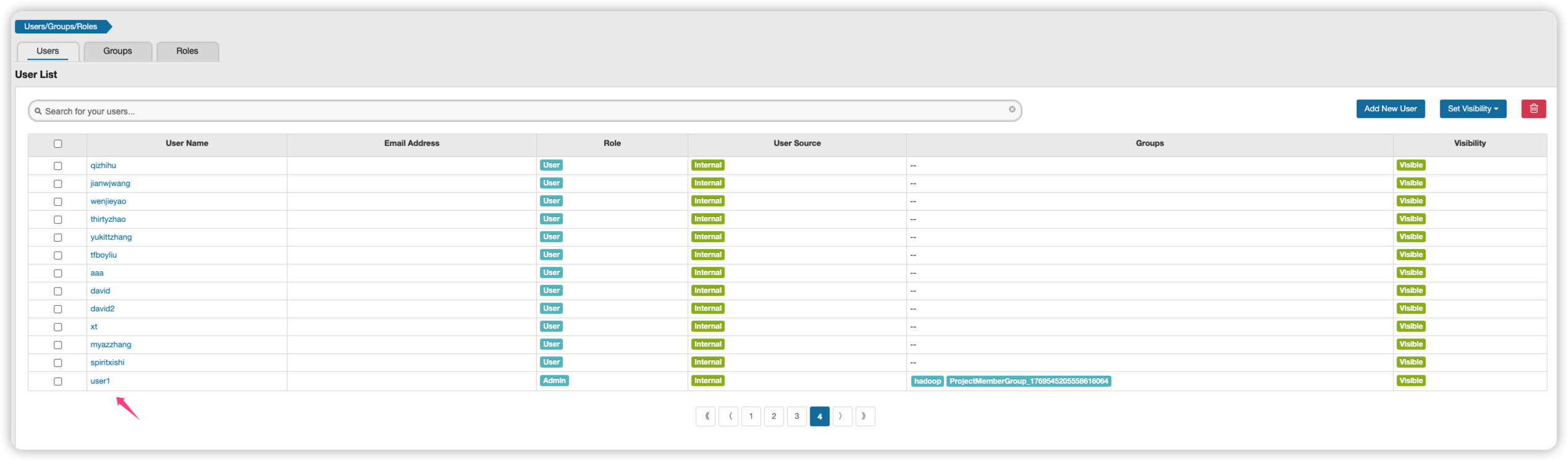
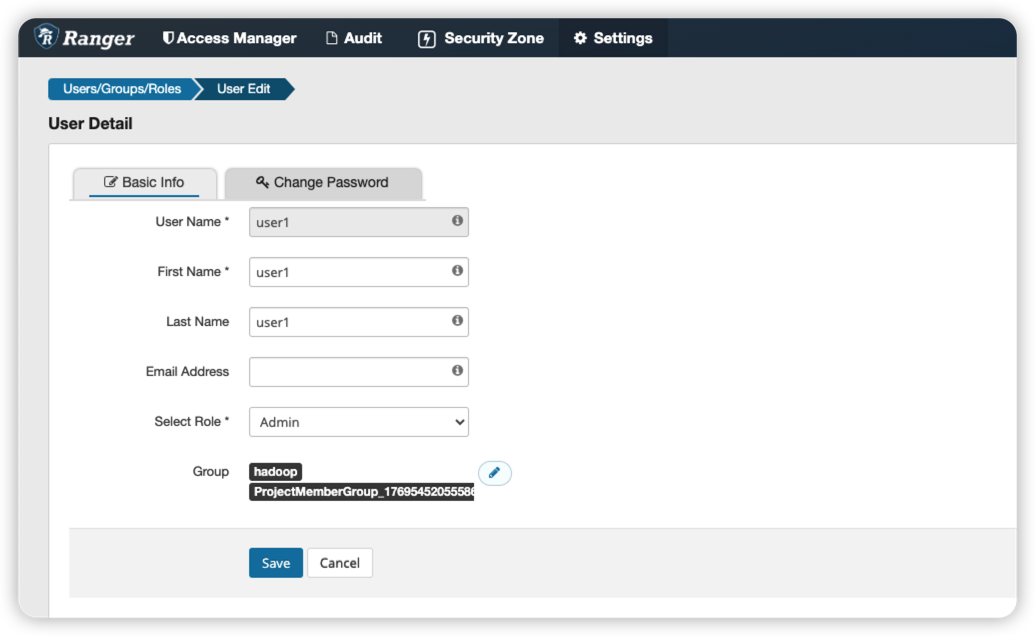
重复创建用户, 报错XUser already exists
{"statusCode":1,"msgDesc":"XUser already exists","messageList":[{"name":"ERROR_DUPLICATE_OBJECT","rbKey":"xa.error.duplicate_object","message":"Error creating duplicate object"}]}
删除用户
curl -u admin:admin -v -i -s -X DELETE http://172.16.48.143:6080/service/xusers/users/userName/user1
返回的是204, 没有content
curl -u admin:admin -v -i -s -X DELETE http://172.16.48.143:6080/service/xusers/users/userName/user1
* About to connect() to 172.16.48.143 port 6080 (#0)
*   Trying 172.16.48.143...
* Connected to 172.16.48.143 (172.16.48.143) port 6080 (#0)
* Server auth using Basic with user 'admin'
> DELETE /service/xusers/users/userName/user1 HTTP/1.1
> Authorization: Basic YWRtaW46YWRtaW4=
> User-Agent: curl/7.29.0
> Host: 172.16.48.143:6080
> Accept: */*
>
< HTTP/1.1 204 No Content
HTTP/1.1 204 No Content
< Set-Cookie: RANGERADMINSESSIONID=925190B149264A74876ABC2957F4420A; Path=/; HttpOnly
Set-Cookie: RANGERADMINSESSIONID=925190B149264A74876ABC2957F4420A; Path=/; HttpOnly
< X-Frame-Options: DENY
X-Frame-Options: DENY
< X-XSS-Protection: 1; mode=block
X-XSS-Protection: 1; mode=block
< Strict-Transport-Security: max-age=31536000; includeSubDomains
Strict-Transport-Security: max-age=31536000; includeSubDomains
< Content-Security-Policy: default-src 'none'; script-src 'self' 'unsafe-inline' 'unsafe-eval'; connect-src 'self'; img-src 'self'; style-src 'self' 'unsafe-inline';font-src 'self'
Content-Security-Policy: default-src 'none'; script-src 'self' 'unsafe-inline' 'unsafe-eval'; connect-src 'self'; img-src 'self'; style-src 'self' 'unsafe-inline';font-src 'self'
< Cache-Control: no-cache, no-store, max-age=0, must-revalidate
Cache-Control: no-cache, no-store, max-age=0, must-revalidate
< Pragma: no-cache
Pragma: no-cache
< Expires: 0
Expires: 0
< X-Content-Type-Options: nosniff
X-Content-Type-Options: nosniff
< Date: Tue, 11 Jul 2023 07:12:13 GMT
Date: Tue, 11 Jul 2023 07:12:13 GMT
< Server: Apache Ranger
Server: Apache Ranger
重复删除已经不存在的用户, 仍然返回204, 不会直接报错
curl -u admin:admin -H "Accept: application/json" -H "Content-Type: application/json" -v -i -s -X DELETE http://172.16.48.143:6080/service/xusers/users/userName/user1


* About to connect() to 172.16.48.143 port 6080 (#0)
*   Trying 172.16.48.143...
* Connected to 172.16.48.143 (172.16.48.143) port 6080 (#0)
* Server auth using Basic with user 'admin'
> DELETE /service/xusers/users/userName/user1 HTTP/1.1
> Authorization: Basic YWRtaW46YWRtaW4=
> User-Agent: curl/7.29.0
> Host: 172.16.48.143:6080
> Accept: application/json
> Content-Type: application/json
>
< HTTP/1.1 204 No Content
HTTP/1.1 204 No Content
< Set-Cookie: RANGERADMINSESSIONID=2DF946C9699AAC2AAA4F8A246E497869; Path=/; HttpOnly
Set-Cookie: RANGERADMINSESSIONID=2DF946C9699AAC2AAA4F8A246E497869; Path=/; HttpOnly
< X-Frame-Options: DENY
X-Frame-Options: DENY
< X-XSS-Protection: 1; mode=block
X-XSS-Protection: 1; mode=block
< Strict-Transport-Security: max-age=31536000; includeSubDomains
Strict-Transport-Security: max-age=31536000; includeSubDomains
< Content-Security-Policy: default-src 'none'; script-src 'self' 'unsafe-inline' 'unsafe-eval'; connect-src 'self'; img-src 'self'; style-src 'self' 'unsafe-inline';font-src 'self'
Content-Security-Policy: default-src 'none'; script-src 'self' 'unsafe-inline' 'unsafe-eval'; connect-src 'self'; img-src 'self'; style-src 'self' 'unsafe-inline';font-src 'self'
< Cache-Control: no-cache, no-store, max-age=0, must-revalidate
Cache-Control: no-cache, no-store, max-age=0, must-revalidate
< Pragma: no-cache
Pragma: no-cache
< Expires: 0
Expires: 0
< X-Content-Type-Options: nosniff
X-Content-Type-Options: nosniff
< Date: Tue, 11 Jul 2023 07:14:10 GMT
Date: Tue, 11 Jul 2023 07:14:10 GMT
< Server: Apache Ranger
Server: Apache Ranger

<
* Connection #0 to host 172.16.48.143 left intact
这期间get仍然能够查询到, 完全看不出用户已经被删除
curl -H "Accept: application/json" -H "Content-Type: application/json" -H "Authorization: Basic YWRtaW46YWRtaW4=" -X GET http://172.16.48.143:6080/service/xusers/users/userName/user1 -v
* About to connect() to 172.16.48.143 port 6080 (#0)
*   Trying 172.16.48.143...
* Connected to 172.16.48.143 (172.16.48.143) port 6080 (#0)
> GET /service/xusers/users/userName/user1 HTTP/1.1
> User-Agent: curl/7.29.0
> Host: 172.16.48.143:6080
> Accept: application/json
> Content-Type: application/json
> Authorization: Basic YWRtaW46YWRtaW4=
>
< HTTP/1.1 200 OK
< Set-Cookie: RANGERADMINSESSIONID=279AA7B229D2D9A99F120A907415E571; Path=/; HttpOnly
< X-Frame-Options: DENY
< X-XSS-Protection: 1; mode=block
< Strict-Transport-Security: max-age=31536000; includeSubDomains
< Content-Security-Policy: default-src 'none'; script-src 'self' 'unsafe-inline' 'unsafe-eval'; connect-src 'self'; img-src 'self'; style-src 'self' 'unsafe-inline';font-src 'self'
< Cache-Control: no-cache, no-store, max-age=0, must-revalidate
< Pragma: no-cache
< Expires: 0
< X-Content-Type-Options: nosniff
< Content-Type: application/json
< Transfer-Encoding: chunked
< Date: Tue, 11 Jul 2023 07:27:04 GMT
< Server: Apache Ranger
<
* Connection #0 to host 172.16.48.143 left intact
{"id":91,"createDate":"2023-07-11T06:27:29Z","updateDate":"2023-07-11T07:12:14Z","owner":"Admin","updatedBy":"Admin","name":"user1","firstName":"user1","lastName":"user1","password":"*****","description":"user1 desc","status":1,"isVisible":0,"userSource":0,"userRoleList":["ROLE_SYS_ADMIN"]}
在用户列表里, 发现用户已经被隐藏, 但其实没有被删除.
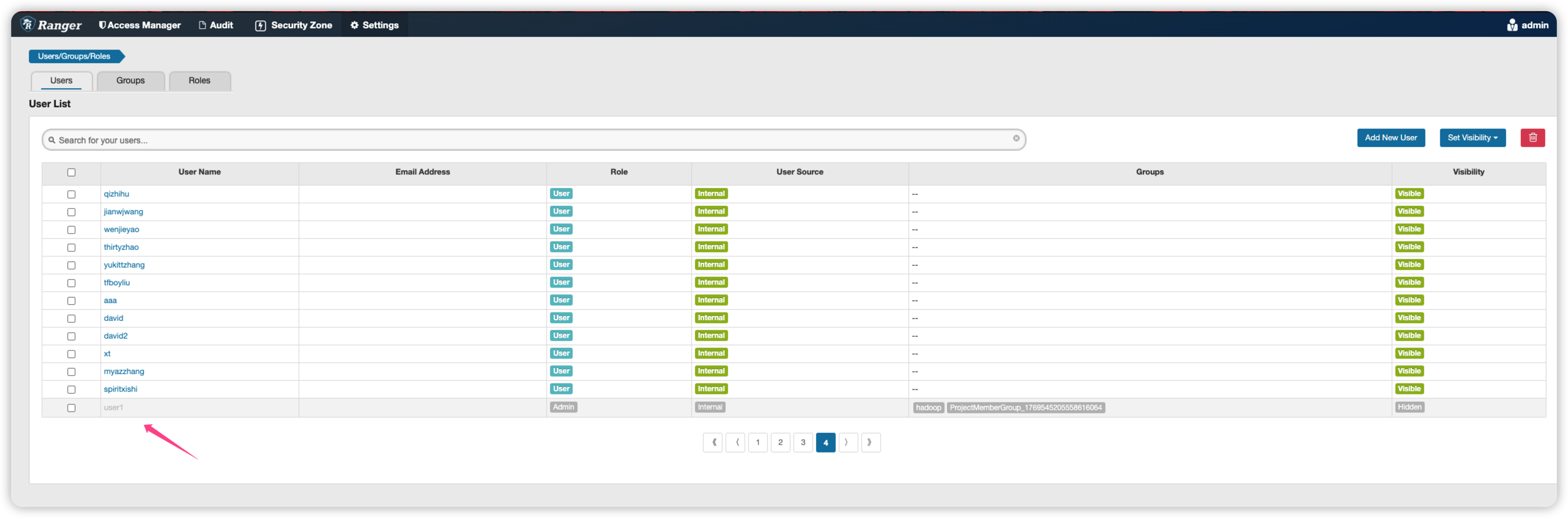
- 删除不存在的用户, 报错400
user123 is Not Found
curl -u admin:admin -H "Accept: application/json" -H "Content-Type: application/json" -v -i -s -X DELETE http://172.16.48.143:6080/service/xusers/users/userName/user123
* About to connect() to 172.16.48.143 port 6080 (#0)
*   Trying 172.16.48.143...
* Connected to 172.16.48.143 (172.16.48.143) port 6080 (#0)
* Server auth using Basic with user 'admin'
> DELETE /service/xusers/users/userName/user123 HTTP/1.1
> Authorization: Basic YWRtaW46YWRtaW4=
> User-Agent: curl/7.29.0
> Host: 172.16.48.143:6080
> Accept: application/json
> Content-Type: application/json
>
< HTTP/1.1 400 Bad Request
HTTP/1.1 400 Bad Request
< Set-Cookie: RANGERADMINSESSIONID=4AE4EC8B0A8AE6955DFC3F391D69D412; Path=/; HttpOnly
Set-Cookie: RANGERADMINSESSIONID=4AE4EC8B0A8AE6955DFC3F391D69D412; Path=/; HttpOnly
< X-Frame-Options: DENY
X-Frame-Options: DENY
< X-XSS-Protection: 1; mode=block
X-XSS-Protection: 1; mode=block
< Strict-Transport-Security: max-age=31536000; includeSubDomains
Strict-Transport-Security: max-age=31536000; includeSubDomains
< Content-Security-Policy: default-src 'none'; script-src 'self' 'unsafe-inline' 'unsafe-eval'; connect-src 'self'; img-src 'self'; style-src 'self' 'unsafe-inline';font-src 'self'
Content-Security-Policy: default-src 'none'; script-src 'self' 'unsafe-inline' 'unsafe-eval'; connect-src 'self'; img-src 'self'; style-src 'self' 'unsafe-inline';font-src 'self'
< Cache-Control: no-cache, no-store, max-age=0, must-revalidate
Cache-Control: no-cache, no-store, max-age=0, must-revalidate
< Pragma: no-cache
Pragma: no-cache
< Expires: 0
Expires: 0
< X-Content-Type-Options: nosniff
X-Content-Type-Options: nosniff
< Content-Type: application/json
Content-Type: application/json
< Transfer-Encoding: chunked
Transfer-Encoding: chunked
< Date: Tue, 11 Jul 2023 07:24:34 GMT
Date: Tue, 11 Jul 2023 07:24:34 GMT
< Connection: close
Connection: close
< Server: Apache Ranger
Server: Apache Ranger

<
* Closing connection 0
{"statusCode":1,"msgDesc":"user123 is Not Found","messageList":[{"name":"DATA_NOT_FOUND","rbKey":"xa.error.data_not_found","message":"Data not found"}]}
{"statusCode":1,"msgDesc":"user123 is Not Found","messageList":[{"name":"DATA_NOT_FOUND","rbKey":"xa.error.data_not_found","message":"Data not found"}]}
使用新的删除接口
curl -u admin:admin -H "Accept: application/json" -H "Content-Type: application/json" -v -i -s -X DELETE http://172.16.48.143:6080/service/xusers/secure/users/user123
一样, 当用户之前存在过, 返回204, 若是用户不存在, 返回userxxx is Not found.
使用forceDelete=true
在url后带上后缀forceDelete=true, 用户会被真正删除, 在ranger页面里看不到, 并且再次删除会报错.
 curl -u admin:admin -H "Accept: application/json" -H "Content-Type: application/json" -v -i -s -X DELETE  http://172.16.48.143:6080/service/xusers/secure/users/user1?forceDelete=true
* About to connect() to 172.16.48.143 port 6080 (#0)
*   Trying 172.16.48.143...
* Connected to 172.16.48.143 (172.16.48.143) port 6080 (#0)
* Server auth using Basic with user 'admin'
> DELETE /service/xusers/secure/users/user1?forceDelete=true HTTP/1.1
> Authorization: Basic YWRtaW46YWRtaW4=
> User-Agent: curl/7.29.0
> Host: 172.16.48.143:6080
> Accept: application/json
> Content-Type: application/json
>
< HTTP/1.1 204 No Content
HTTP/1.1 204 No Content
< Set-Cookie: RANGERADMINSESSIONID=32C2764E1B819812AA6FC1CEDE74DB67; Path=/; HttpOnly
Set-Cookie: RANGERADMINSESSIONID=32C2764E1B819812AA6FC1CEDE74DB67; Path=/; HttpOnly
< X-Frame-Options: DENY
X-Frame-Options: DENY
< X-XSS-Protection: 1; mode=block
X-XSS-Protection: 1; mode=block
< Strict-Transport-Security: max-age=31536000; includeSubDomains
Strict-Transport-Security: max-age=31536000; includeSubDomains
< Content-Security-Policy: default-src 'none'; script-src 'self' 'unsafe-inline' 'unsafe-eval'; connect-src 'self'; img-src 'self'; style-src 'self' 'unsafe-inline';font-src 'self'
Content-Security-Policy: default-src 'none'; script-src 'self' 'unsafe-inline' 'unsafe-eval'; connect-src 'self'; img-src 'self'; style-src 'self' 'unsafe-inline';font-src 'self'
< Cache-Control: no-cache, no-store, max-age=0, must-revalidate
Cache-Control: no-cache, no-store, max-age=0, must-revalidate
< Pragma: no-cache
Pragma: no-cache
< Expires: 0
Expires: 0
< X-Content-Type-Options: nosniff
X-Content-Type-Options: nosniff
< Content-Type: application/json
Content-Type: application/json
< Date: Tue, 11 Jul 2023 07:39:39 GMT
Date: Tue, 11 Jul 2023 07:39:39 GMT
< Server: Apache Ranger
Server: Apache Ranger

<
再次删除用户, 这回就报错了 400, Data not found
 curl -u admin:admin -H "Accept: application/json" -H "Content-Type: application/json" -v -i -s -X DELETE  http://172.16.48.143:6080/service/xusers/secure/users/user1?forceDelete=true
* About to connect() to 172.16.48.143 port 6080 (#0)
*   Trying 172.16.48.143...
* Connected to 172.16.48.143 (172.16.48.143) port 6080 (#0)
* Server auth using Basic with user 'admin'
> DELETE /service/xusers/secure/users/user1?forceDelete=true HTTP/1.1
> Authorization: Basic YWRtaW46YWRtaW4=
> User-Agent: curl/7.29.0
> Host: 172.16.48.143:6080
> Accept: application/json
> Content-Type: application/json
>
< HTTP/1.1 400 Bad Request
HTTP/1.1 400 Bad Request
< Set-Cookie: RANGERADMINSESSIONID=3A04E53787B60ED0B7D3789970B8A178; Path=/; HttpOnly
Set-Cookie: RANGERADMINSESSIONID=3A04E53787B60ED0B7D3789970B8A178; Path=/; HttpOnly
< X-Frame-Options: DENY
X-Frame-Options: DENY
< X-XSS-Protection: 1; mode=block
X-XSS-Protection: 1; mode=block
< Strict-Transport-Security: max-age=31536000; includeSubDomains
Strict-Transport-Security: max-age=31536000; includeSubDomains
< Content-Security-Policy: default-src 'none'; script-src 'self' 'unsafe-inline' 'unsafe-eval'; connect-src 'self'; img-src 'self'; style-src 'self' 'unsafe-inline';font-src 'self'
Content-Security-Policy: default-src 'none'; script-src 'self' 'unsafe-inline' 'unsafe-eval'; connect-src 'self'; img-src 'self'; style-src 'self' 'unsafe-inline';font-src 'self'
< Cache-Control: no-cache, no-store, max-age=0, must-revalidate
Cache-Control: no-cache, no-store, max-age=0, must-revalidate
< Pragma: no-cache
Pragma: no-cache
< Expires: 0
Expires: 0
< X-Content-Type-Options: nosniff
X-Content-Type-Options: nosniff
< Content-Type: application/json
Content-Type: application/json
< Transfer-Encoding: chunked
Transfer-Encoding: chunked
< Date: Tue, 11 Jul 2023 07:39:45 GMT
Date: Tue, 11 Jul 2023 07:39:45 GMT
< Connection: close
Connection: close
< Server: Apache Ranger
Server: Apache Ranger

<
* Closing connection 0
{"statusCode":1,"msgDesc":"user1 is Not Found","messageList":[{"name":"DATA_NOT_FOUND","rbKey":"xa.error.data_not_found","message":"Data not found"}]}
这回用get查询, 也查询不到用户了
 curl -H "Accept: application/json" -H "Content-Type: application/json" -H "Authorization: Basic YWRtaW46YWRtaW4=" -X GET http://172.16.48.143:6080/service/xusers/users/userName/user1
{"statusCode":1,"msgDesc":"user1 is Not Found","messageList":[{"name":"DATA_NOT_FOUND","rbKey":"xa.error.data_not_found","message":"Data not found"}]}
不同删除user的api对错误的处理不同
curl -u admin:admin -H "Accept: application/json" -H "Content-Type: application/json" -v -i -s -X DELETE  http://172.16.48.143:6080/service/xusers/users/93?forceDelete=true
* About to connect() to 172.16.48.143 port 6080 (#0)
*   Trying 172.16.48.143...
* Connected to 172.16.48.143 (172.16.48.143) port 6080 (#0)
* Server auth using Basic with user 'admin'
> DELETE /service/xusers/users/93?forceDelete=true HTTP/1.1
> Authorization: Basic YWRtaW46YWRtaW4=
> User-Agent: curl/7.29.0
> Host: 172.16.48.143:6080
> Accept: application/json
> Content-Type: application/json
>
< HTTP/1.1 204 No Content
HTTP/1.1 204 No Content
< Set-Cookie: RANGERADMINSESSIONID=FC5AF6AE3227F2B02F6AF99EE6C8E10E; Path=/; HttpOnly
Set-Cookie: RANGERADMINSESSIONID=FC5AF6AE3227F2B02F6AF99EE6C8E10E; Path=/; HttpOnly
< X-Frame-Options: DENY
X-Frame-Options: DENY
< X-XSS-Protection: 1; mode=block
X-XSS-Protection: 1; mode=block
< Strict-Transport-Security: max-age=31536000; includeSubDomains
Strict-Transport-Security: max-age=31536000; includeSubDomains
< Content-Security-Policy: default-src 'none'; script-src 'self' 'unsafe-inline' 'unsafe-eval'; connect-src 'self'; img-src 'self'; style-src 'self' 'unsafe-inline';font-src 'self'
Content-Security-Policy: default-src 'none'; script-src 'self' 'unsafe-inline' 'unsafe-eval'; connect-src 'self'; img-src 'self'; style-src 'self' 'unsafe-inline';font-src 'self'
< Cache-Control: no-cache, no-store, max-age=0, must-revalidate
Cache-Control: no-cache, no-store, max-age=0, must-revalidate
< Pragma: no-cache
Pragma: no-cache
< Expires: 0
Expires: 0
< X-Content-Type-Options: nosniff
X-Content-Type-Options: nosniff
< Date: Tue, 11 Jul 2023 08:05:51 GMT
Date: Tue, 11 Jul 2023 08:05:51 GMT
< Server: Apache Ranger
Server: Apache Ranger

<
* Connection #0 to host 172.16.48.143 left intact
删除不存在的用户, xusers/users/{id}接口返回的是404且无内容, 而不是400 + error message
[root@tcs-172-16-48-140 gee]#   curl -u admin:admin -H "Accept: application/json" -H "Content-Type: application/json" -v -i -s -X DELETE  http://172.16.48.143:6080/service/xusers/users/93?forceDelete=true
* About to connect() to 172.16.48.143 port 6080 (#0)
*   Trying 172.16.48.143...
* Connected to 172.16.48.143 (172.16.48.143) port 6080 (#0)
* Server auth using Basic with user 'admin'
> DELETE /service/xusers/users/93?forceDelete=true HTTP/1.1
> Authorization: Basic YWRtaW46YWRtaW4=
> User-Agent: curl/7.29.0
> Host: 172.16.48.143:6080
> Accept: application/json
> Content-Type: application/json
>
< HTTP/1.1 404 Not Found
HTTP/1.1 404 Not Found
< Set-Cookie: RANGERADMINSESSIONID=9CEC9ABBA4173C2076E0F05B93EAA144; Path=/; HttpOnly
Set-Cookie: RANGERADMINSESSIONID=9CEC9ABBA4173C2076E0F05B93EAA144; Path=/; HttpOnly
< X-Frame-Options: DENY
X-Frame-Options: DENY
< X-XSS-Protection: 1; mode=block
X-XSS-Protection: 1; mode=block
< Strict-Transport-Security: max-age=31536000; includeSubDomains
Strict-Transport-Security: max-age=31536000; includeSubDomains
< Content-Security-Policy: default-src 'none'; script-src 'self' 'unsafe-inline' 'unsafe-eval'; connect-src 'self'; img-src 'self'; style-src 'self' 'unsafe-inline';font-src 'self'
Content-Security-Policy: default-src 'none'; script-src 'self' 'unsafe-inline' 'unsafe-eval'; connect-src 'self'; img-src 'self'; style-src 'self' 'unsafe-inline';font-src 'self'
< Cache-Control: no-cache, no-store, max-age=0, must-revalidate
Cache-Control: no-cache, no-store, max-age=0, must-revalidate
< Pragma: no-cache
Pragma: no-cache
< Expires: 0
Expires: 0
< X-Content-Type-Options: nosniff
X-Content-Type-Options: nosniff
< Content-Length: 0
Content-Length: 0
< Date: Tue, 11 Jul 2023 08:05:54 GMT
Date: Tue, 11 Jul 2023 08:05:54 GMT
< Server: Apache Ranger
Server: Apache Ranger

<
* Connection #0 to host 172.16.48.143 left intact
删除的ranger代码
查询不到用户的时候, 直接先报错了.
    @DELETE
    @Path("/users/userName/{userName}")
    @PreAuthorize("hasRole('ROLE_SYS_ADMIN')")
    public void deleteXUserByUserName(@PathParam("userName") String userName,
            @Context HttpServletRequest request) {
        String forceDeleteStr = request.getParameter("forceDelete");
        boolean forceDelete = false;
        if(!StringUtils.isEmpty(forceDeleteStr) && forceDeleteStr.equalsIgnoreCase("true")) {
            forceDelete = true;
        }
        VXUser vxUser = xUserService.getXUserByUserName(userName);
        xUserMgr.deleteXUser(vxUser.getId(), forceDelete);
    }

    public VXUser getXUserByUserName(String userName) {
        XXUser xxUser = daoManager.getXXUser().findByUserName(userName);
        if (xxUser == null) {
            throw restErrorUtil.createRESTException(userName + " is Not Found",
                    MessageEnums.DATA_NOT_FOUND);
        }
        return populateViewBean(xxUser);

    }
ranger接口里带有secure字段
但是测试发现不带用secure api, 查询的时候仍然需要用户名密码.
查询服务下的所有策略详情
-o /dev/null表示不想看到结果, -w 'Total: %{time_total}s\n'用于展示curl api的耗时.
curl -u admin:admin -H "Accept: application/json" -H "Content-Type: application/json" -o /dev/null -w 'Total: %{time_total}s\n' -v -i -s -X GET http://1.2.3.4:6080/service/plugins/policies/service/name/tdw_hive
一般请求的返回都是200ms左右. 如果修改ranger策略, 这时候快速进行curl请求测试, 会发现第一个请求耗时会从200ms变为2s. 看来ranger的写入操作对后台影响非常大, 估计后台会有各种数据库锁死操作. 难怪之前看到网易的ranger经验文章, 他们写入是直接到ranger,但是读取则从来只读外部的同步缓存.
bash-4.2# sh test.sh
sh: warning: setlocale: LC_ALL: cannot change locale (C.UTF-8)
Total: 2.429s
Request 1 took 2436 ms.
Total: 0.187s
Request 2 took 194 ms.
Total: 0.183s
Request 3 took 189 ms.
Total: 0.189s
Request 4 took 195 ms.
Total: 0.193s
Request 5 took 199 ms.
Total: 0.195s
Request 6 took 201 ms.
Total: 0.197s
Request 7 took 203 ms.
Total: 0.179s
Request 8 took 185 ms.
Total: 0.184s
Request 9 took 190 ms.
Total: 0.219s
Request 10 took 226 ms.